EM01
Frequently Asked Questions
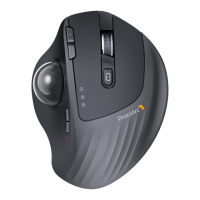
Can the trackball mouse be used while charging?
The EM01 mouse can be used when it is charging, but we do not
suggest you use the mouse while charging to protect the batte.
15
The trackball is not smooth.
As you mentioned the trackball of the mouse does not move
smoothly, there maybe something got stuck.
Could you please t to eject the trackball from the backside of the
mouse and clean the trackball?
16
Can someone conrm that this mouse has bluetooth built-in i.e.
i don't require to plug a usb receiver in my laptop?
Protoarc trackball mouse has Bluetooth & 2.4G wireless connection.
If you want to use wireless mode, inse the USB receiver, then you
need to switch to mode ①.
If you want to connect bluetooth, press the mode switch button to
switch to channel② or ③, the white light ashes slowly. Then press
and hold the mode switch button for 3~5 seconds until the white
light ashes quickly, the mouse enters the Bluetooth pairing mode.
17
if there was any way to disable the RGB or set a static
color ?
About the RGB of EM01 mouse:
The four modes are all changing colored lights, and there is no static color
mode. You can long press the light switch button for three seconds to turn
o the light eect.
It has 4 light mode:
1. Streamer mode (Default)
2. Breathing mode
3. Mixed color breathing mode
4. Neon mode.
14


 To Previous Page