3
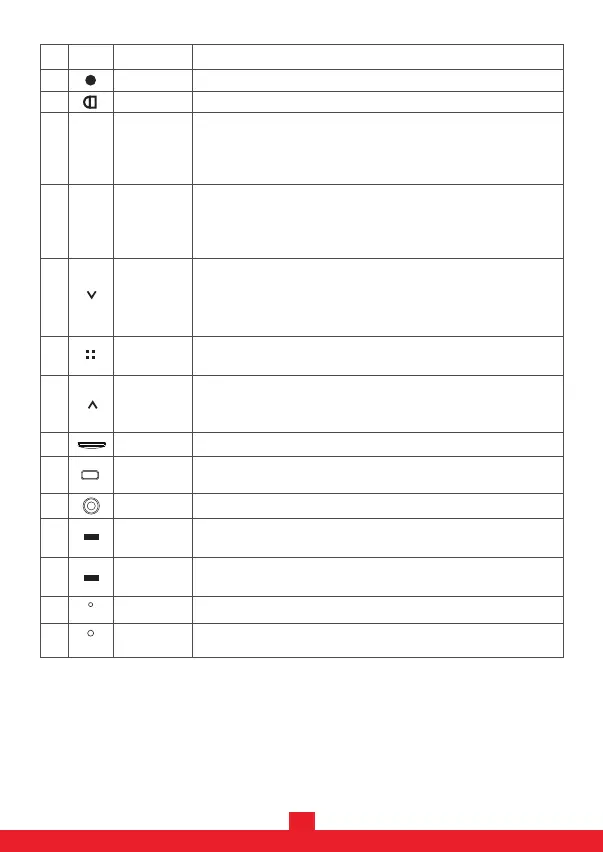
IconNo. Name Operating Instructions
1
9
10
8
6
11
POWER
Menu
TF card slot
TYPE-C port
- Under Standby mode, press for system settings.
- Under Standby mode, long press to enter WiFi function.
Micro SD (TF) card slot.
Power
Indicator
- Red LED: power indicator, LED will turn off after fully charged.
- Connect to a PC for data transmission.
- Connect to the car charger for power supply.
13
14
Reset
R
MIC
Microphone
Reset the device to factory settings.
Microphone
7
UP
- Under Menu, use the UP/DOWN keys to navigate.
- Under Playback mode, press to browse between playback files.
- Under Playing mode, press to speed Backward.
- Press for more than 3 seconds to turn on/off the camera.
3
MODE
- Under Recording mode, press to take a picture.
- Under Standby mode, press to switch between Video mode,
Photo mode and Playback mode.
(Notice: You must stop video recording before mode switching)
M
DOWN
5
- Under Menu, use the UP/DOWN keys to navigate.
- Under Playback mode, press to browse between playback files.
- Under Playing mode, press to speed Forward.
- Under standby mode, press to turn on/off the recording voice.
OK
- Under Video mode, press to stop/start recording.
- Under Photo mode, press to take a picture.
OK
4
- Under Menu mode, press OK to confirm the settings.
- Under Playback mode, press to play/stop video files.
AV Connect the Back Camera.
2
LOCK
Under recording mode, press to Lock Current video.
- Blue LED: indicating the camera is recording.
Recording
Indicator
12


 To Next Page