7. Ready to go.
When the car engine starts, the camera will turn on automatically and start
the video recording. Likewise, the camera will automatically turn off when
the car’s engine is turned off.
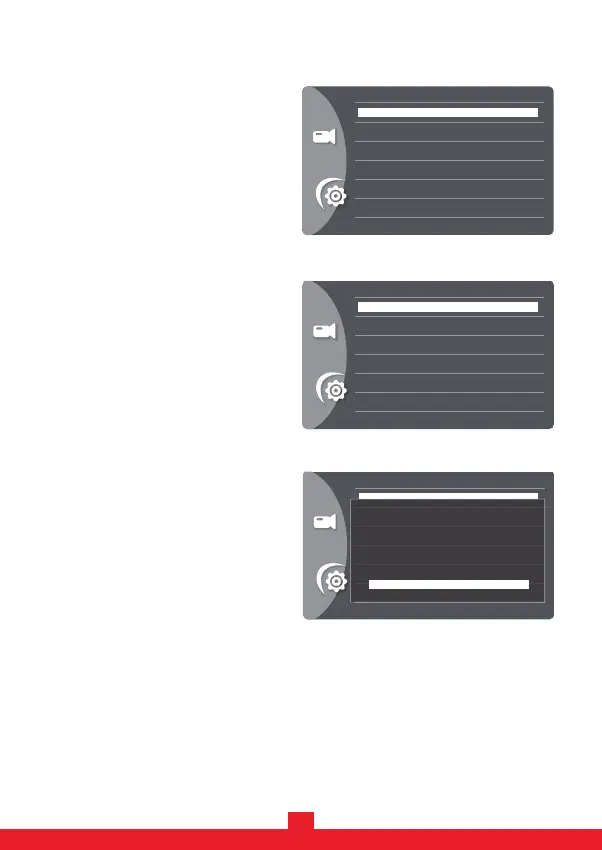
D. Press the “MENU” button to leave the menu mode. Then, press the “OK”
button to start recording.
C. Press the “DOWN” button to select
the “OK” option and press the “OK”
button to format it.
6
B. Press the “DOWN” button to select
the “Format” option and press the
“OK” button to confirm.
6. Start the engine, and the dash camera will automatically turn on. Press the
“OK” button to enter the “Standby Mode”.
A. Press the “MENU” button twice to
enter the SETUP list.
>
>
>
>
>
>
Format
All data will be deleted
Cancel
OK
>
>
>
>
>
>
Date/Time
Auto Power Off
Beep Sound
Language
Frequency
Auto Display Off
>
>
>
>
>
>
Format
Default Setting
Version


 To Next Page