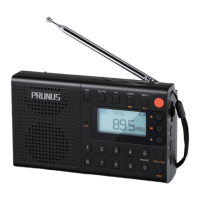
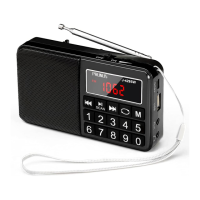
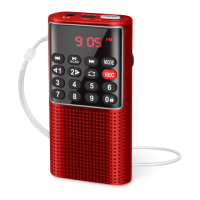
PRUNUS J-328 Mini Speaker Radio User Manual
Thank you for purchasing the PRUNUS J-328 radio. In order to get the best from the radio please read this manual carefully before using it and take special notice of the section on
precautions.
Precautions
◆ Please note TF card (micro SD card) with MP3 file is required for sound recording. The radio has TF mode only when a TF card with MP3 file is inserted. So if the TF card is empty, there is no TF
mode in radio and you can not make an outside sound recording, however, it can be used for FM stations recording.
◆ Please charge this product under safe environment, and do not charge under unstable voltage or near dangerous goods.
◆ Please do not use this product near water or put it into liquid.
◆ Please do not use this product near the environment over 40 degrees Celsius.
◆ Please do not throw this product into fire in case of explosion.
Functional components
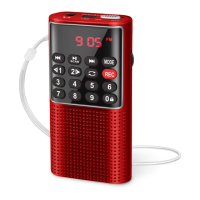
① ON/OFF : Power switch ② Number buttons ③ Volume knob ④ DC5V/AUX : DC 5V charging/AUX in jack ⑤ Earphone output
⑥ LED : Charging indicator ⑦ Previous/Rewind ⑧ Play/Pause/Scan and memory radio channels ⑨ Next/Fast-forward
⑩ MODE: Mode switch among TF/FM/AUX ⑪ Lock button/Number 0 button ⑫ Previous folder/Number 1 button
⑬ Next folder/Number 2 button ⑭ Repeat ⑮ REC: Record button ⑯ TF card slot
Power Supply
1. Charging method: Plug the big end of the charging cable into the USB jack of computer or power bank, and plug the small end into the <④DC 5V/AUX> of this unit. (If an adapter is important
for you, please send message “PRUNUS Charger” to E-mail:wanwanus@outlook.com(reply in 1 working day) , to get PRUNUS quality charger with indicator in 60% discount.)
2. Charging indicator: When charging, the <⑥LED> will light on with RED light (the charging time is 3-5 hours); when it is fully charged, the charging indicator will turn from RED to GREEN.
◆Please use standard DC5V/0.5-2A charger (or other devices can supply this type of power) to charge it, or it may damage the radio.
◆In order to make sure the battery has longer using life, you'd better not charge the radio continuously for a long time, such as 24 hours charging or more.
Radio reception
1. Push <①ON/OFF> to "On" to turn on the radio.
2. Press <⑩MODE> to switch to FM mode.
3. How to search and store channels?
1) Automatic Search: I. Press <⑧Play/Pause/Scan and memory radio channels> for 3 seconds to automatically search, store and number the channels around you. Please note that the order of
the channels cannot be changed manually.
II. Long press <⑦Previous/Rewind> or <⑨Next/Fast-forward> to search for the previous or next channel around you, when there is a channel, it will stop searching and play the current channel
automatically.
2) Manual Search: Press <②Number buttons> to search and select your favorite channels. For example, pressing 8 + 9 + 8, will jump to 89.8MHZ channels.
4. How to select the stored channels?
1) Press <⑦Previous/Rewind> or <⑨Next/Fast-forward> to select the channel you want to listen to.
2) Press number buttons to select one specific channel (For example, continuously press buttons 1+5 to select the 15th radio channel, but if the total numbers of the radio channels are not more
than 15, it will play the current radio channel).
5. Turn the <③Volume knob> to adjust the volume.
6. Press <⑧Play/Pause/Scan and memory radio channels> to pause the current playing; pressing this button again will resume the playing.
◆Rotate the radio to get the best reception.
◆In order to get better reception, when using the radio indoors, please approach it to the window and do your best to keep it away from the electronic devices (such as computers, TVs, refrigera-
tors, mobile cellphones, etc).
Music Playing
1. Played by TF card
1) Insert the TF card loaded with MP3 format files into the <⑯TF card slot>. Once mp3 files are detected, it will play automatically. (If a TF card is important for you, please send message “PRUNUS
Card” to Email: wanwanus@outlook.com(reply in 1 working day) , to get PRUNUS quality card in 60% discount.)
2) Turn the <③Volume knob> to adjust the volume.
3) Press <⑦Previous/Rewind> or <⑨Next/Fast-forward> to select the song you want to play.
4) Long press <⑦Previous/Rewind> or <⑨Next/Fast-forward>to rewind or fast-forward;Pressing <⑧Play/Pause/Scan and memory radio channels> will pause the current playing; pressing this
button again will resume the playing.
5) Long press <⑫Previous folder/Number 1 button> or <⑬Next folder/Number 2 button> to switch the songs folders.
6) Press number buttons to select one specific MP3 (For example, continuously press buttons 9+6 to select the 96th mp3, but if the total numbers of the MP3 files are not more than 96, it will play
the current MP3).
7) For the <⑭Repeat>, the first press for ONE, repeating the current MP3; next press for FOLD, repeating the MP3s of the current folder; one more next press for ALL, repeating all the MP3s.
8) Press <⑩MODE> will change to other mode.
◆The radio can only read MP3 files.
◆If your TF card can’t be read, please make sure they are in FAT or FAT32 Format, as the radio can’t read TF card in NTFS Format.
2. Played by AUX
1) Press <⑩Mode> to change to AUX mode.
2) Insert one end of the AUX cable into the <④DC 5V /AUX>, and insert the other end into the earphone jack of the mobile cellphone or computer, then open the music software/app to play music.
3) Turn the <③Volume knob> to adjust the volume.
4) Press <⑧Play/Pause/Scan and memory radio channels> to pause the current playing; pressing this button again will resume the playing.
5) Pressing <⑩MODE> will change to other mode.
◆When in AUX mode, only <③Volume knob>, <⑧Play/Pause/Scan and memory radio channels>, <⑩MODE> works, other buttons cannot be operated.
REC Function
1. How to record an FM station?
1) Insert the TF card into the <⑯TF card slot>.
2) If the TF card is empty, it will enter into FM mode directly. If the TF card has MP3s in, press <⑩MODE> to change to FM mode.
3) Tune to the station you want to record.
4) When it plays the radio normally, press <⑮REC> button to start your recording.
5) Press <⑮REC> button again to end the recording. The screen will display numbers such as "0002", which means the radio program has been recorded and stored with this number. It will play
this recording MP3 right now and then enter into TF mode automatically.
2. How to record a sound?
1)Insert the TF card with MP3 files into the <⑯TF card slot>, and the radio will enter into TF mode.(Note: if it is an empty TF card, you can record an FM station first, and then you can record sound.)
2)Press <⑮REC> button to start the sound recording.
3)Press <⑮REC> button to stop recording. The screen will display numbers such as "0010", which means the sound has been recorded and stored with this number. It will play the recording MP3
right now.
3. How to play a recording?
1) Press <⑩MODE> to switch to TF mode, and the radio will automatically play the MP3 files in the TF card.
2) Press number buttons to select the recording you want to play(Eg. Press For example, press button 2 to select the station recording file, and it will play the current recording MP3).
3) The same, you can fast forward, rewind, pause or repeat the recording MP3.
4) Pressing <⑩MODE> will change to other mode.
◆Long pressing <⑮REC> button can delete the recorded content.
Lock Key
Long press <⑪Lock button/Number 0 button> to lock the other keys, then the screen display will flash and other buttons cannot work until you long press this button again.
Headphones
In order not to disturb others around you, you can use headphones.
1. Plug the headphones into the <⑤Earphone output>, and the radio will automatically switch to headphone listening mode and the speaker will be muted.
2. When you pull out the headphones, the radio will return to the speaker mode. Please adjust the volume in time, to adapt to the surrounding environment and your own hearing needs.
Human Body Induction
When reception is weak, it will get better if hold the radio in hand, but its reception will be weak again when the hand is away. This is a common phenomenon called " Human Body Induction "
among almost all the radios.
After Sale Service
◆If the radio fails, please scan this QR code.Then click “Ask a question”and
log into Amazon to contact us. We will provide you with the best service:
◆You can also send your messages to our customer service e-mail:
prunus-technik@hotmail.com


 To Next Page
 Loading...