4826 Sterling Drive, Boulder, CO 80301
PH: 720.406.8946 service@psaudio.com www.psaudio.com
®
Getting Started
3
©2012 PS Audio International Inc. All rights reserved.
Owner’s Reference P3
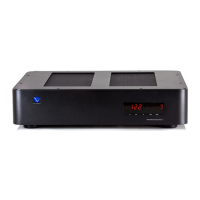
Once your new P3 is unpacked, you’ll need to nd a convenient place to set it.
The P3 is stackable on other PS Audio PerfectWave devices, however, because of ventilation issues
it is recommended the P3 be on top of the stack of equipment if possible
If your equipment is located a long distance from the P3, it is preferable to use a long, heavy gauge
shielded power cable between the AC receptacle in the wall and the Power Plant. This is better than
long individual power cables between the connected components and the P3.
The P3 can benet from aftermarket isolation devices such as cones, spikes and
Sorbothane pads. Once you have chosen the location for the P3 you can use the supplied AC
power cord to connect to the wall receptacle, or you can use an aftermarket power cord and/or
receptacle.
We discourage the use of any other power conditioning equipment before or after the P3 without
considerable evaluation. A critical determination will have to be made as to whether there are any
sonic or visual shortcomings. The P3 has a signicant input & output passive lter design, and
adding extra power cables to its input or additional ltering to its output may, in fact, be undesirable.
Connecting your P3 to the network is an option that provides extended functionality benets. It
is recommended that the P3 be connected to the router via hard-wire connection, however it will
certainly function if connected to the network via wireless Ethernet bridge.
If a network connection is not available for the P3 it will in no way affect the P3’s performance in your
system in terms of the quality of regenerated, regulated AC. Connecting your P3 to the network
allows functionality benets only, not performance based benets.
The online interface is user friendly and can be accessed by registering one’s P3 at the following link
powerplay.psaudio.com. The end-user will nd a multitude of usability features including
• P3 consumption records and performance tracking.
• Individualized zone control.
• Naming of individual zones.
• Firmware updates (when available)
Location
Mounting
Vibration
Conditioners
Network
Connectivity


 To Next Page
 Loading...