12286 Rev 2 Page 3 of 4
2.1 Installation and Power-Up
Select Communication Operating Mode
The TIM-100/120 communication operating mode must be selected before set points can be
properly received and interpreted.
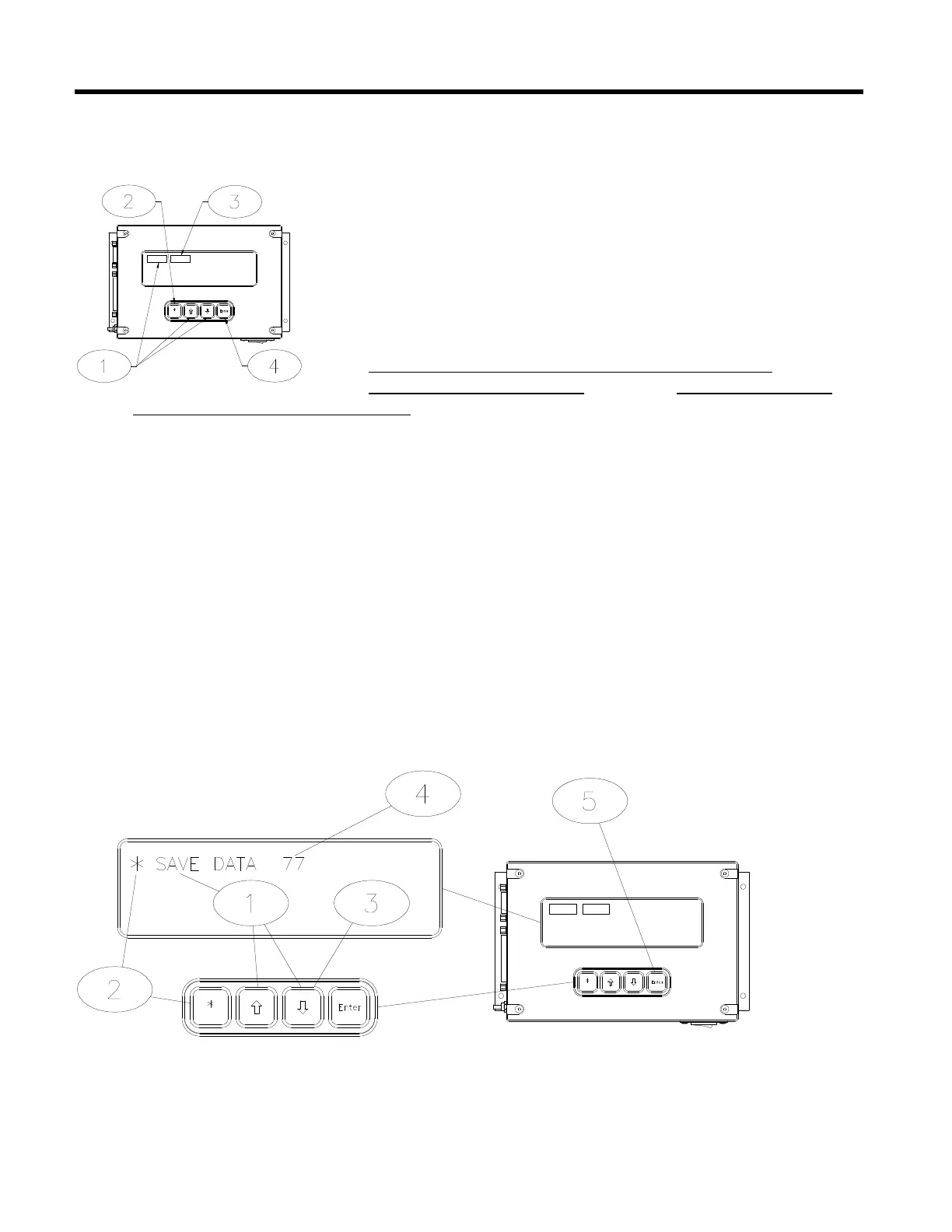
• Using the up [á] or down [â] arrow keys on the SENTRY
TIM-100/120 keypad, scroll through the menu parameters
until “STPT MODE” is shown in the top left corner of the
display.
‚ Choose the menu item by pressing on the asterisk [*] key.
ƒ Using the up [á] or down [â] arrow keys on the SENTRY
TIM-100/120 keypad, scroll through the list and choose
“SINGLE” if using stand-alone operation or serial
(interface) communication or choose “ANALOG” if using
analog (interface) communication.
„ Press the enter [ENT] key to confirm selection.
Save Operating Parameter Data
Any change made to the menu items is stored in memory until the power to the TIM-100/120 is
turned off. To permanently store selections into memory, the following steps must be taken.
• Using the up [á] or down [â] arrow keys on the SENTRY TIM-100/120 keypad, scroll
through the menu parameters until “SAVE DATA” is shown in the top left corner of
the display.
‚ Choose the menu item by depressing on the asterisk [*] key.
ƒ Press the down [â] arrow key once (“0” will be displayed).
„ Press the up [á] arrow key seven times (“77” will be displayed).
… Press the enter [ENT] key to confirm selection.



 To Next Page