Weather
On the Weather function Page, you can view the current temperature.
Sports
There are 8 exercise modes in the smartwatch. These exercises have individual icons in the smartwatch. Just tap
on the icon and you will find the details.
a) Running
b) Bike Riding
c) Jumping Jack
d) Basket Ball
e) Badminton
f) Volley Ball
g) Tennis
h) Football
Note: To get the appropriate & correct data, wear the smartwatch properly.
Camera
1. For using this feature first need to open the lock of the mobile phone.
2. Now, you will find Camera option in smartwatch and just click on it.
3. You will get Start option there. Just click on that and you will see that camera will get open in your connected
mobile phone.
4. Just turn your wrist (need to wear the smartwatch) or click on Start to capture pictures.
Other Smartwatch Functions
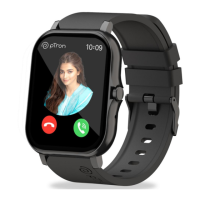
1. Dialler - You can dial & make calls at any number from here.
2. Phone book -The mobile numbers that you have saved in the app can be seen here. From here you can call
these contacts.
3. Stop watch - This can be used as a timer.
4. Find - You can search your phone with this function. As when you click on this, you will see an option to Start.
As you click on Start, your mobile will start ringing. To stop ringing tap on Stop on the smartwatch.
5. Message - You can receive messages in the smartwatch. You can also receive social media messages in the
smartwatch. You can check the latest message history too.
6. Reset - Can reset the smartwatch with this.
7. QR Code - You can scan and directly go to download option.
8. Menu Style - You can change the view pattern from this. There are 3 types of styles given in this.
9. More - Click on that to find other functions available.
- About: Here you will find Smartwatch related information.
- Set Language - Can change language from here.
- Set Time - Can change & update time from here.
- Set Date - Can change & update date from here.
- 12 hour format - You can change the time format with the help of this.
- Backlight Time - You can change the time of automatic display off from here.
- Go Back Time -If the watch gets off or the display will get off when you will ON the watch again then the same
page will open.
Mobile App ‘pTron Fit+’ Features
A) Home: You can also see distance, calories & goal data. By clicking on the Steps you can check the complete
summary details.
1. Health Report - To get the health assessment report you need to click on Reevaluate and then fill the required
details. You can see your Helath Index here - BMI & Body Fat rate.
2. Healthy Habits - There are many healthy habits already in the app. You can add these and follow up it by
doing routine check up by marking system in the app.
B) Sports: You will find a Sports page in the app. There you will find 3 options that is Walk, Run & Riding.
Choose any 1 sport and start and then you see GPS on the page. Also, you will get score of Average Pace, Total
time & Heat consumption.
Important: You must login, otherwise GPS will be not shown in the mobile App.


 To Next Page
 Loading...