EasyManua.ls Logo

Pudu PuduBot PD1 Standard - User Manual

Pudu PuduBot PD1 Standard
21 pages
Print Icon
To Next Page IconTo Next Page
Loading...
XXXQVEVUFDIDPN
User manual
7
$PQZSJHIUh1VEV5FDIOPMPHZ*OD"MM3JHIUT3FTFSWFE
1VEV5FDI
PD1PD2PD6PD8PD9
Question and Answer IconNeed help?

Do you have a question about the Pudu PuduBot PD1 Standard and is the answer not in the manual?

Overview

PuduBot Device Manual Description

The PuduBot is a versatile wheeled robot designed for indoor environments, primarily for food delivery and plate collection services in various business scenarios. It offers a range of operational modes and features to enhance efficiency and customer experience in hospitality settings.

Function Description

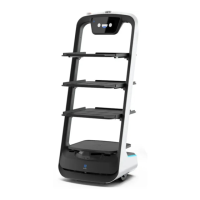
The PuduBot's core function is autonomous transportation of items within a defined indoor space. It is equipped to deliver food to multiple tables simultaneously, collect used plates, and even provide self-service options like drinks or snacks in a cruise mode. The robot navigates using a combination of vision positioning, depth vision sensors, and Lidar, ensuring precise movement and obstacle avoidance. Its design allows for adjustable tray heights, accommodating different types of items, and it can be configured with either three or four trays depending on the model.

The robot's operational modes include:

  • Food Delivery Mode: This is a common mode where the robot delivers food to designated tables. Users place food on the trays, enter the corresponding table numbers, and the robot plans the optimal path for delivery. After delivery, it automatically returns to a pick-up position.
  • Cruise Mode: In this mode, the PuduBot moves along a customized circulation path, carrying self-service items like drinks, desserts, snacks, or paper towels. It can invite customers to enjoy or taste items through voice prompts, enhancing the interactive experience.
  • B-day Mode: This specialized mode is designed for delivering birthday cakes or gifts and automatically plays pre-set birthday songs during transport, adding a festive touch to special occasions.
  • Direct Delivery Mode: For one-way transport operations, the robot can deliver items to a specific table, dishwashing room, or other designated location without returning to the pick-up position immediately after delivery.
  • Used Plate Collection Mode: After delivering food, the robot can be tasked with collecting used plates. It can be directed to return to a dish-return site or a dishwashing room, performing collection tasks in a loop until the mode is exited.
  • Special Mode: This mode allows for quick selection of background music to be played during food delivery, suitable for unique scenarios like marriage proposals or blessings.

The PuduBot also features a user-friendly touch screen interface for task management, mode selection, and interaction. It provides voice prompts for various actions and alerts, ensuring clear communication with both staff and customers.

Usage Features

The PuduBot is designed for ease of use and integrates seamlessly into daily operations. Before each power-on, the robot should be moved directly below a visual mark for accurate positioning. Powering on involves pressing and holding the power button for three seconds, indicated by a blue light strip. The screen then enters the working mode, confirming successful boot-up. Powering off follows a similar process, with the light strip turning off and the screen going black.

During operation, the robot can be paused by touching the screen, allowing for temporary stops to pick up or drop off items. In cruise mode, if no action is taken during a pause, the robot automatically resumes walking after 20 seconds; in other modes, it resumes after 10 seconds. Users are advised not to pick up or drop food while the robot is moving to prevent spills or injury.

The robot's navigation system is robust, but users should ensure the environment is flat, free of debris, and has sufficient clearance (minimum 80cm pass width, 1m for long passes, and 1.2m for kitchen entrances). It can handle slight slopes (up to 10° climbing angle, but 5° recommended for stability of dishes) and avoids obstacles automatically. However, sudden blocking of the robot during high-speed operation is prohibited.

Charging is straightforward: connect the charging cable to the robot's charging port. The screen displays charging progress and indicates when the battery is full. It's crucial to charge the robot when the power is below 10% to maintain battery life and to disconnect the charger once fully charged. The robot will not perform tasks if the battery is below 2%.

The PuduBot offers customizable settings for various parameters:

  • Map Settings: Allows selection from multiple pre-configured maps and setting parking positions.
  • Voice Settings: Provides options for voice packet replacement and custom cruise voice settings, including adding multiple voices that play randomly.
  • Speed Settings: Users can adjust the robot's food delivery and cruise speeds, with options ranging from 0.5m/s to 1.2m/s depending on the mode.
  • Tray Settings: The number of trays for food delivery can be selected, supporting up to five layers.
  • Music Function: Enables control over music playback, with options for file management, list editing, and importing music. Users can create and modify music playlists for different modes, such as birthday or special modes. Music can be uploaded by connecting a mobile phone to the same Wi-Fi network as the robot.
  • Parking Instructions: Offers flexible parking options, including one-to-one fixed parking, free mode with multiple priority-based locations, and parking replenishment mode for temporary parking in other areas.

Maintenance Features

Maintaining the PuduBot ensures its longevity and optimal performance. Regular cleaning and inspection are essential:

  • Trays, Drive Wheel, and Auxiliary Wheel: Keep trays clean with a cotton cloth. Check for debris entanglement in the bottom wheel at least once a week; if found, the robot needs to be lifted for cleaning.
  • Sensors: Inspect and clean the top positioning sensor and 3D obstacle avoidance sensors weekly. Immediate cleaning is required if contamination is observed to prevent sensor blockage and abnormal operation. Soft tissue or lens cleaner should be used.
  • Robot Body: The robot's body should be kept clean with a cotton cloth. Users are strictly advised not to lift, climb, bump, push, or stack objects on the robot. Unauthorized disassembly, modification, or opening of covers is prohibited and should only be performed by technical support engineers.
  • Handling of Robot: When manually moving the robot, two colleagues should lift it from the designated left and right profiles (indicated by arrows in the manual) to ensure balance and maintain the robot's upright posture. Lifting by the trays is strictly forbidden.
  • Sign Maintenance: No objects should be hung directly under or near the robot's sign. Care should be taken not to damage the sign during cleaning, and it should not be moved or rotated.

In case of alarms or malfunctions, the robot will stop working and provide an alarm tone and instructions on the screen. Common alarms include low battery (requiring charging) and loss of positioning (requiring the robot to be pushed back to the visual mark). For emergencies, an emergency stop switch is located on top of the robot.

The manual also outlines detailed after-sales service information, including free warranty conditions, exclusions, and the service process. It emphasizes using original rechargeable batteries and chargers, protecting the power cord, and charging in a dry, normal-temperature environment away from flammable objects. Regular checks for charger damage are also recommended.
Pudu PuduBot PD1 Standard Specifications

General IconGeneral
BrandPudu
ModelPuduBot PD1 Standard
CategoryRobotics
LanguageEnglish

Related product manuals