Z
T-937S lead-free reflow oven user manual
Press “set ” button,
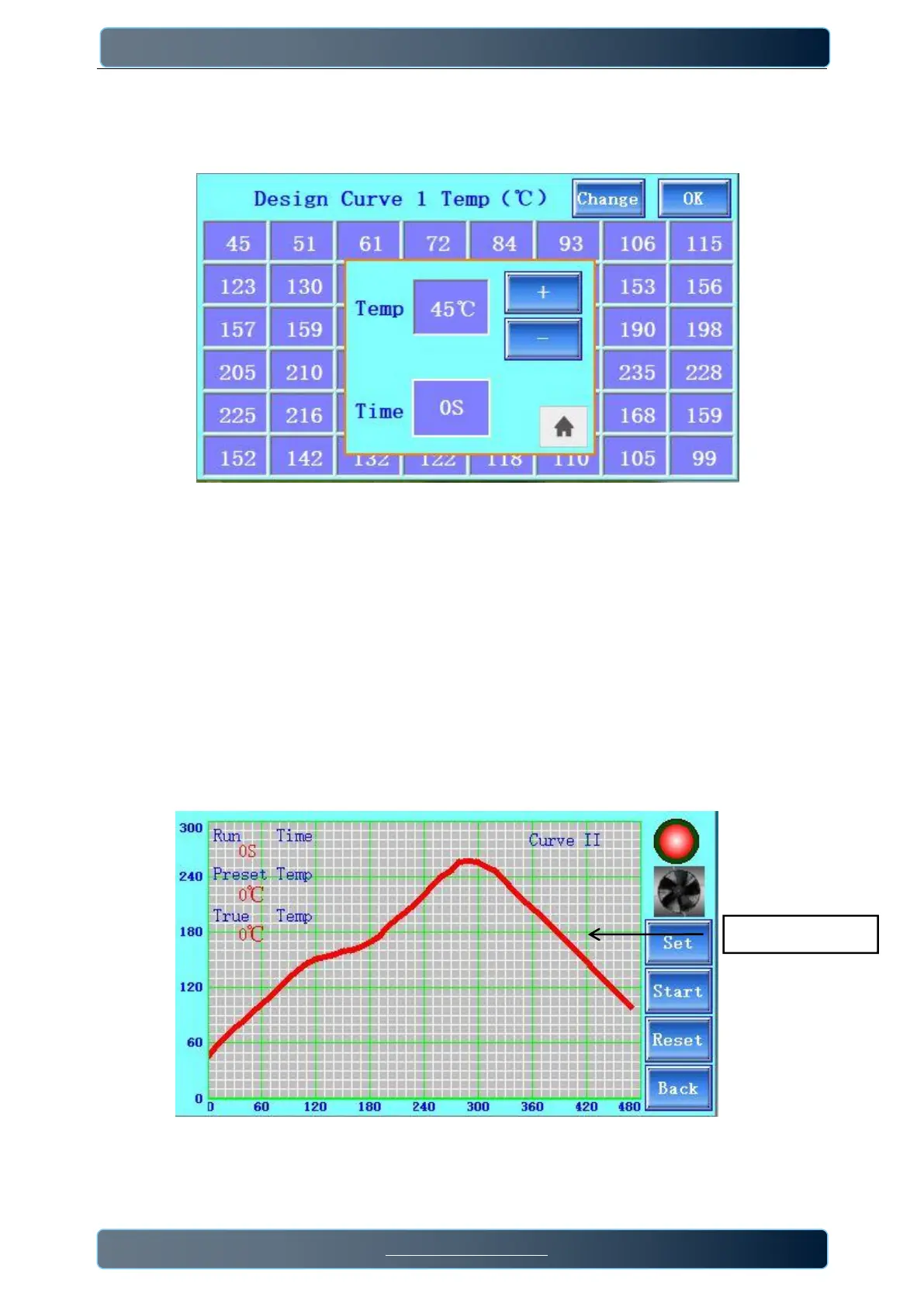
Set the peak temp value in different time, (the total welding time is 470s, a fixed value),as below pic
8
/
9
:
The temperature value of the 1st row from left to right corresponds to the time value 0→70s;
The temperature values in the 2nd row from left to right correspond to the time values 80→150s
In the 3rd row, the temperature value from left to right corresponds to the time value 160→230s;
The temperature values in the 4th row from left to right correspond to the time values 240→310s
In the 5th row, the temperature value from left to right corresponds to the time value 320→390s;
In the 6th row, the temperature value from left to right corresponds to the time value 400→470s;
a. Users can directly click the temperature value to change the temp value in the selection;
b. or can also click on "Change" Button, and a small window will pop up. Click the "+" and "-" buttons on the
interface to conveniently change the temperature value at a specified point in time.
The time value is fixed and cannot be changed. Click "OK" button to return to the heating interface of self-set
curve and a new curve has been drawn.
User-defined curve


 To Next Page