EasyManua.ls Logo

Puls DIMENSION UB Series - User Manual

Puls DIMENSION UB Series
34 pages
Print Icon
To Next Page IconTo Next Page
Loading...
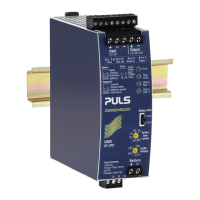
UB40.241
UB-Series
24V, 40A, DC-UPS
Jun. 2020 / Rev.0.1 DS-UB40.241-EN All values are typical figures specified at 24Vdc input voltage, 40A output current in
power supply mode at 25°C ambient, no charging and after a 5 minutes run-in time unless otherwise noted.
www.pulspower.com Phone +49 89 9278 0 Germany
DC-UPS CONTROL UNIT
1-Battery-Concept - Each 12V battery is charged and monitored
separately for longest battery life, matching of batteries not
necessary
Output is decoupled from the input to separate load circuits into
buffered and non-buffered sections
Allows VRLA battery sizes between 12Ah and 200Ah;
Battery Size selector for various battery sizes
50% Extra output power for up to 5s
Superior battery management for longest battery life
Comprehensive diagnostic and monitoring functions
Replace Battery signal included
Battery-Low Prewarning signal included
Selectable buffer time limiter
Temperature controlled battery charging
3 Years warranty
PRODUCT DESCRIPTION
The UB40.241 is an uninterruptible power supply controller (DC-
UPS controller), which is used in combination with a 24V power
supply and an external 24V-battery pack to bridge power
failures. When the power supply provides sufficient voltages,
the DC-UPS controller charges the battery. When the power
supply voltage fails, the energy stored in the battery is released
to the DC bus in a regulated process.
A unique feature is the battery charger, which can balance two
unmatched batteries and which includes two independent
battery testers for the two 12V batteries connected in series.
This feature makes matching batteries unnecessary and allows
for precise battery charging, testing and optimized usage of the
battery capacity to achieve the longest battery service life.
The device includes various battery diagnostic functions
including a battery-low pre-warning signal that ensure a reliable
operation of the entire system. Furthermore, temperature
controlled charging extends the life of the batteries. It also
includes a selectable buffer time limiter as well as Ready,
Buffering and Replace battery contacts. For safety and
maintenance, an inhibit-input signal is included to enable phases
without enforced buffering.
SHORT-FORM DATA
Input voltage
DC 24V
±25%
Min. input voltage to start
charging and to enable
battery mode
23V
Transfer voltage to switch
to battery mode
22.2V
Internal current
consumption
3.2A / 6.2A
<65Ah / ≥65Ah, incl.
charging current
Voltage loss
55mV / 110mV
Input to output,
at 20A / 40A
110mV / 220mV
Battery input to output, at
20A / 40A
Output current
50A
Below +50°C
40A
At +60°C
30A
At +70°C
60A
Short term, up to 5s
Derate linearly between +50 and +70°C
Power losses
6.0W
At 40A in power supply
mode, full batteries
9.9W
At 40A in battery mode
Temperature range
-25°C to +70°C
Size (wxhxd)
46x124x127mm
Without DIN-rail
Weight
530g / 1.17lb
ORDER NUMBERS
DC-UPS UB40.241 Standard DC-UPS unit
Batteries UZK24.122 Battery module 24V, 12Ah
UZO24.122 UZK24.122 w/o batteries
UZK24.262 Battery module 24V, 26Ah
UZO24.262 UZK24.262 w/o batteries
UZK24.262-E1 Battery extension 24V, 26Ah
UZO24.262-E1 UZK24.262-E1 w/o batteries
UZW24.100 Connection and wiring kit
UZW24.101 Connection and wiring kit
UZS24.100 Sensor and center-tap board
MAIN APPROVALS
For details or a complete approval list see chapter 19.

planned
IND. CONT. EQ.
planned

Questions and Answers

  • M
    Michael GonzalezAug 4, 2025
    Why does my Puls DIMENSION UB constantly switch between power supply mode and battery mode?
    • C
      collinsgavinAug 4, 2025
      If your Puls Controller constantly switches between power supply and battery mode, it might be due to the input source being too small to deliver enough current. Try using a larger power supply or reducing the output load. Another cause could be the power supply's output voltage dipping too low, in which case you should increase it. High voltage drops on the wires could also be the culprit; you can resolve this by increasing the power supply's output voltage or using wires with a larger cross-section between the power supply and the DC-UPS.
  • A
    Amber MorganAug 11, 2025
    What to do if the “Error” LED on Puls DIMENSION UB is solid on?
    • L
      laura75Aug 11, 2025
      If the “Error” LED on your Puls Controller is solid on, you should check the wiring between the battery and the DC-UPS to ensure it is correct. Also, verify that the battery fuse is properly inserted and not blown. Check that the battery voltage is between 14V and 30V, and confirm the battery polarity is correct.
  • B
    bobbymayAug 16, 2025
    Why has my Puls DIMENSION UB DC-UPS stopped buffering?
    • T
      toddscottAug 16, 2025
      If the DC-UPS stopped buffering, several factors could be responsible. The deep discharge protection might have stopped buffering, in which case you should use a larger battery or allow sufficient time for charging the battery. Also, the buffer time limiter might have stopped buffering; try changing its settings on the front of the unit. Too large output capacitors can trigger the current limiter, switching off the output of the DC-UPS.
  • K
    kimberly72Aug 22, 2025
    Why Puls DIMENSION UB DC-UPS did not buffer?
    • D
      davispaulAug 22, 2025
      If the Puls Controller DC-UPS did not buffer, it could be due to several reasons: the Inhibit-input might have been set, the input voltage of the DC-UPS might not have reached the minimum of 23V, or the battery voltage might be below 23V.
  • C
    Courtney GomezAug 28, 2025
    How to fix single flash on the “Error” LED on Puls Controller?
    • L
      lawrenceamandaAug 28, 2025
      If you see a single flash on the “Error” LED of your Puls Controller, check the input voltage. The input voltage must be at least higher than 23V and smaller than 30V.

Summary

PRODUCT DESCRIPTION

DC-UPS CONTROL UNIT

Core features and operational concepts of the DC-UPS control unit, including battery management.

INSTALLATION INSTRUCTIONS

TYPICAL WIRING SCHEME

INPUT AND OUTPUT CHARACTERISTICS

BATTERIES AND BATTERY CHARGING

BUFFER TIME

INHIBIT-INPUT

SIGNAL OUTPUTS

FUNCTIONAL DIAGRAM

FRONT SIDE AND USER ELEMENTS

Front Panel Elements

Detailed description of terminals, LEDs, selectors, and connectors on the DC-UPS front panel.

CONNECTION TERMINALS

EMC

SAFETY AND PROTECTION FEATURES

ACCESSORIES

APPLICATION NOTES

BATTERY REPLACEMENT INTERVALS

Explains causes of battery failure and provides guidelines for determining battery replacement intervals.

Parallel use for redundancy

Provides recommendations for building redundant systems using multiple DC-UPS units and battery modules.

TROUBLESHOOTING

Offers solutions for common problems and symptoms encountered with the DC-UPS unit.

Puls DIMENSION UB Series Specifications

General IconGeneral
ManufacturerPuls
CategoryController
Input Voltage Range85-264VAC
Output Voltage24VDC
MountingDIN Rail
Cooling MethodConvection
Protection ClassIP20
Product SeriesDIMENSION
FunctionPower Supply
Operating Temperature-25°C to +70°C (derating above +60°C)
Operating Temperature Range-25°C to +70°C
EMC StandardsEN 61000-6-2