l
Battery life indicator
When the battery nears its end, the second hand moves at two-second intervals
instead of normal one-second intervals. In that case, have the battery replaced with
a new one as soon as possible.
* The watch remains accurate while the second hand is moving at two-second
intervals.
l
We recommend that you contact an AUTHORIZED PULSAR DEALER for battery
replacement.
l
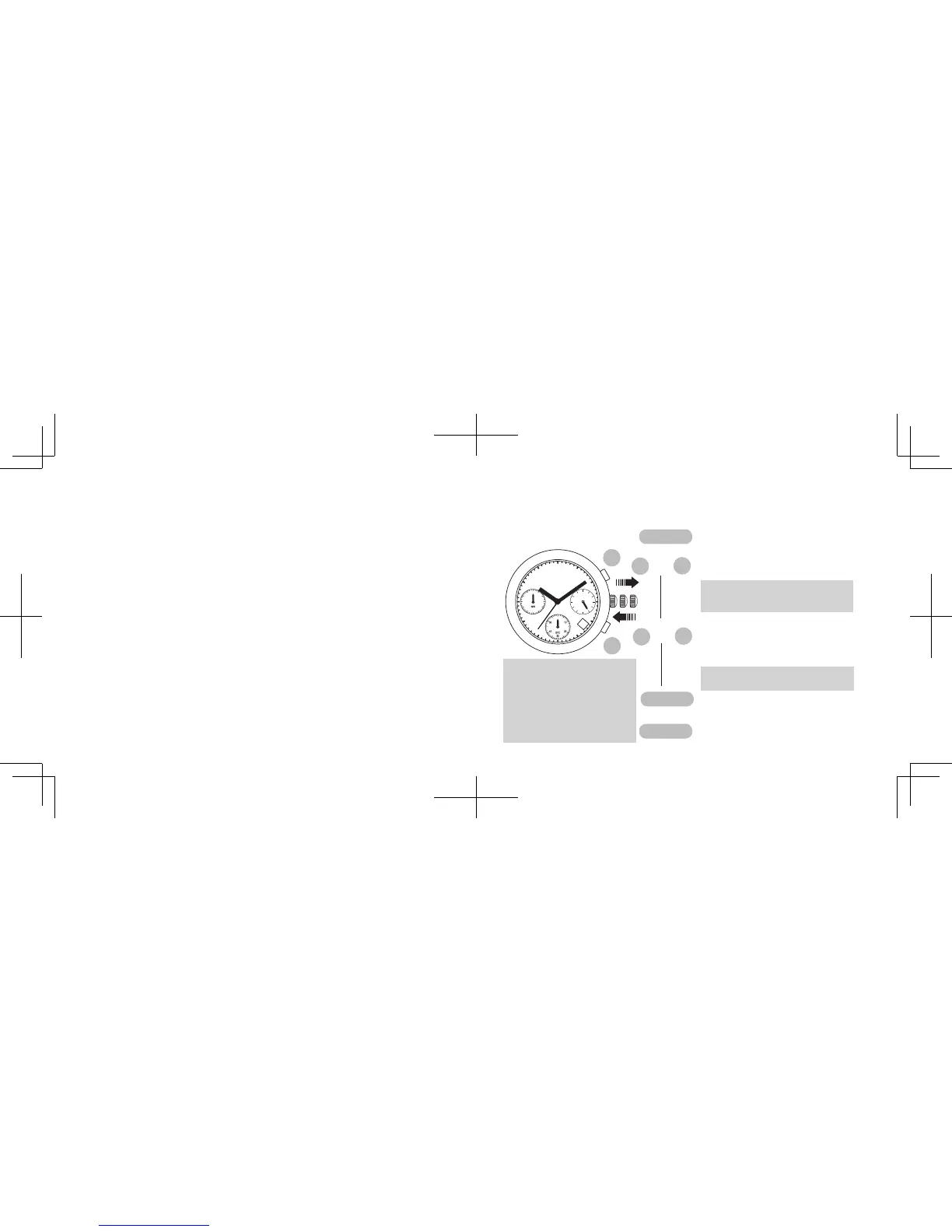
After the battery is replaced with a new one, adjust the stopwatch hand position and
set the time/calendar.
l
Necessary procedure after battery change
AND
Press and hold simultaneously
for 2 seconds or longer.
Press to reset the STOP
-
WATCH second and minute
hands to the “0” position.
After the battery is replaced with a new one, or in case any of the hands should move
improperly, follow the procedure below to reset the
STOPWATCH
hands to “0” po-
sition.
* The STOPWATCH second hand
turns counter clockwise, and then
returns to where it was.
s
Turn to set the time.
Push back in to normal position.
s
Pull out to second click.
s
* The STOPWATCH minute
hand moves correspond-
ingly with the STOPWATCH
second hand.
* The STOPWATCH hands
mo ve qu ic kl y if t he re -
spective buttons are kept
pressed.
B
A
CROWN
B
A
B
A
CROWN
CROWN
A: The hands move counterclockwise.
B: The hands move clockwise.
OR
s



 To Next Page