19
HOW TO SET THE ALARM
ALARM
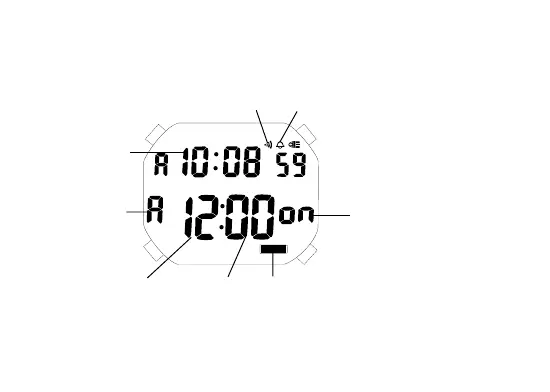
“A”(AM)/
“P”(PM) mark
“on”/“- -”
(Alarm engagement/
disengagement mark)
Current time
Alarm mark Hourly time signal mark
BC
D
Alarm display mark
Minutes
Hour
• The alarm can be set to ring on a 24-hour basis. At the
designated time, the display is illuminated as the alarm rings.
1. Depress mode selector “A” to show the alarm display.
2. Depress button “B” for 2 to 3 seconds to show the alarm
setting display. The alarm mark and “on”/“- -” mark disappear
A


 To Next Page