EasyManua.ls Logo

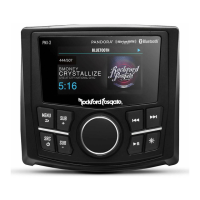
punch PMX-2 - User Manual

Default Icon
13 pages
Print Icon
To Next Page IconTo Next Page
Loading...
PMX-2
DIGITAL MEDIA
RECEIVER

Questions and Answers

  • B
    Belinda LloydJul 26, 2025
    Why won't my punch PMX-2 turn on?
    • B
      brucemckinneyJul 27, 2025
      There are several reasons why your Punch Receiver might not be turning on: * A blown fuse could be the culprit. Check the unit's fuse and replace it with one of the correct rating. * If the vehicle's ignition is off and the unit is connected as instructed, it will not operate. * The voltage applied to the red wire may not be between 10.5 & 16 volts, or there may be no voltage present. Check the battery, connections, and fuses, repairing or replacing them as needed. If the voltage exceeds +16 volts, have the electrical system inspected by an authorized service center. * The unit might not be properly grounded. Inspect the wiring and repair it if necessary.
  • D
    David ThompsonJul 30, 2025
    What to do if my punch PMX-2 USB device is not recognized?
    • J
      John DelgadoJul 31, 2025
      If your Punch Receiver isn't recognizing the USB device, it could be due to a couple of reasons. First, the USB device might be damaged. Try disconnecting and reconnecting it. If it's still not recognized, try a different USB device. Also, remember that USB does not work with Android devices. Another potential cause is loose connectors.
  • C
    Carla HarmonAug 4, 2025
    What to do if my Punch Receiver USB device cannot be inserted?
    • M
      Mary RodgersAug 4, 2025
      If you're having trouble inserting your USB device into the Punch Receiver, it might be because it's inserted in the wrong direction. Try reversing the connection direction and reinserting it. Alternatively, the USB device connector may be broken, in which case you should replace it with a new USB device.
  • D
    Deborah ByrdAug 8, 2025
    Why does my Punch Receiver tuner fail to tune any stations?
    • T
      Timothy SanchezAug 8, 2025
      If your Punch Receiver's tuner isn't picking up any stations, the issue might be with the antenna. Check all connections to ensure the antenna is properly connected and that there are no open connections in the cable. Repair as necessary.
  • Y
    yvette43Aug 13, 2025
    Why is the sound skipping or noisy on my punch PMX-2?
    • E
      Emily LoveAug 13, 2025
      If the sound from your Punch Receiver skips or is noisy, the MP3/WMA files might not be created properly. Ensure that you are using MP3/WMA files that are encoded correctly.
  • B
    bwilsonAug 17, 2025
    What to do if unable to tune stations in seek mode on punch PMX-2 Receiver?
    • V
      velezdouglasAug 17, 2025
      If you're unable to tune stations in seek mode on your Punch Receiver, it could be because you are in a weak signal area. Ensure that the tuner LOC mode is off.
  • D
    Douglas DiazAug 21, 2025
    What to do if no sound heard with the display “No File” shown on Punch Receiver?
    • D
      David HubbardAug 21, 2025
      If you see a “No File” message and hear no sound on your Punch Receiver, the USB device may not have MP3/WMA files stored on it. Make sure to store these files properly on the USB device. Also, note that USB does not work with Android devices.

Summary

Safety Information

Design Features

Rotary Encoder

Primary knob for volume, navigation, and settings adjustments.

Main Controls

Explains MENU, SRC, SUB, REV/FWD, DIMMER, PLAY/PAUSE buttons for unit operation.

Wiring Diagram

Installation and Mounting

Installation Considerations

Lists tools and general guidelines for safe and effective installation.

Mounting Methods

Step-by-step guides for mounting using a mounting plate or U-bracket.

Settings and Configuration

Tuner Operation and Settings

Audio Source Operation

Pandora App Operation

punch PMX-2 Specifications

General IconGeneral
Brandpunch
ModelPMX-2
CategoryReceiver
LanguageEnglish

Related product manuals