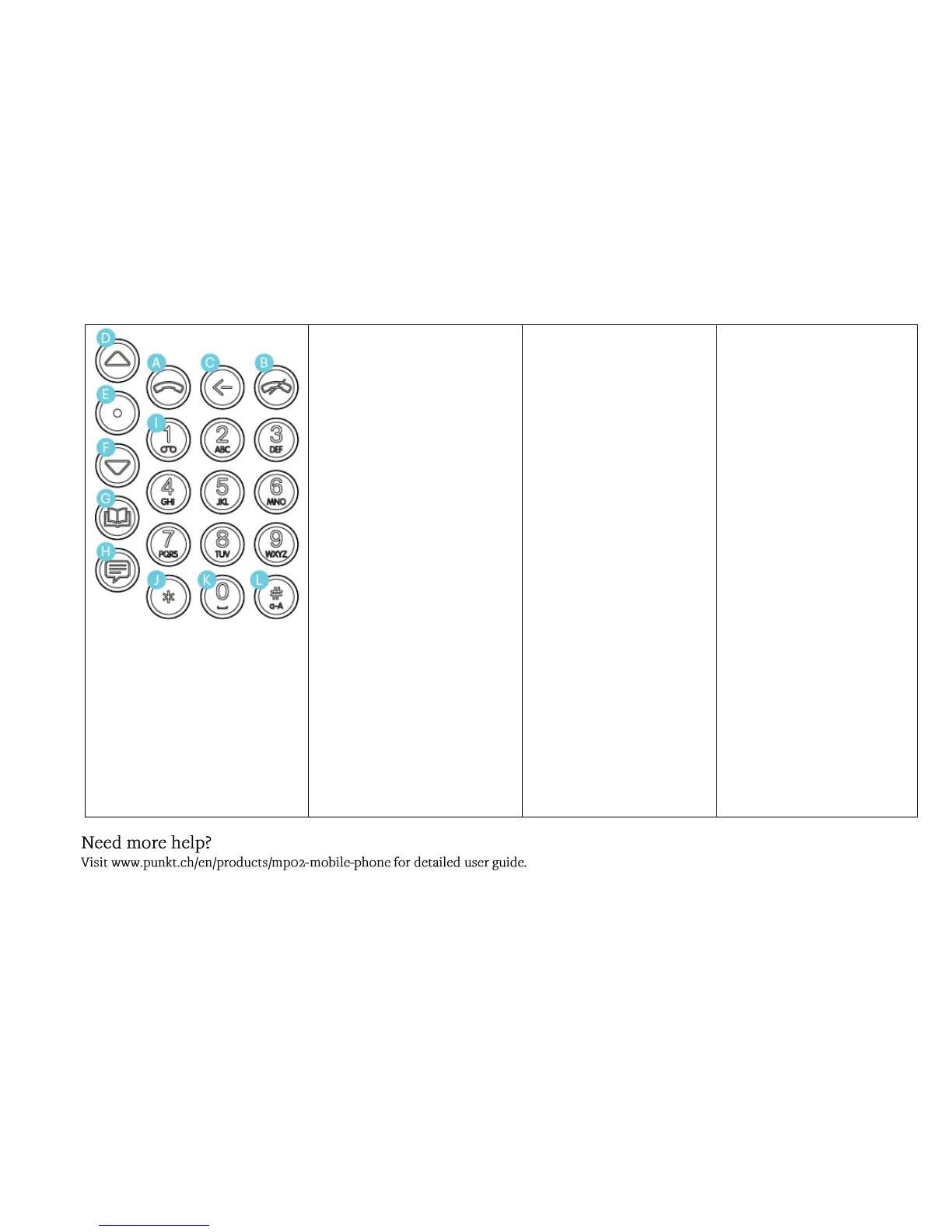
A. SEND
Answers incoming call.
LONG PRESS during incoming
call will answer with
speakerphone on.
Places a call to the valid dialled
number valid number in focus.
During an active call, toggles Hold
On/Off.
When on the Home Screen,
opens Call History.
B. END
Ends a call and/or navigates to
the home screen
C. BACK
Navigates back one step
Navigates back one step or clears
characters when in an editor
D. UP
Moves content into focus or
moves focus.
For number type settings, in-
crements or decrements.
In texting modes (messages,
notes, contact details) moves the
cursor left, to the start of text. If
cursor is at the beginning of text,
then the focus moves up.
LONG PRESS:
From Home screen takes you
directly to Connectivity menu
Otherwise moves to the top
menu element, or beginning
of texts.
E. PUNKT
From Home Screen: opens
the main menu
Selects the item in focus.
If reading message thread,
brings directly to new
message composition box.
F. DOWN
Moves content into focus or
moves focus.
In texting modes moves the
cursor right to the end of the
text. If cursor is at the end of
text, then the focus moves
down.
LONG PRESS moves to
bottom menu element or to
the end of texts.
G. CONTACTS
Opens contacts app.
LONG PRESS:
o On Home Screen to
create new contact
o On an unsaved
number, to save the
contact.
H. MESSAGE
Opens messages app.
LONG PRESS: On Home
Screen opens Message
Composer.
When focused on a number or
contact the Message
Composer will open with the
recipient pre-entered.
I. 1 (ONE)
LONG PRESS dials voicemail.
SHORT PRESS followed by
SEND dials voicemail.
J. * (ASTERISK)
LONG PRESS: Toggles mute
on/off during an ACTIVE CALL
In texting modes opens the
Special characters panel.
K. 0 (ZERO)
LONG PRESS:
o Enters “+” symbol in
dialer or numeric editor
mode.
o Enters “0” in text mode
One press creates a space in
text mode
L. # (HASH)
In texting mode alternates the
text input between Predictive
Input and Multi Tap; in the
following loop order:
Abc P.I. -> ABC P.I. -> abc P.I.
-> Abc MT -> ABC MT -> abc
MT -> 123



 To Next Page