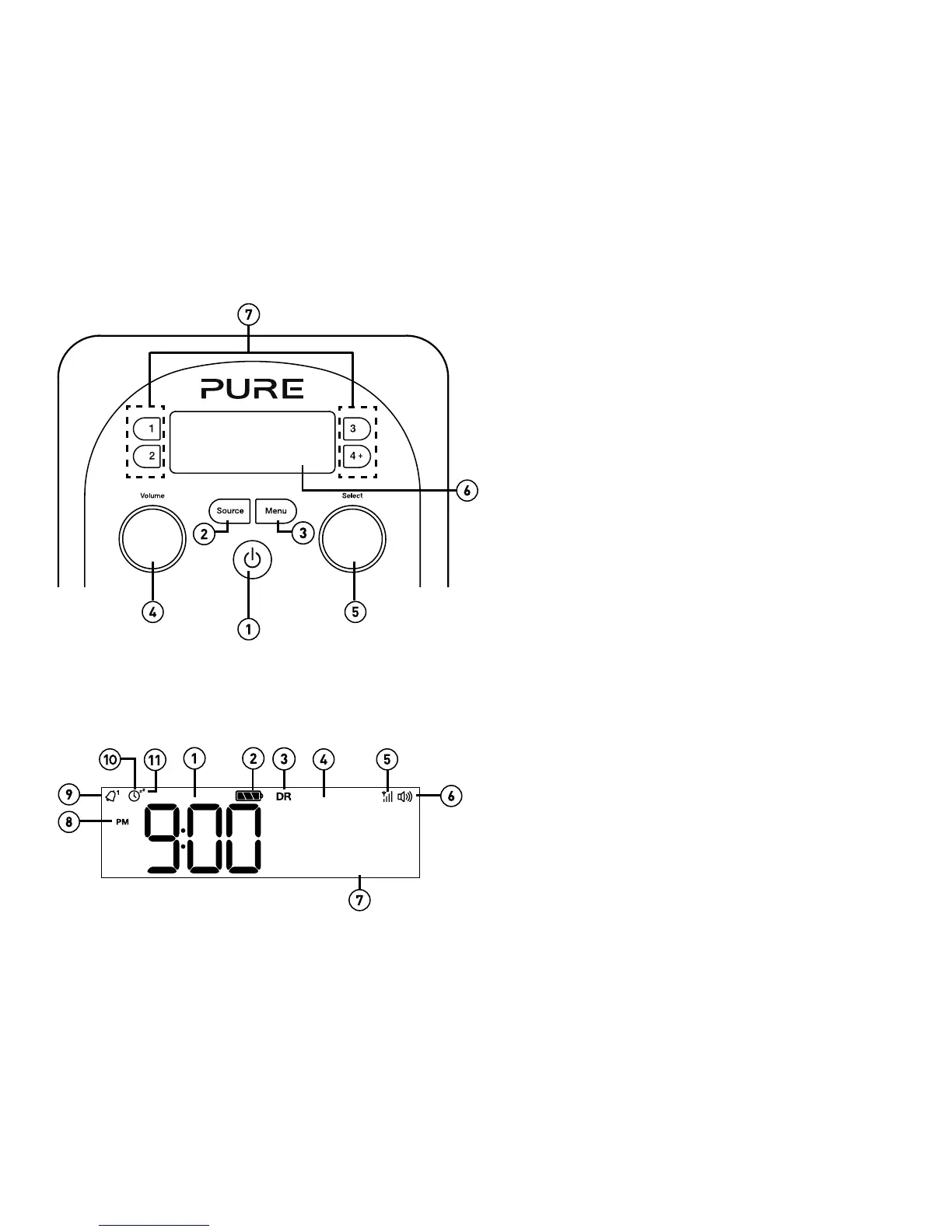
Front panel controls
Introduction
1. Standby: On/standby switch (mains powered) or on/
off switch (ChargePAK powered).
2. Source: Press to switch between Digital radio, FM
radio and Auxiliary input.
3. Menu: Press to access setup options.
4. Volume: Turn to adjust volume. Push to mute and
un-mute.
5. Select: Turn and press to browse and select radio
stations (see page 7), select and adjust menu
options or pause and control scrolling text (see
page 7).
6. Display: See below for more information on the
display options.
7. Presets 1 - 4+: Store up to 10 digital or 10 FM radio
preset stations.
Display
1. Current time.
2. ChargePAK indicator.
3. Source indicator.
4. Displays station name.
5. Signal strength.
6. Volume/mute indicator.
7. Displays date, scrolling text, settings and station
information (see page 12).
8. AM/PM indicator.
9. Alarm set indicator (see page 9).
10. Sleep and kitchen timer indicator (see page 10).
11. Alarm snooze indicator (see page 9).
BBC R1
NEWSBEAT



 To Next Page