Need help?
Do you have a question about the PURE Evoke D2 and is the answer not in the manual?
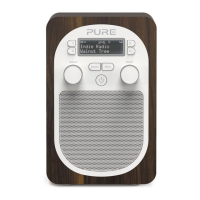
Overview of the buttons and controls on the front of the Evoke D2 radio.
Explanation of icons and information shown on the radio's display screen.
Details of ports and connectors located on the back of the Evoke D2.
Step-by-step instructions for initial setup and powering on the Evoke D2.
How to select and tune digital radio stations on the Evoke D2.
How to select and tune FM radio stations on the Evoke D2.
Instructions for pausing and navigating scrolling text information.
Connecting and playing audio from external devices via the auxiliary input.
Method to quickly save favorite stations to preset buttons 1 through 3.
Process for saving stations to the full preset list from 1 to 10.
How to access and listen to previously stored preset radio stations.
Procedures for cancelling an active alarm on the Evoke D2.
How to activate the snooze function for a sounding alarm.
Steps to permanently turn off a set alarm.
How to configure the sleep timer for automatic radio shutdown.
Configuration options including language, factory reset, and software version.
Settings specific to digital radio functionality, such as Autotune.
Settings for FM radio reception, including stereo/mono and tuning modes.
Adjustments for bass, treble, and volume levels for audio output.
Customization options for the display backlight brightness and duration.
Configuration of time, date, time format, and clock synchronisation.
Instructions on how to fit and charge the optional ChargePAK B1.
Detailed technical data and specifications for the Evoke D2 radio.
Safety guidelines for using and handling the ChargePAK B1 accessory.
Legal disclaimers, trademarks, and copyright notices for the product.
Instructions for environmentally responsible disposal of the product.
 General
| Radio type | Portable |
|---|---|
| Tuner type | Digital |
| PLL synthesizer | - |
| Supported radio bands | DAB, DAB+, DMB, FM |
| RMS rated power | 1.6 W |
| Number of built-in speakers | 1 |
| Subwoofer driver diameter (imperial) | 3 \ |
| Headphone connectivity | 3.5 mm |
| USB 2.0 ports quantity | USB 2.0 ports have a data transmission speed of 480 Mbps, and are backwards compatible with USB 1.1 ports. You can connect all kinds of peripheral devices to them. |
| Product color | Walnut, White |
| Input voltage | 230, 5.5 V |
| Apple docking compatibility | Not supported |
| Power source | DC/Battery |
| Power consumption (standby) | 0.7 W |
| Power consumption (typical) | 1.9 W |
| Certification | CE, EMC, Low Voltage Directives (2004/108/EC & 2006/95/EC) ETSI EN 300 401, C-Tick N1600 |
 Weight and Dimensions
| Depth | 120 mm |
|---|---|
| Width | 115 mm |
| Height | 180 mm |

 To Next Page