EasyManua.ls Logo

PURE Highway 600 - User Manual

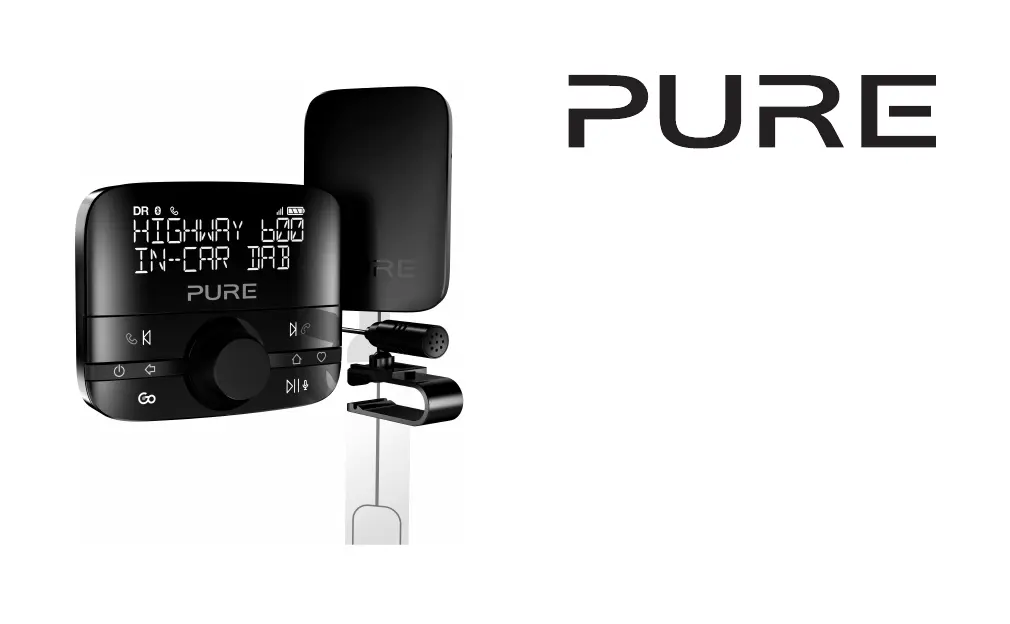
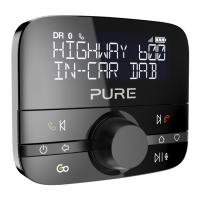
PURE Highway 600
152 pages
Print Icon
To Next Page IconTo Next Page
Loading...
Highway 600

Table of Contents

Questions and Answers

  • V
    velazquezdavidAug 18, 2025
    How to fix PURE Highway 600 when the wireless controller displays 'ANTENNA CONNECTING' or 'CHECK POWER TO ANTENNA'?
    • M
      Mary ReyesAug 18, 2025
      This issue occurs when the antenna isn't connected to the power supply, or the controller isn't paired correctly with the antenna. To resolve this: * Remove the power adapter from the 12V socket, then re-insert it. If the antenna has power, the antenna's status light will illuminate for 5 seconds, and the controller should connect within 30 seconds. * If you cannot access the power adapter, perform a power reset. * If the problem persists, pair the controller with the antenna by using a paperclip to press the reset button on the antenna (the status light will flash slowly). Then, place the controller within 50cm of the antenna, and press and hold the specified buttons together. If it doesn't connect within 30 seconds, repeat the pairing steps.
  • E
    Elizabeth SmithAug 20, 2025
    What to do if my PURE Highway 600 is not connected to my vehicle?
    • N
      Nicholas GonzalezAug 20, 2025
      Ensure the auxiliary cable is firmly connected to your vehicle's audio system, or ensure you are tuned to the correct FM frequency.
  • A
    Amy GilbertAug 23, 2025
    What to do if my PURE Highway 600 is not connected to my mobile device in Bluetooth mode?
    • P
      petersentoddAug 23, 2025
      If your PURE Adapter is not connected to your mobile device in Bluetooth mode, switch on Bluetooth on your mobile device. If required, pair your Highway with your mobile device again.
  • T
    Troy WolfAug 26, 2025
    Why can't I connect my PURE Highway 600 Adapter to a compatible mobile device?
    • D
      Derrick WilcoxAug 26, 2025
      If you can't connect your PURE Adapter to a compatible mobile device, it may be because: * Bluetooth is switched off on your mobile device. Check that your mobile device is Bluetooth compatible and Bluetooth is switched on. * Another Bluetooth device is connected to your Highway. Switch off Bluetooth on the other device. * Your Highway isn't paired correctly with your mobile device. Pair your Highway with your mobile device again.
  • J
    Jermaine KingAug 28, 2025
    Why is the PURE Highway 600 Adapter volume too low on my vehicle or connected mobile device?
    • Y
      youngtaylorAug 28, 2025
      The volume may be too low on your vehicle or connected mobile device. Turn up the volume on your vehicle and on the connected mobile device.
  • R
    Robert BennettAug 30, 2025
    What to do if my PURE Adapter keeps switching off by itself?
    • K
      Kathryn RamirezAug 30, 2025
      If your PURE Adapter keeps switching off by itself, the auto standby mode may be switched on. If this is happening too often, change the auto standby setting.
  • M
    Melissa SkinnerSep 2, 2025
    How to resolve distorted sound when my PURE Highway 600 Adapter is connected with an auxiliary cable?
    • B
      Brian KerrSep 2, 2025
      If the sound is distorted when your PURE Adapter is connected with an auxiliary cable, the gain setting might not be correct. Set the gain setting to 'LOW' or change to FM transmission.
  • M
    Michael MendezSep 4, 2025
    What to do if the status light on my PURE Highway 600 Adapter antenna is constantly lit?
    • W
      whitesarahSep 4, 2025
      The status light on the antenna is constantly lit because your Highway is in update mode. If you are updating the software, finish the update. If not, remove the power adapter from the 12V socket, then insert it. If the antenna has power, the status light on the antenna lights up for 5 seconds and the controller connects to the antenna within 30 seconds. If you can't access the power adapter, perform a power reset.
  • D
    Daniel SalasSep 7, 2025
    What to do if the wireless controller is unresponsive or the screen is blank on my PURE Highway 600?
    • N
      newmansamanthaSep 7, 2025
      If the wireless controller is unresponsive or the screen is blank on your PURE Adapter, it could be due to: * Dead batteries: Replace the batteries in the controller. * Software issue: Remove and then reinsert the batteries in the controller.
  • A
    Amy WeberSep 9, 2025
    What to do if the status light on my PURE Adapter antenna is flashing?
    • S
      singhjamesSep 9, 2025
      If the status light on the antenna is flashing, the controller has lost connection with the antenna. To pair the controller with the antenna: 1. Use a paperclip to press the reset button on the antenna. The status light on the antenna flashes slowly. 2. Place the controller within 50cm of the antenna, then press and hold the specified buttons together. If the controller does not connect to the antenna within 30 seconds, repeat steps 1 and 2.

Summary

Safety and Product Overview

Safety Warnings and Symbols

Key safety instructions and explanations of symbols used for safe product operation.

Whats in the Box

Lists all components included with the Highway 600 device.

Controls and Installation

Wireless Controller Buttons

Details the functions of each button on the wireless controller for device operation.

Highway 600 Installation Guide

Step-by-step instructions for installing the Highway 600, including antenna and microphone placement.

Installing the Wireless Controller

Steps for mounting the wireless controller onto the vehicle's dashboard.

Initial Power On and Setup

Guides for switching on the device and completing the initial configuration.

Core Features: Digital Radio and Bluetooth

Digital Radio and Presets

How to listen to digital radio and manage favorite station presets.

Bluetooth Pairing and App Integration

Connecting via Bluetooth, using the Pure Go app, and streaming audio from a mobile device.

Hands-Free Calls and Assistant

Making calls and accessing your mobile device's personal assistant through the Highway 600.

Settings and Troubleshooting

Configuration and Customization

Settings for connection, standby, radio, and display preferences.

Software Updates

Information on how to update the Highway 600's software for optimal performance.

Troubleshooting Common Issues

Solutions for connection, audio, signal, and controller problems.

Product Specifications

Technical Specifications and Disposal

Details on operational parameters, technical specifications, and responsible product disposal.

PURE Highway 600 Specifications

General IconGeneral
Radio typeCar
Tuner typeAnalog & digital
FM band range87.6 – 107.9 MHz
DAB III band range174 - 240 MHz
Supported radio bandsDAB, DAB+, FM
RMS rated power- W
Built-in speaker(s)No
Display typeLCD
Built-in displayYes
Power sourceBattery, Cigar lighter
DC input voltage12 V
MP3 playback-
Product colorBlack
Internet radio services supportedSpotify
Compatible battery sizesAAA
Number of batteries supported2
Weight and Dimensions IconWeight and Dimensions
Width- mm
Weight390 g

Related product manuals