17
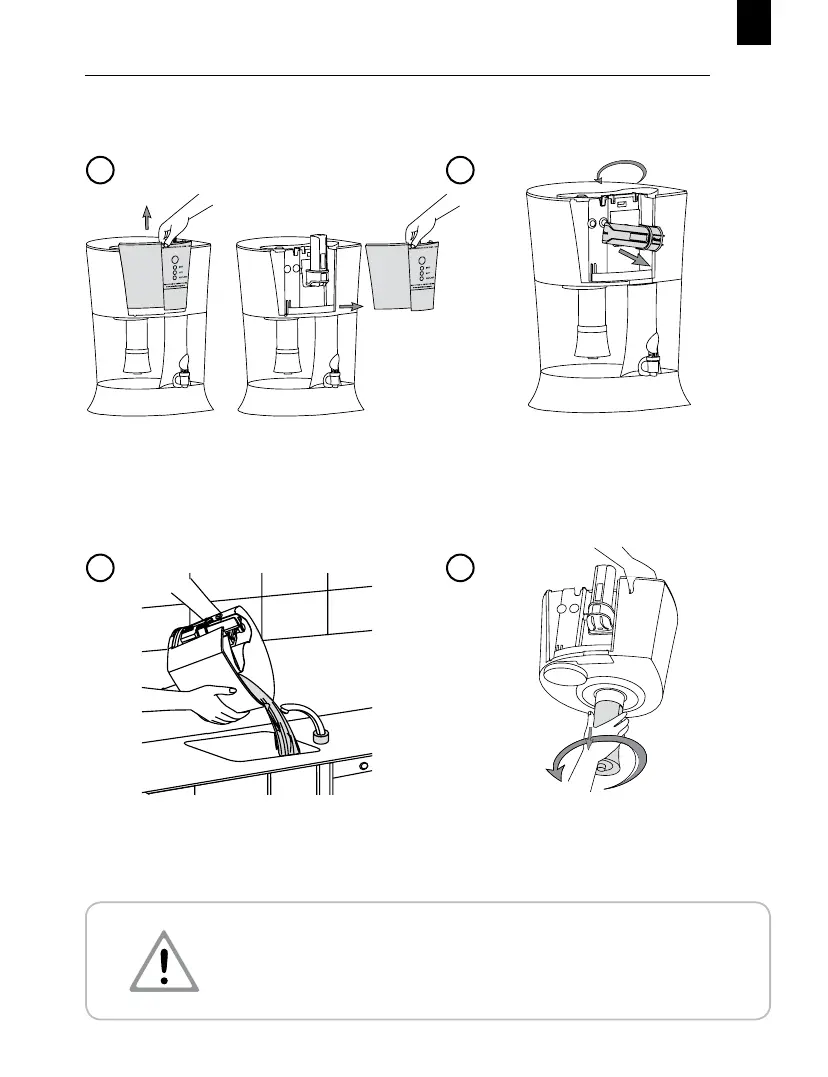
Wash hands thoroughly. Rotate the Microcharged Mem-
brane Assembly in anti-clockwise direction to remove.
Keep it aside in a clean place.
Rotate the Germkill Processor in the
anti-clockwise direction to remove and keep it in a safe
place.
CLEANING & MAINTENANCE OF PUREIT EXCELLA
8
6
Do not remove the Microcharged Membrane Assembly without emptying water from the
Cleansing Collection Chamber.
Empty the water from the
Cleansing Collection Chamber.
7
Slightly pull the Germkill Life Indicator Cover upwards
and remove it from the purier.
5


 To Next Page