OPERATING INSTRUCTIONS
REMOVING THE WATER TANK
Plug the DC power jack of AC/DC power adaptor to the
DC power socket (at back of the dehumidifier), then
connect the AC plug of the AC/DC power adaptor to the
appropriate wall mains socket.
-
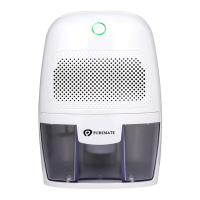
Press the power switch, the mini dehumidifier will begin to
operate, the Green LED will illuminate. To switch off the
unit, press power switch again.
-
When the water tank is full, the unit will automatically shut
off and the Red LED will illuminate.
-
When the water tank is full, with approximately 500ml of
water collected, the unit will automatically shut off and
the Red LED will illuminate.
-
To remove the water tank, first switch off the mini
dehumidifier. Then, remove the water tank from the unit
and pour the water into a sink or drain. Put the water tank
back into the unit. To continue dehumidifying, press the
“On/Off” button again.
-
THE AC/DC POWER ADAPTOR MAY BECOME HOT
DURING USE, THIS IS NORMAL AND DOES NOT MEAN
THERE IS A FAULT.



 To Next Page