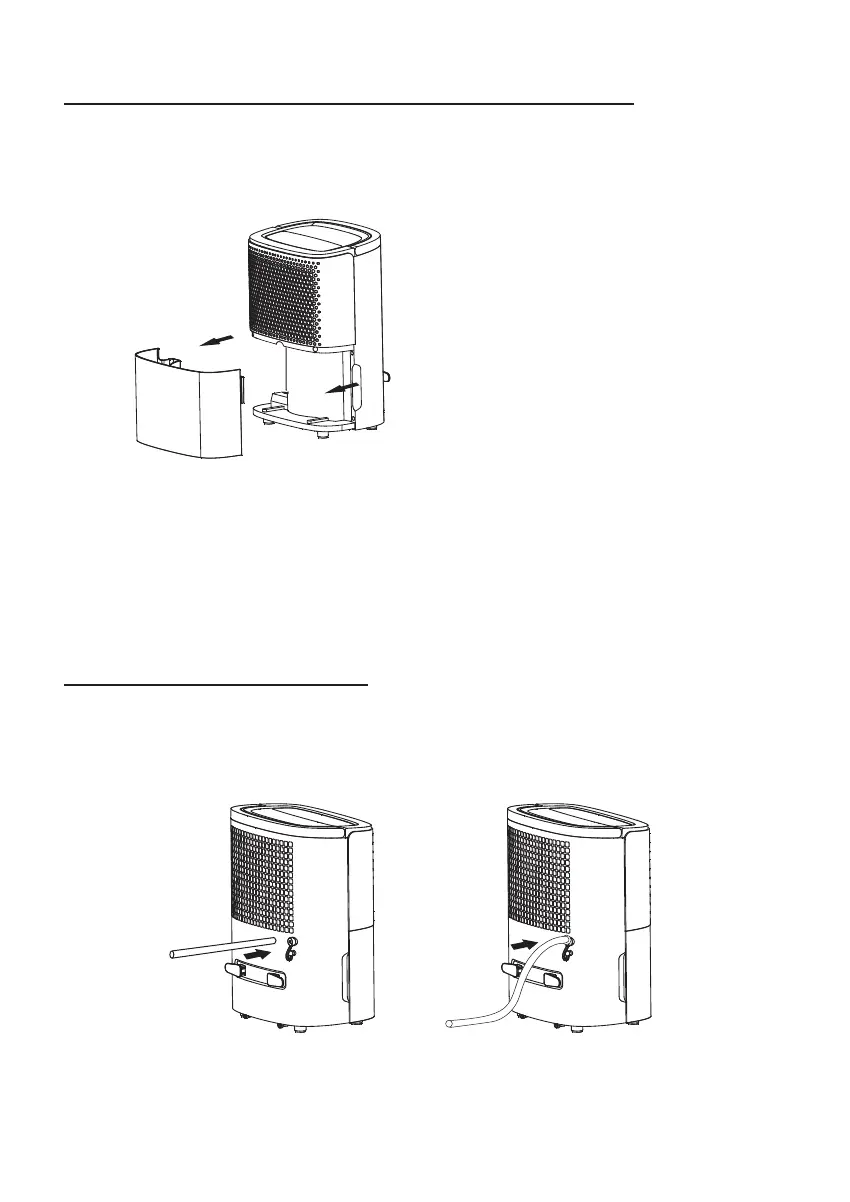
When the Water Tank Full indicator illuminates and the dehumidifier sounds. The unit
will automatically stop . Press the POWER button before removing the water tank.
1. Lightly press on the sides of the tank with both hands and pull the tank out gently.
2. Discard the collected water.
NOTE : Do not remove the float from the water tank. The water full sensor will
no longer be able to detect the water level correctly without the float and water
may leak from the water tank.
The unit features a continuous drainage port, connect a water pipe in the back,
(inner diameter is 9mm) water can be drained continuously.
Please check if the pipe is stably connected with the drainage mouth to prevent
leaking.
CAUTION : DO NOT PLACE CONTINUOUS DRAINAGE HOSE OUTSIDE IN
TEMPERATURES BELOW 1°C
NOTE: When replacing the drainage tank, press the tank firmly into place with
both hands. If the tank is not positioned properly, the “TANK FULL” sensor will
be activated, and the dehumidifier will not operate.
CONTINUOUS DRAINING
REMOVING AND EMPTYING THE WATER TANK
English | 4


 To Next Page