IMPORTANT: Always turn off and unplug the unit from the mains before carrying
out any maintenance or cleaning of the unit.
1. Use a soft, dry cloth to wipe the unit clean, removing any dust or debris from the
surface of the unit and inlet/outlet.
Don't ever use volatile chemicals, gasoline, detergents, chemically treated
clothes, or other cleansing solutions. All these could possibly cause damage to the
cabinet.
2. Remove the water tank, disposing of any collected water, and wipe with a soft damp
cloth.
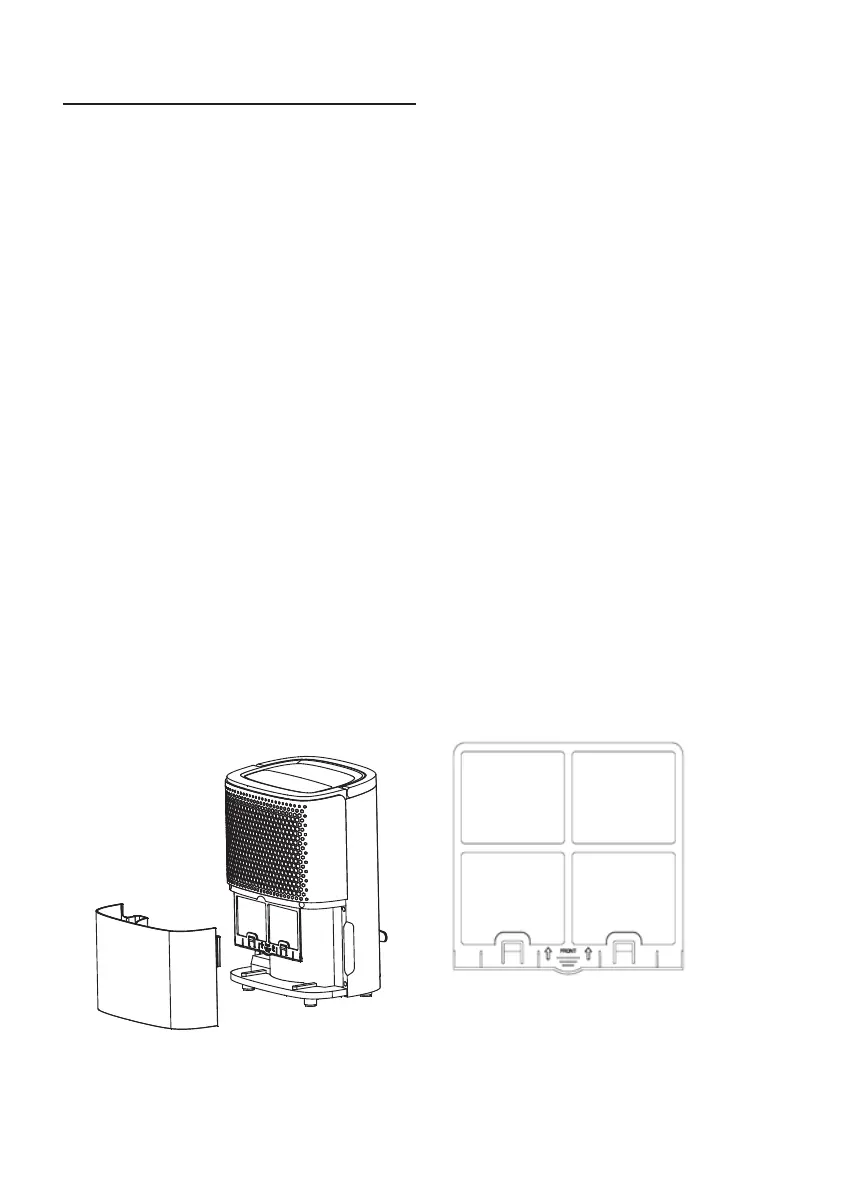
3. Remove the filters, by pulling down on the tab.
4. Remove the carbon filter from the pre-filter
5.Lightly vacuum the filters for easy cleaning. If the pre -filter is particularly dirty, clean
it with very small amount of water.
DO NOT WET THE 2 IN 1 ANTI-FORMALDEHYDE & ACTIVE CARBON FILTER
6. Make sure the pre-filter is completely dry before replacing. Reinstall the carbon filter
into the pre-filter and return back into the dehumidifier.
7. Reinstall the water tank.
It is recommended to clean the filter at least once fortnightly.
CLEANING & MAINTENANCE
English | 5


 To Next Page