06
PURE-PRO REVERSE OSMOSIS SYSTEM
09
PURE-PRO REVERSE OSMOSIS SYSTEM
P
R
O
P
URE
DRINKING WAT ER SYSTEM
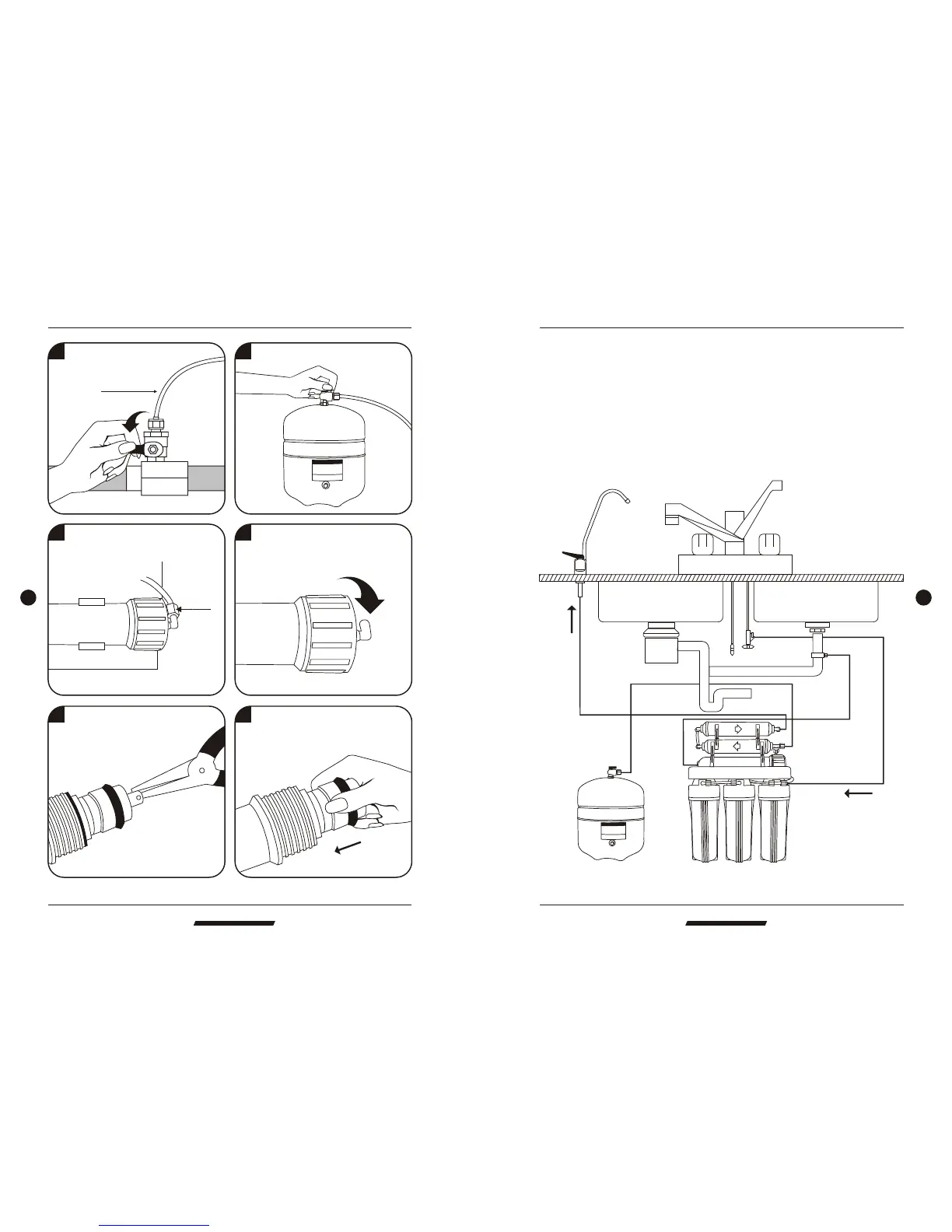
Tubing connection diagram
P
R
O
P
URE
DRINKING WAT ER SYSTEM
Change membrane
EC106 Upgrade Body Function RO System EC106 Upgrade Body Function RO System
5 Remove the membrane by a pincer.
6 Install the membrane by carefully
pushing the spigot end into the
socket at the far end of the housing
until completely in.
1 Turn off water source. 2 Switch off water tank.
To RO system
Faucet
Tank
Drain
Input water
A
B
C
D
CONNECTING THE COLOR TUBING:
A. Connect the WHITE tubing to the water supply connector.
B. Connect the BLUE tubing to the sink top faucet.
C. Connect the BLACK tubing to the drain saddle.
D. Connect the RED tubing to the storage tank.



 To Next Page