PURE-PRO REVERSE OSMOSIS SYSTEM
07 08
PURE-PRO REVERSE OSMOSIS SYSTEM
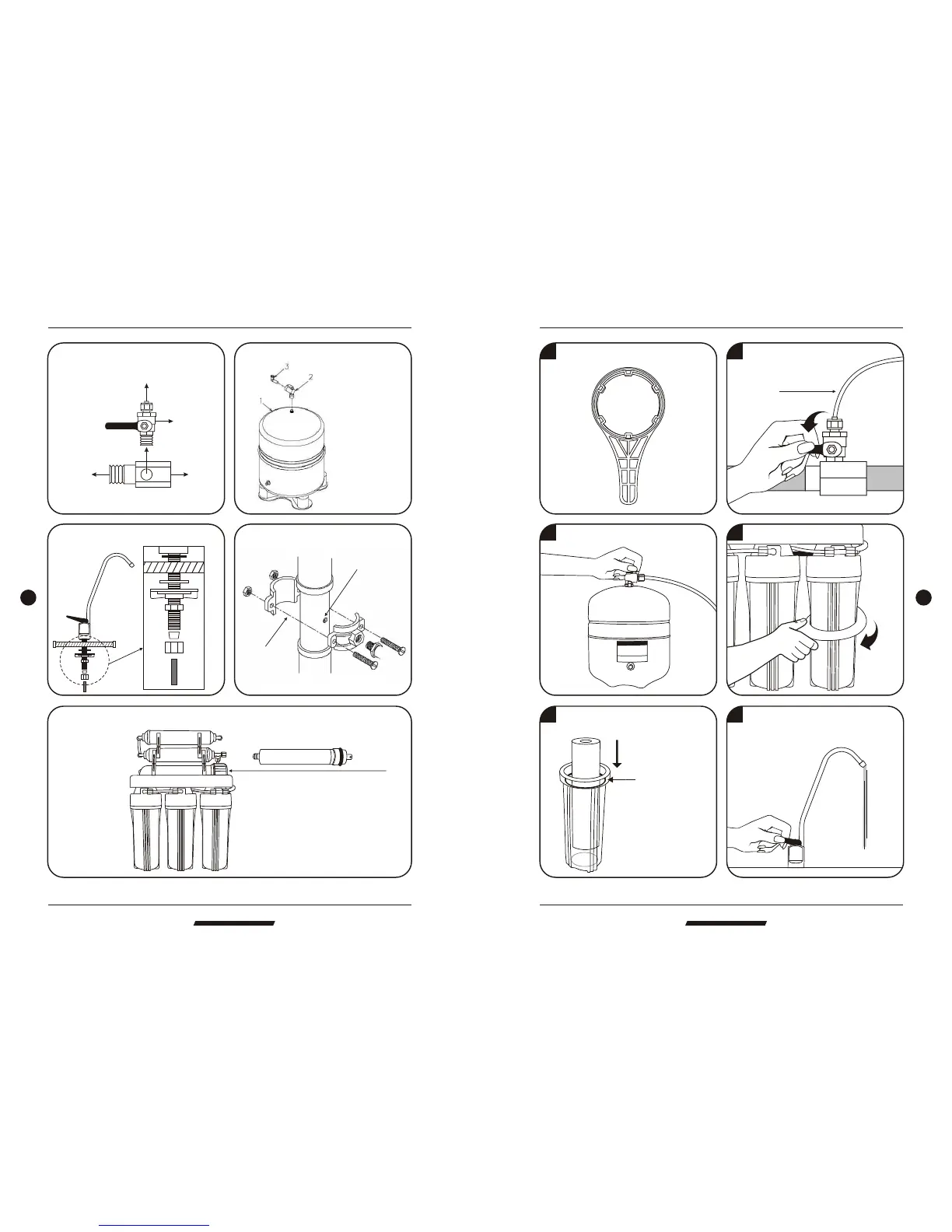
Input water : Install water tank :
1.Remove the membrane housing cap.
2.Replace the membrane.
P
R
O
P
URE
DRINKING WAT ER SYSTEM
To RO system
Deliver valve
To faucet
To water source pipe
Install faucet :
Install drain saddle :
Assemble membrane :
Hand tighten plastic
shut-off valve to tank.
Then connect color
tubing.
Drill a 1/4" hole into
the drain pipe.
Mount drain
saddle aligning
holes.
Installation diagram
P
R
O
P
URE
DRINKING WAT ER SYSTEM
Change filters
EC106 Upgrade Body Function RO System EC106 Upgrade Body Function RO System
Micro Computer Controller
POWER
SOURCEPROCESSFLUSH
FULL
1 Prepare a housing wrench.
5 Put the replacement filters in the
housings and double O'ring.
6 Drain out 1 Gallon of water to
purify replacement filters.
Be sure tighten with
O-ring to prevent
from leaking.
4 Open housings clockwise with a wrench.
3 Switch off water tank.
2 Turn off water source.
To RO system



 To Previous Page