User Manual
PT-SCREEN-200
8
Front
Remote Control Receiver and
Power Lamp:
Remote Control Receiver: Use the remote control of
the signal source connected with HDBT TX to point
to this Remote Control Receiver to control the signal
source. Power Lamp: Lamp is red when power o.
Lamp is on when power is on.
Rear
A/V:
Push A/V to select the input signal between HDMI
and HDBT
Menu:
Button for OSD menu
Keylock function: Press Menu key for 8 sec, OSD will
be locked. To unlock, press Menu key for 8 sec again
Curser:
move curser downward
move curser upward
Power ON/OFF Button: Push button to ON/OFF display
HDBaseT (RJ-45):
HDBaseT signal sent from HDBaseT Transmitter by
CAT 5E/6 cable
HDMI:
HDMI Input。User can connect media player HDMI
output to this port.
DC Input:
If no 48V PoE HDBaseTtransmitter used, user can use
AC Adaptor to power the display.
VESA 75x75mm: Screw hole for VESA mounting
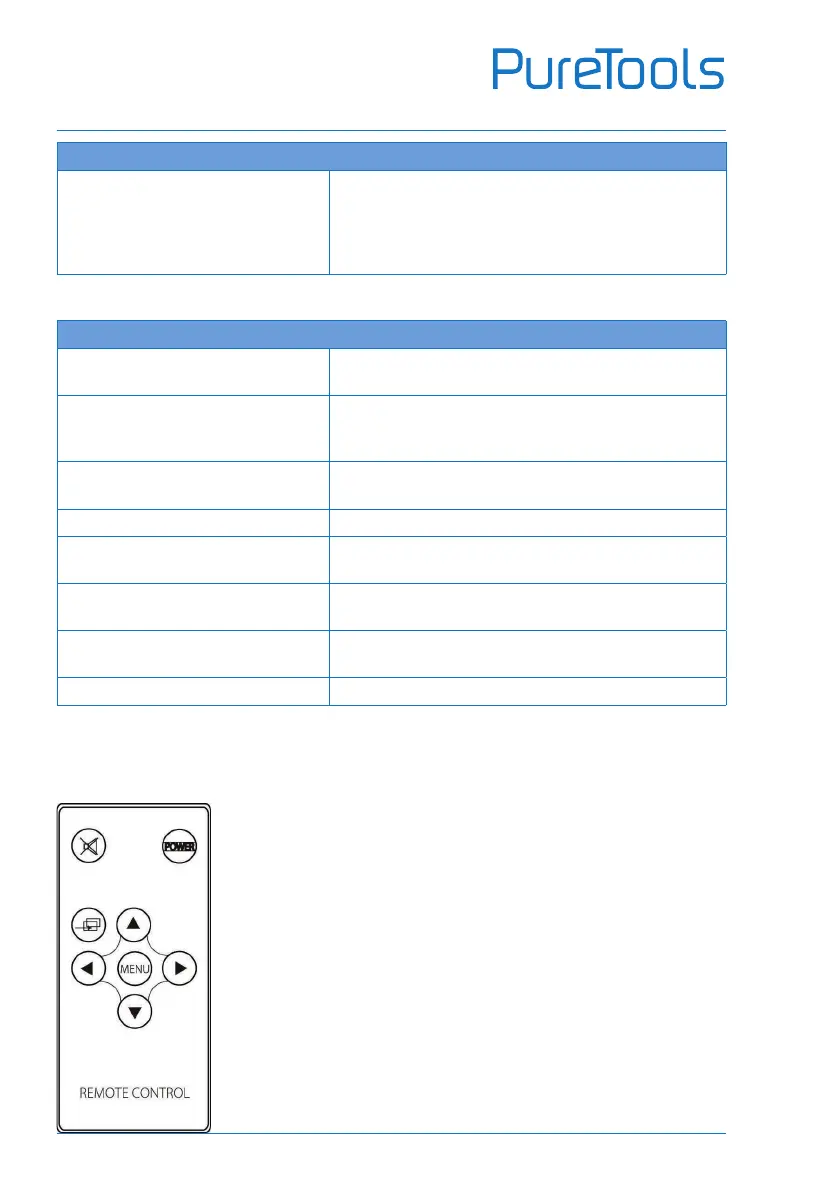
Remote Control
POWER: Power On / O
MUTE: Audio o
INPUT: Input Source Selection
MENU: Start Menu selection
: No function
: No function
: Move cursor up
: Move cursor down
NOTE: The Remote Control is used to control PT-SCREEN-200
from HDBT TX side. It can NOT be used to control PT-SCREEN-200
locally.


 To Next Page