2
Panel Description
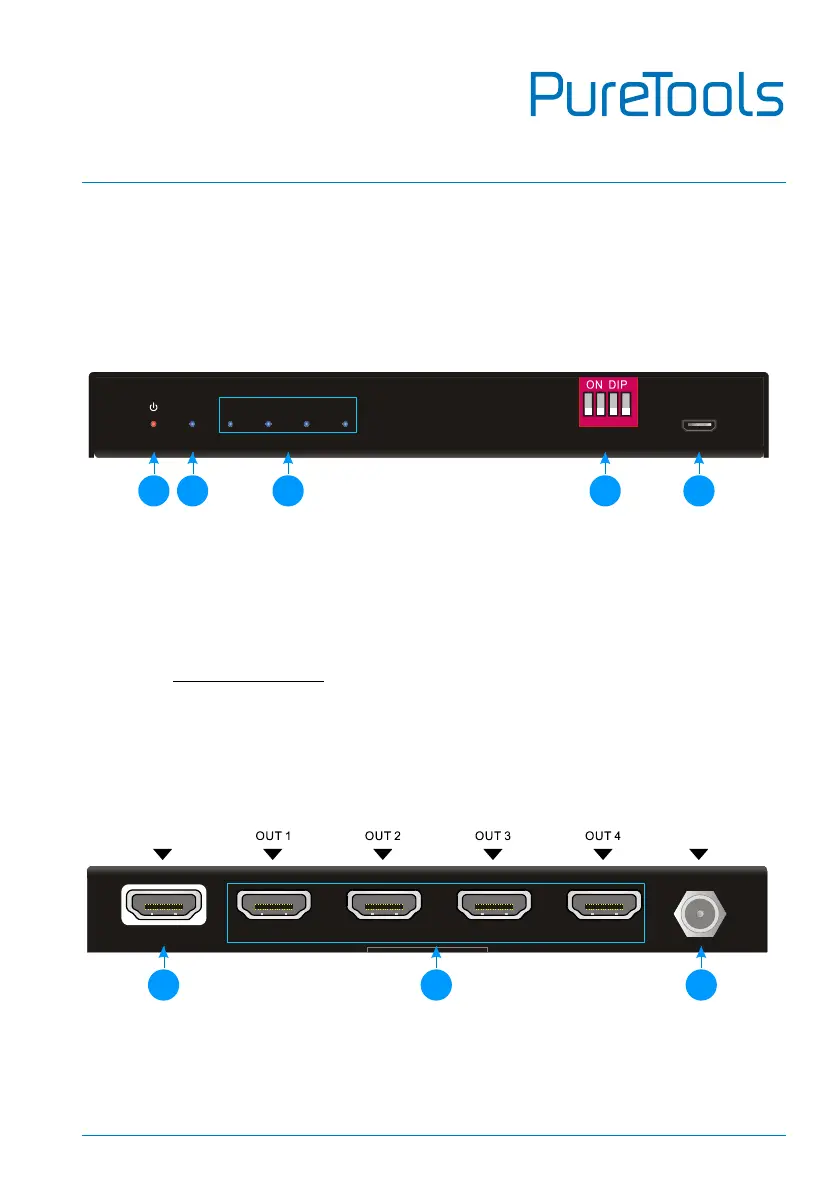
Front Panel
① POWER LED: The LED illuminates red when power is applied.
② INPUT LED: The LED illuminates blue when there is HDMI input.
③ OUTPUT LEDs: The LED illuminates blue when there is HDMI output on the
corresponding channel.
④ EDID: 4-pin DIP switch for EDID setting and HDCP mode selection. Please refer
to the EDID Management for more details.
⑤ FW: Micro-USB port for firmware upgrade.
Rear Panel
① INPUT: Type-A female HDMI input port to connect a HDMI source.
② OUTPUTS: Four type-A female HDMI output ports to connect HDMI displays.
③ DC 5V: DC barrel port to connect an AC power adapter.
IN 1 2
3
4 FW
1 2 3 4
EDID
ON
OFF
1
0
1
2
3 4
5


 To Next Page