EasyManua.ls Logo

PXN V99 - Page 2

PXN V99
4 pages
Print Icon
To Next Page IconTo Next Page
To Previous Page IconTo Previous Page
Loading...
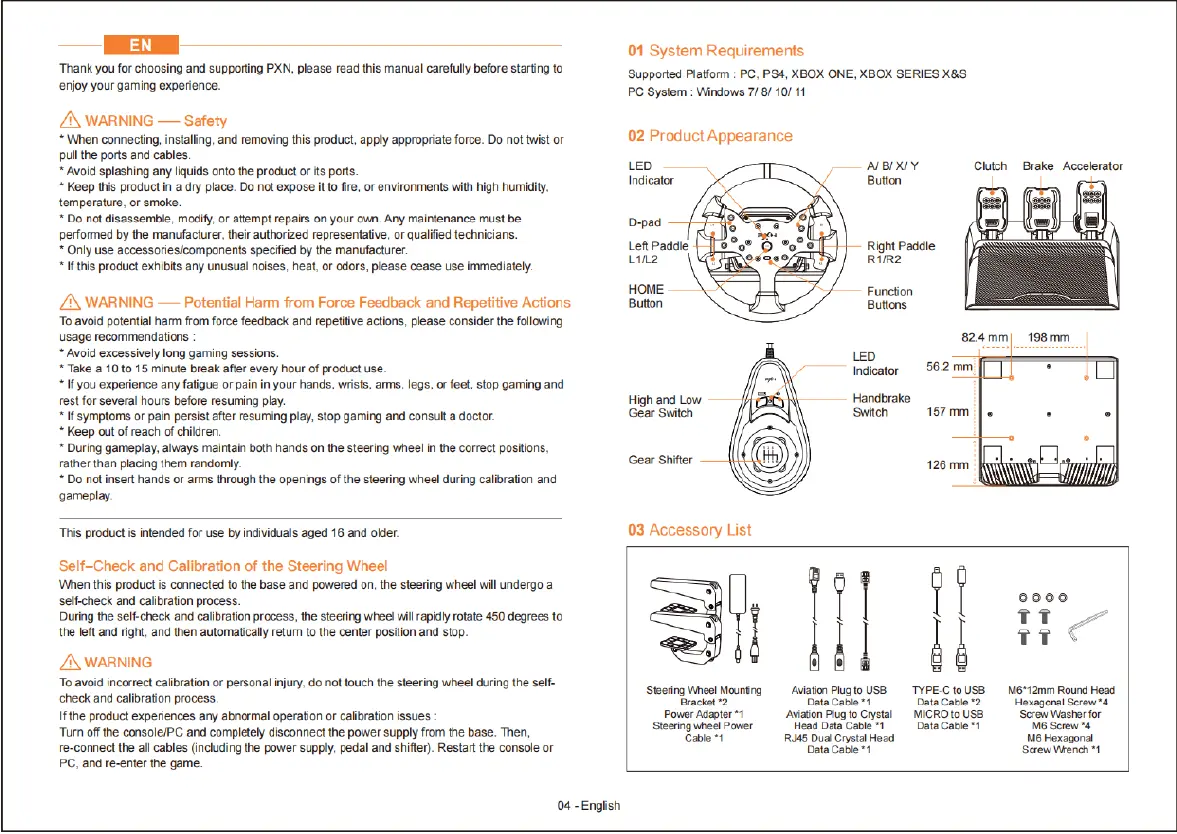
‘Thank
you
for
choosing
and
suppoting
PXN.
please
read
this
manual
carefully
before
starting to
enjoy
your
gaming
experience.
/N
WARNING
Safety
*
When
connecting,
instaling,
and removing
this
product,
apply
appropriate
force.
Do
not
twist
or
pullthe
ports
and
cables.
*
Avoid
splashing
any
liuids
onto
the
product
o
s
ports.
*
Keep
this
product
in
a
dry
place.
Do
not
expose
it
to
fire,
or
environments
with
high
humidity.
temperature,
or
smoke.
Do
not
disassemble,
modiy,
or
attempt
repairs
on
your own.
Any
mainenance
must be
performed
by
the
manufacturer.
their
authorized
representalive,
or
qualified
technicians.
*
Only
use
accessoriesicomponents
specfied
by
the
manufacturer
*Ifthis
product
exhibits
any
unusua
noises,
heat,
or
odors,
please
cease
use
immediately.
A\
WARNING
Potential
Harm
from
Force
Feedback and
Repetitive
Actions
To
avoid
potential
ham
from
force
feedback
and
repetitive
actions,
please consider the
following
usage recommendations
:
*
Avoid
excessively
long
gaming
sessions.
*
Take
&
10to
15
minue
break
after
every
hour
of
product
use
*If
you
experience
any
fatigue
or
pain
in
your
hands,
wrists,
arms,
legs,
or
feet,
stop
gaming
and
rest for
several
hours
before
resuming
play.
*If
symptoms
or
pain
persist
after
resuming
play,
stop
gaming and
consut
a doctor
*
Keep
out
of
reach
of
children.
*
During
gameplay, always
mairtain
both
hands
on
the
steering
wheel
in
the
correct
positions,
ather
than
placing
them
randomly.
*
Do
notinsert
hands
or
arms
through
the
openings
of
the
steering
wheel
during
calioration
and
gameplay.
“This
product
is
infended
for
use
by
individuals
aged
16
and
oider.
Self-Check and
Calibration
of
the
Steering
Wheel
When
this
product
is
connected
fo
he
base
and
powered
on, the
steering
wheel
will
undergo a
self-check
and
calibration
process.
During
the
self-check
and
calibration
process,
the
steering
wheel
will
rapidly
rotate
450
degrees
to
the
left
and
right,
and
then
automatically
retun
o
the
center
position
and
stop.
/\
WARNING
To
avoid
incorrect
calbration
or
personal
injury,
do
ol
fouch
the
steering
heel
during
the self
check
and
calibration
process.
Ifthe
product
experiences
any
abnermal operaton
o
cafbration
issues
Turn
off
the
console/PC
and
completely
disconnect
the
power
supply
from
the
base.
Then,
re-connect
the
all
cables
(including
the
power
supply,
pedal
and
shifter).
Restart
the
console
or
PC.
and
re-enter
the
game.
04
-
Englsh
01
System
Requirements
‘Supported
Platform
:
PC,
PS4,
XBOX
ONE,
XBOX
SERIES
X&S
PC
System
:
Windows
7/ 8/
10/
11
02 Product
Appearance
LED
T
-
|
77
<
El
Steering
Whee!
Mouning
Avation
Plugto
USS TYPEC10USS
Me*12mm
Round
Head
Bracket
2
Data
Cable
"1
DataCable2
Hexagonal
Screw*s
Power
Adapter
*1
Avaion
Piugto
Crystal
MICROto
USB
Scraw
Viasher
for
Steering
wheel
Power Head
Data
Cable
"1
Data
Cable
™1
M6
Screw
4
Cable
1
RU45
Dua
Crystal
Head
148
Hexagonal
Data
Cable
1
Screw
Wbench
"1

Related product manuals