EasyManua.ls Logo

Pyle PFA540BT - User Manual

Pyle PFA540BT
10 pages
Print Icon
To Next Page IconTo Next Page
Loading...
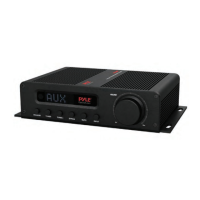
Compact 5-Channel Wireless BT Amplifier
PFA540BT
Hi-Fi AV Audio Amplifier Receiver
with HDMI & FM Radio (100 Watt)

Questions and Answers

  • H
    Harold MartinezAug 4, 2025
    Why Pyle Amplifier has no sound?
    • M
      Melissa HobbsAug 4, 2025
      If your Pyle Amplifier isn't producing any sound, there might be a few reasons: * The input signal selection could be incorrect; ensure you've selected the right one. * The mute function might be activated; try turning it off. * The sound source machine may not be powered on; make sure it is.
  • J
    John MasseyAug 11, 2025
    What to do if either of the main channels of Pyle PFA540BT Amplifier has no sound?
    • W
      Wendy StrongAug 11, 2025
      If you're experiencing sound issues with either of the main channels on your Pyle Amplifier, the signal plug might be connected incorrectly, or the lines might have a short-circuit. Check the connection of the signal plug and the lines.
  • J
    justin30Aug 18, 2025
    What to do if my Pyle PFA540BT has no power?
    • G
      George SmithAug 19, 2025
      If your Pyle Amplifier isn't powering on, it could be due to these reasons: * The AC adapter might be incorrectly connected; double-check its connection. * The power socket itself might not be working; test if the socket is powered.
  • T
    Todd EstradaAug 27, 2025
    What to do if Pyle PFA540BT Amplifier LED screen display is abnormal?
    • S
      Sophia MooreAug 27, 2025
      If the LED screen display on your Pyle Amplifier is acting up, it could be due to external disturbances. Try turning the amplifier off and then on again. Also, avoid exposing the amplifier to direct sunlight or heat.

Summary

Important Safety Information

Owners Record

Record the model and serial number for future reference.

General Cautions

Precautions to reduce fire or electric shock risk, including ventilation and liquid placement.

Installation

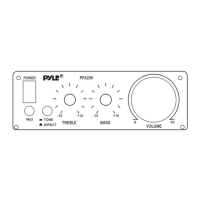
Front Panel Controls

Overview and identification of front panel buttons, knobs, and display.

Rear Panel Connections

Diagram illustrating rear panel input/output ports and speaker connections.

Using the Remote Control

Remote Control Functions

Explanation of each button and selector on the remote control system.

Basic Operations

Adjusting Audio Settings

Guide to adjusting treble, bass, and subwoofer volume levels.

Troubleshooting Guide

Product Features

Pyle PFA540BT Specifications

General IconGeneral
Channels2
BluetoothYes
Frequency Response20Hz - 20kHz
InputsRCA, 3.5mm Aux
Amplifier TypeClass D
USB PortYes
SD Card SlotYes
Impedance4 - 8 Ohms

Related product manuals