Need help?
Do you have a question about the Pyle PKRK210 and is the answer not in the manual?
Lists all controls and input/output ports on the main unit's panel.
Details the USB slot, game slot, and playback controls on the DVD panel.
Explains the function of each button on the remote control for DVD operation.
Explains how to power the PA speaker using main power or internal battery.
Details the procedure for charging the unit's internal battery.
Guides on using the wireless microphone, including battery insertion and pairing.
Instructions for connecting and using a wired microphone.
How to connect a guitar and adjust its volume.
Details supported audio formats and card limitations for USB/SD playback.
Steps to connect and play audio via Bluetooth.
Instructions for tuning and auto-searching FM radio stations.
How to connect an external 12V battery for extended use.
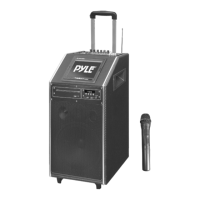
The Pyle PKRK210 is a versatile 1000 Watt Bluetooth Karaoke Vibe Portable PA Speaker designed for a range of audio and entertainment needs. This all-in-one system features dual 10" woofers, a 7" TFT screen, a DVD player, and a VHF wireless handheld microphone, making it suitable for karaoke, public address, and general music playback.
The PKRK210 serves multiple functions, primarily as a portable PA system and a karaoke machine. Its robust 1000-watt output ensures clear and powerful sound projection, suitable for various indoor and outdoor events. The integrated DVD player allows users to play video content directly on the 7" TFT screen, enhancing the karaoke experience by displaying lyrics or other visuals. Bluetooth connectivity enables wireless streaming of music from compatible devices such as smartphones and tablets, offering convenience and flexibility in music selection.
For karaoke enthusiasts, the system includes a VHF wireless handheld microphone, providing freedom of movement during performances. The microphone features adjustable volume and echo effects, allowing users to customize their vocal sound. Additionally, the unit supports wired microphones, enabling multiple users to sing simultaneously. A dedicated guitar input allows musicians to connect their instruments directly to the PA system, making it suitable for small performances or practice sessions.
The PKRK210 also functions as a media player, supporting USB and SD card playback for MP3, MP4, and WMA audio files. This feature allows users to play their favorite music directly from storage devices. An integrated FM radio tuner provides access to local radio stations, further expanding the entertainment options.
The device is designed for portability, featuring an internal 12V battery for operation without a direct power source. This makes it ideal for outdoor events, parties, or any situation where power outlets are not readily available. The system also includes an option to connect to an external 12V battery for extended usage, ensuring uninterrupted entertainment.
Operating the PKRK210 is straightforward, with a user-friendly control panel and a comprehensive remote control for the DVD player.
To power on the unit, users can connect it to a main power source or utilize the internal 12V battery. A power ON/OFF switch is located on the top panel. For battery operation, simply turn on the battery switch. The unit automatically powers on when connected to main power.
The wireless microphone requires 2XAA batteries. After inserting the batteries with correct polarity, the microphone will flash and automatically pair with the PA speaker. The MIC VOL knob on the top control panel adjusts the microphone's volume, while the ECHO knob adds vocal effects. For wired microphones, simply plug them into the MIC INPUT slot and adjust their volume using the same controls. It's important to set MIC VOL/ECHO at a lower level before turning on the wireless microphone to prevent squealing.
Guitars can be connected via the 1/4" GUITAR INPUT plug. The GUITAR VOL knob on the top panel controls the instrument's volume.
Insert a USB stick or SD card into the designated slot. The unit will automatically begin playback of compatible audio files (MP3, MP4, WMA). The PRE/NEXT/PLAY/PAUSE buttons control music playback. Note that the system supports cards up to 32GB, and searching large memory files may take longer.
To connect a Bluetooth device, press the INPUT button until you hear two "tone" indicator sounds, signifying Bluetooth activation. Search for "PKRK210" on your device and connect. If prompted, enter the code "0000". Once connected, music streamed from your device will play through the speaker. Volume, bass, and treble can be adjusted via the unit's controls or your connected device.
Press the INPUT button once to select FM Radio. Use PRE/NEXT to select radio stations. For the first use, pressing NEXT twice will auto-search and store stations with the strongest signal. Ensure the antenna at the rear of the speaker is extended for optimal reception.
The DVD player is controlled via a dedicated remote. Key functions include Open/Close, PAL/NTSC/AUTO switch, Mute, Random play, Subtitle selector, Angle selection, A-B repeat, Setup menu, and various playback controls (Play/Pause, Stop, Forward, Backward, Next, Previous). The 7" TFT screen displays video content.
Master volume, bass, and treble for the main channel are controlled by dedicated knobs on the top panel. Individual volume controls are available for guitar and microphones.
A LOW BATTERY indicator light illuminates when the internal battery is running low. A charging indicator light shows when the unit is charging.
The PKRK210 is designed for ease of use and durability, with simple maintenance guidelines to ensure its longevity.
Before initial use, the internal 12V battery should be charged for at least 8 hours. To charge, connect the power cable to the unit and a main power source, then turn off the battery switch. The charging indicator light will be on during this process. The internal battery charges even when the unit is in operation with the power switch on, but it is recommended to charge with the power switch off for optimal battery health.
To extend the PA speaker's operational time beyond the internal battery life, an external 12V battery source can be connected to the INPUT DC 12V port. The unit will consume the internal battery first, and when it's low, the external battery will power the unit and also charge the internal battery simultaneously. This feature is crucial for prolonged use in areas without AC power.
To conserve battery life for the wireless microphone, always turn off its power switch when not in use. This simple practice helps prolong the life of the AA batteries.
While not explicitly detailed in the provided text, general electronic device maintenance practices such as keeping the unit clean, avoiding exposure to extreme temperatures or moisture, and handling it with care would contribute to its overall lifespan. The robust design, with dual 10" woofers, suggests a durable build, but proper handling during transport and setup is always recommended for portable equipment.
 General
| Purpose | Home |
|---|---|
| Karaoke modes | Single |
| Product color | Black |
| RMS rated power | 500 W |
| Microphone connectivity | Wired |
| Number of microphones supported (max) | 1 |
| Disc types supported | CD, CD-R, DVD, DVD-R |
| Compatible memory cards | SD |
| USB version | 2.0 |
| Display type | LCD |
| Display diagonal | 7 \ |
| AC adapter input voltage | 110 - 220 V |
| Control type | Buttons |
 Weight and Dimensions
| Weight | 23659 g |
|---|


 To Next Page