EasyManua.ls Logo

Pyle PLCDBT65MRW - User Manual

Pyle PLCDBT65MRW
14 pages
Print Icon
To Next Page IconTo Next Page
Loading...
MOBILE AUDIO SYSTEM
USER MANUAL
PLCDBT65MRW

Questions and Answers

  • Z
    zjonesSep 12, 2025
    How to stop my Pyle PLCDBT65MRW from skipping?
    • G
      Gabrielle ColeSep 12, 2025
      If your Pyle Audio system is skipping, here are a couple of things you can check: * Ensure that the installation angle is less than 30 degrees. * If the disc is extremely dirty or defective, clean it or try a new one.
  • N
    Nicole ColemanSep 14, 2025
    What to do if the operation keys on my Pyle PLCDBT65MRW don't work?
    • E
      elizabethparksSep 14, 2025
      If the operation keys on your Pyle Audio system aren't working, it might be due to noise affecting the built-in microcomputer. Try pressing the RESET button.

Overview

This document describes the PYLE PLCDBT65MRW Mobile Audio System, a car stereo designed for audio playback and communication.

Function Description

The PLCDBT65MRW is a versatile mobile audio system that supports various audio sources and features. Its primary functions include:

  • Radio Operation: It can receive FM and AM radio broadcasts. Users can switch between different frequency bands (FM1, FM2, FM3, AM1, AM2), seek stations automatically or manually, and store/recall preset stations. It also features automatic memory storing and program scanning to find and save strong signals.
  • CD/MP3/WMA Playback: The unit includes a CD player that supports standard audio CDs as well as MP3/WMA files recorded on CD-R/CD-RW discs. Playback features include selecting tracks, pausing, previewing all tracks, repeating a single track or all tracks, and random playback. It also supports directory navigation for MP3/WMA discs.
  • USB Playback: A front-panel USB port allows connection of USB memory devices for playing MP3/WMA files. The operation for USB playback is similar to CD/MP3/WMA playback.
  • SD Card Playback: A front-panel SD slot enables playback of MP3/WMA files from SD cards. This function is also similar to CD/MP3/WMA playback.
  • Bluetooth Operation: The system supports Bluetooth connectivity for hands-free communication and audio streaming (A2DP). Users can pair their mobile phones, answer/reject incoming calls, hang up calls, and stream music from their phones to the car speakers.
  • Auxiliary Input: A 3.5mm AUX IN jack on the front panel allows connection of external portable audio players.
  • Sound Adjustment: Users can adjust various sound parameters such as bass, treble, balance, fader, loudness, and equalization (EQ) presets (CLASS, POP, ROCK).
  • Display Information: The LCD display shows current frequency, activated functions, and time.
  • Time Setting: The unit allows users to set the current time.

Important Technical Specifications

General:

  • Power Supply: DC 12 Volts, Negative Ground
  • Chassis Dimensions: 178 (W) x 160 (D) x 50 (H) mm
  • Tone Controls:
    • Bass (at 100 Hz): ±10 dB
    • Treble (at 10 kHz): ±10 dB
  • Maximum Output Power: 4x40 watts
  • Current Drain: 10 Ampere (max.) (For Normal Power Version)

CD Player:

  • Signal to Noise Ratio: More than 55 dB
  • Channel Separation: More than 45 dB
  • Frequency Response: 40Hz – 18 kHz

Radio:

  • FM:
    • Frequency Coverage: 87.5 to 107.9 MHz
    • IF: 10.7 MHz
    • Sensitivity (S/N=30dB): 4μV
    • Stereo Separation: >25dB
  • AM:
    • Frequency Coverage: 530 to 1710 kHz
    • IF: 450 kHz
    • Sensitivity (S/N=20dB): 36 dBu

MP3/WMA Decoding Modes:

  • MPEG1 Audio Layer 3 (44.1kHz): Bit Rate 32, 48, 64, 96, 128, 192, 256, 320 kbps (Stereo)
  • Windows Media Audio (44.1kHz): Bit Rate 64, 96, 128, 192 kbps (Stereo)

USB/SD Solution Support:

  • Folders: 500 max.
  • Files: 999 max.
  • Depth of Folder: 8 layers
  • Size: 32 GB

Usage Features

Installation:

  • DIN Front-Mount: The unit is designed for DIN front-mount installation. It requires securing a sleeve into the dashboard opening and then sliding the unit into place until it locks. A metal strap is provided to secure the back of the unit.
  • Wiring: Detailed wiring diagrams are provided for a 4-speaker system, including connections for ground, accessory/switch, power antenna/amplifier turn-on, and constant power supply.
  • Removal: The unit can be removed by inserting supplied keys into slots on the sides and pulling it out.

Operation:

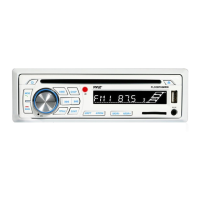
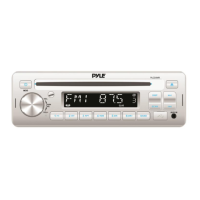
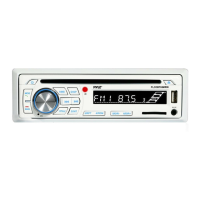
  • Controls: The front panel features a rotary knob for volume/selection, various buttons for mode, band, seek, display, pause, intro, repeat, random, directory navigation, and eject. An IR sensor is present for the remote control.
  • Remote Control (Optional): An optional remote control handset provides access to most functions, including power, mode, band, volume, tune/skip, EQ, pause, intro, random, directory, repeat, display, and mute.
  • Reset Function: A reset button is available to address issues like non-operating buttons or error symbols on the display. It should be activated with a thin object.
  • CD/MP3/WMA Playback: Discs are gently inserted with the printed side up and are automatically drawn in. The unit supports searching for tracks by number, file name, and from folders.
  • USB/SD Playback: Simply insert a USB drive or SD card, and the unit will automatically search for and play MP3/WMA files.
  • Bluetooth Pairing: To pair a mobile phone, users need to select "CAR BIT" on their phone's Bluetooth settings and enter "0000" if a password is required. A BT mark on the LCD indicates successful pairing.
  • Bluetooth Audio: After pairing, users can stream music from their mobile phone's music player.

Disc Notes:

  • Standard Discs: Only round-shaped CD discs should be used. Non-standard shapes can damage the unit.
  • Disc Condition: Avoid sticking paper or tape on discs. Dirt, dust, scratches, and warping can cause malfunctions.
  • CD-R/CD-RW Compatibility: Only discs with specific "DIGITAL AUDIO Recordable" or "DIGITAL AUDIO ReWritable" marks are supported. Discs must be finalized to play. Playback may vary depending on recording status and equipment used.
  • MP3 File Naming: MP3 files must have the ".MP3" extension to be recognized.
  • ISO9660 Format: MP3 discs should be in ISO9660 level 1 or 2, Joliet, or Romeo format.

Maintenance Features

  • Troubleshooting Guide: The manual includes a troubleshooting section to help users diagnose and resolve common issues such as no power, disc loading/ejection problems, no sound, sound skips, and non-responsive controls.
  • Reset Button: The reset button can be used to restore the unit to its initial state if functions are not operating correctly.
  • Cleaning: If the unit does not work after a reset, cleaning the front panel socket with a cotton swab soaked in isopropyl alcohol is recommended.
  • Installation Angle: The unit's optimum performance is achieved when the installation angle does not exceed 30° from horizontal. Adjusting the installation angle is suggested if sound skips occur.
  • Environmental Considerations: Avoid installing the unit where it will be exposed to high temperatures (direct sunlight, hot air from heaters), dust, dirt, or excessive vibration.
  • USB/SD Card Data: It is advised not to connect USB/SD cards with important files to the unit to prevent potential data loss due to wrong operation.

Pyle PLCDBT65MRW Specifications

General IconGeneral
BrandPyle
ModelPLCDBT65MRW
CategoryAudio system
LanguageEnglish

Related product manuals