EasyManua.ls Logo

Pyle PLDVRCAMG37 - Page 10

Pyle PLDVRCAMG37
14 pages
Print Icon
To Next Page IconTo Next Page
To Previous Page IconTo Previous Page
Loading...
Select
Memory
Card
disk
path,
then
click
the
"Apply"
to
load
and
automatically
play
the
document
in
the
memory
card.
Clicking
the
iKUlUlUltiJl
ActiveX
can
control
playing
state:
From
Left
to
Right:
Slow
turning
/
stop
/
play
(pause)
/
fast
turning.
4.
Select
Dou
b
l
e
Lens
C
h
a
nn
e
l
:
Clicking
therĀ®"HH
ActiveX
can
select
double
lens
channel
of
video
playing:
Double
lens
/
front
lens
/
back
lens.
5.
Video
on
File:
Select
video
file
to
save
El
and
click
B^ato
pop
up
the
saving
file
path
icon.
After
selection,
click
"sure"
to
save
the
selected
file.
6.
Image
File:
Select
image
photo
to
save
and
click
isS
to
pop
up
saving
file
path
picture.
After
selecting
the
path,
click"save".
7.
Delete
Document:
Select
the
video
file
to
be
deleted
El
and
clickii|."Sure/
Cancel"
options
will
appear,
select
"Sure"
to
delete
the
selected
video
file.
8.
Kit:
Kit
can
proceed
as
follows:
SD
card
formatting
/
upload
software
to
the
SD
card
/
SD
card
speed
test
/
map
selection
and
user
password
setting.
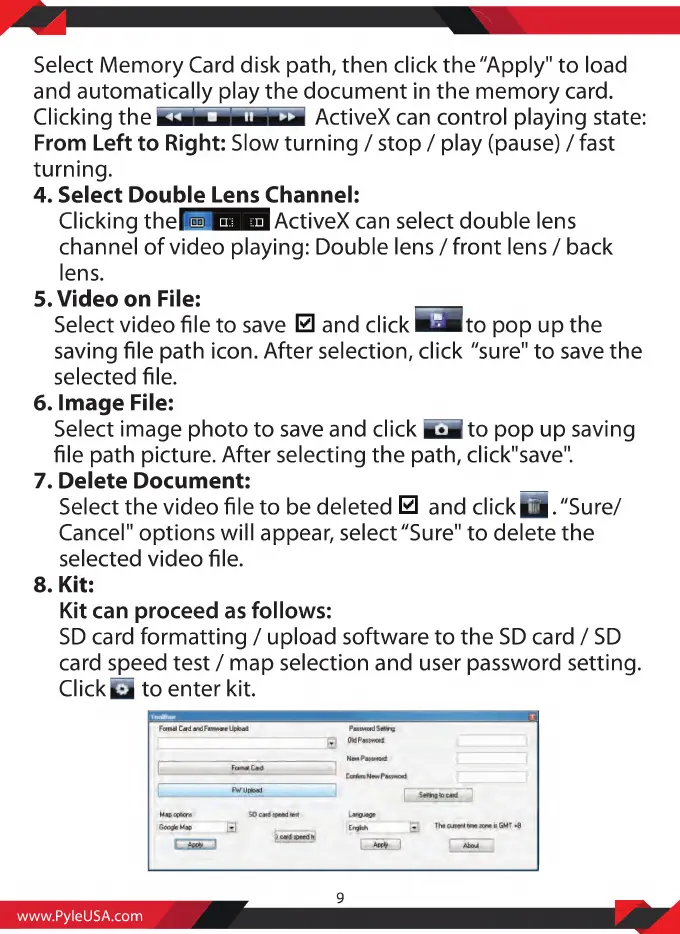
ClickQ
to
enter
kit.
www.PyleUSA.com
9

Related product manuals