www.PyleUSA.com
11
[Color]
Adjust the saturation of the color based on your own like. Press button to adjust.
[Tint]
Adjust the hue (Red, Green, Blue) of the picture. Press button to adjust.
[Sharpness]
Adjust the peaking in the detail of the picture. Press button to adjust.
[Color Temperature]
Increase or reduce warm color of the picture personally (red), and the cool color personally (blue)
according to your like.
Normal: The most balanced setting
Warm: Increase the red color for the white.
Cool: Increase the blue tone for the white.
Blue Screen
Press button to select (o/on).
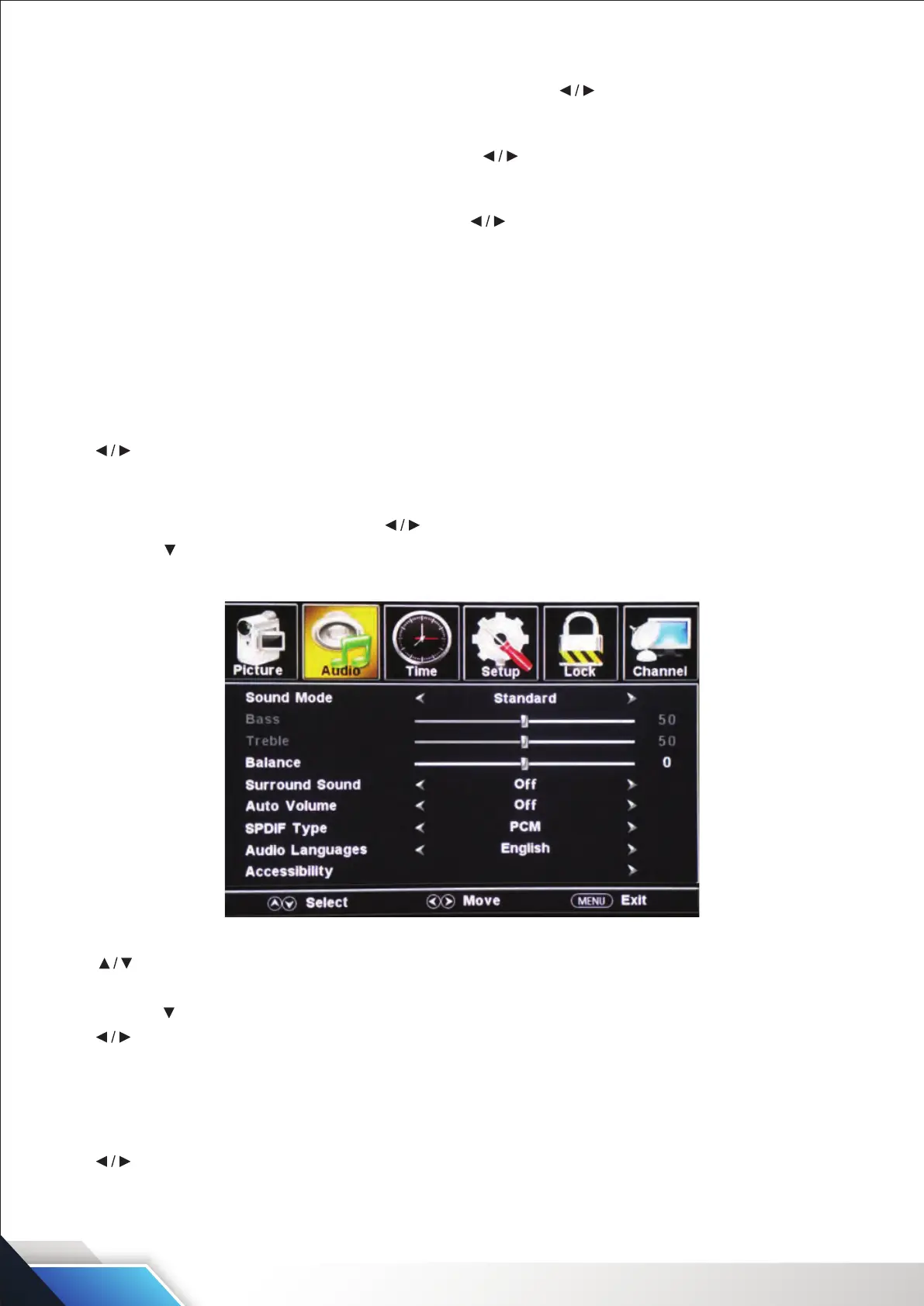
SOUND MENU
Press MENU to enter the main menu, Press button to select.
Press ENTER / to enter.
Press MENU again to exit or back to parent menu.
Press button to select among Soundmode/Bass/Treble/Balance/Surround sound/Auto Volume/
SPDIF type/Accessibility/TV Speaker.
Press ENTER / to enter.
Press button to adjust.
Press MENU again or back to parent menu.
SOUND MODE
Select a sound mode to achieve ideal sound.
Press button to select (Standard/Music/Movie/Sports/User).
Note: The bass and treble are only available in User mode, you can adjust as you like.


 To Next Page