www.PyleUSA.com
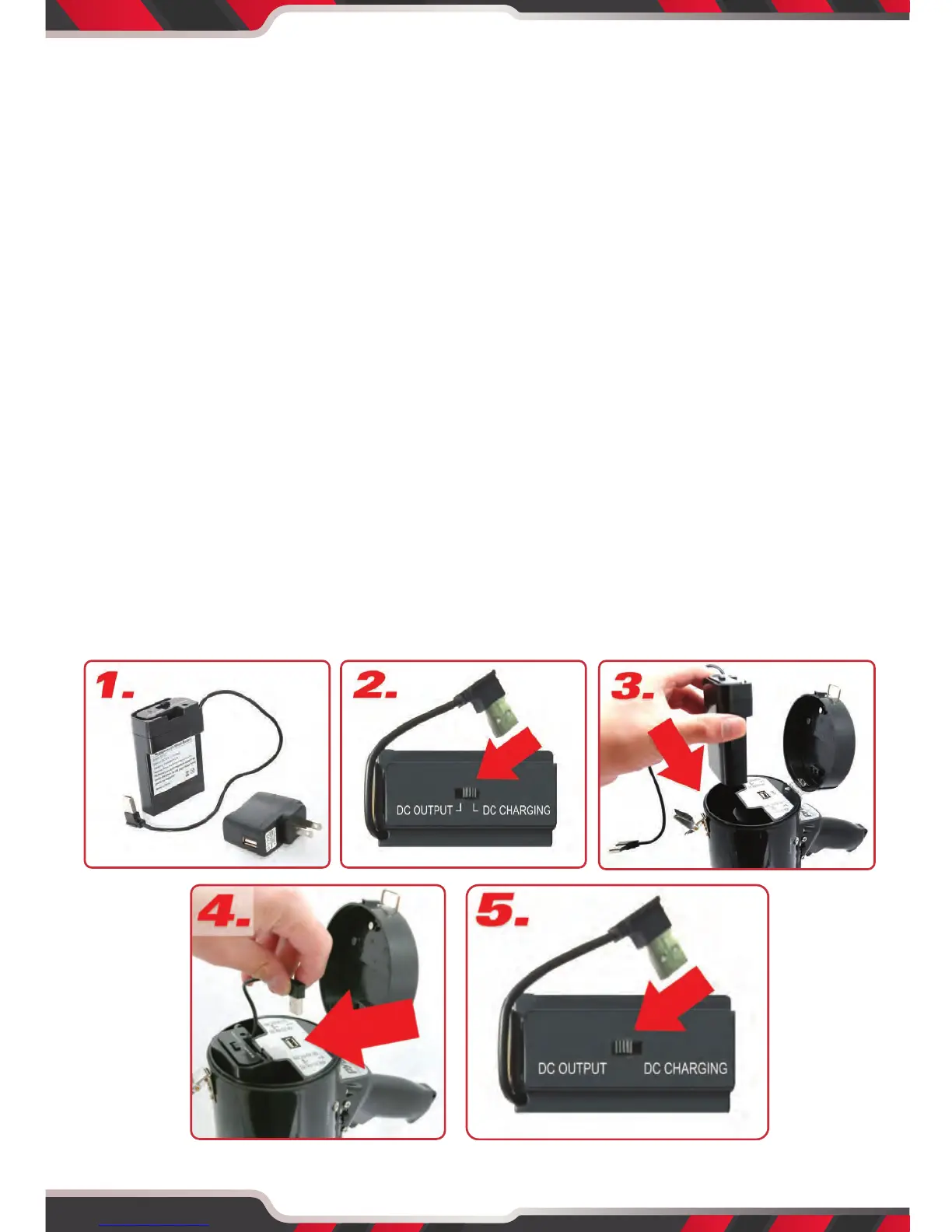
BATTERY CHARGING
1. The megaphone features a removable rechargeable battery, that plugs-in
directly into the USB wall power outlet for charging. Once connected to
the wall power outlet, the battery will begin charging automatically, after
you set the battery to "Charge Mode" (average time for full-charge: 8.5
hours). A Red light will be lit while charging and turns Green when fully
charged.
2. *Important Note*: Before charging the battery, ensure you hit the switch
to "DC CHARGING" -- as located on the battery, to enable Charge Mode.
3. Once fully charged, insert the battery into the megaphone by opening the
end cap in the rear of the megaphone. Be sure to slide the battery into the
compartment properly, ensuring the power connection cable is exposed.
4. Once the battery is inserted, connect the battery power cable connector
into the megaphone power input -- ensure you set the battery to "Power
Output" Mode.
5. *Important Note*: Before operating the megaphone, ensure you hit the
switch to "DC OUTPUT" -- as located on the battery, to enable Power
Output Mode.
4


 To Next Page