four
Symbol
Symbol
four
Symbol
symbol
Press to default setting
Add to next
Deduct for back
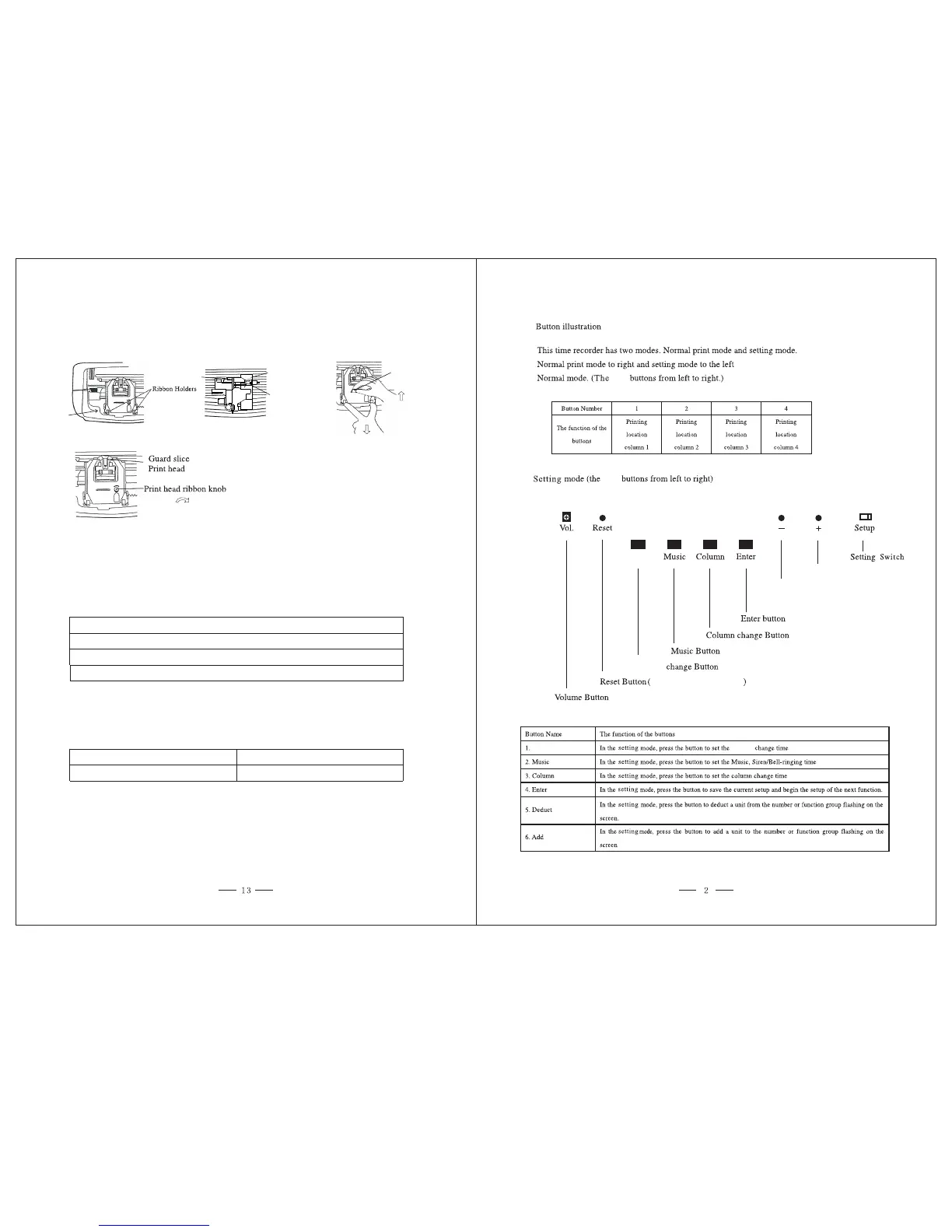
9. REPLACING THE RIBBON CARTRIDGE
Move SETUP Button to the left to center the ribbon cartridge .
Always tighten the ribbon by
replacing the ribbon cartridge.
turning the knob clockwise after
10. SUPPLIES AND SUPPORT
11. SPECIFICATIONS
Required Power
Operating Temperature
For time cards, ribbons, time card racks or warranty questions please contact Allied
Time at 888. 860.2535 or visit www.alliedtime.com.
Item No.
42427
42426
Qty
1
100
Description
Black
Ribbon
Time Cards
110V
~240V ,
0℃ ~40℃
50/60Hz
Gentle to the front
Up
Remove old
View A
Replacing the
ribbon cartridge
Ribbon cartridge
Holder
42475
1
10
Capacity Time Card Rack
View A
Handle


 To Next Page