15
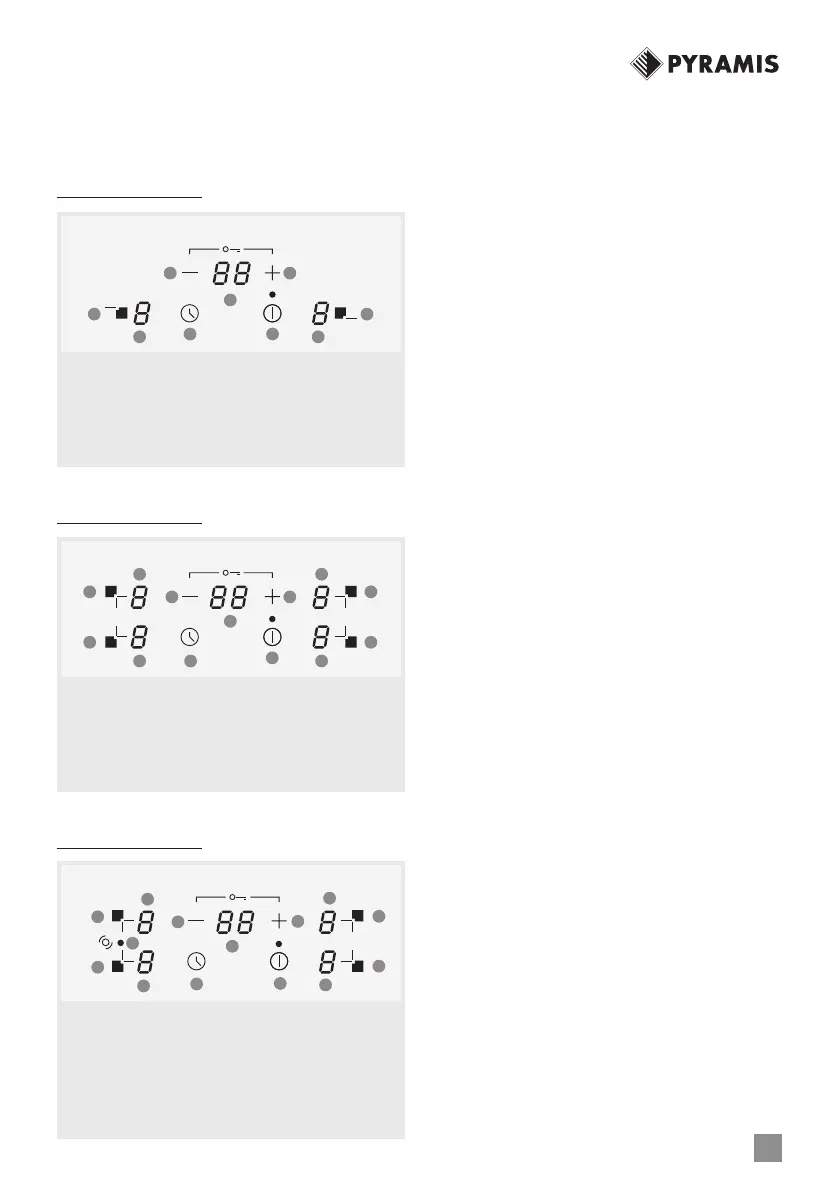
3. CONTROL PANEL (ACCORDING TO
EACH MODEL TYPE)
2 Cooking Zones
4 Cooking Zones
5 Cooking Zones
4. SWITCH ON/OFF KEY OF THE HOB
When cooktop is unlocked, touching dur-
ing 1 second ON/OFF key, all heaters will
switch on showing 0 power value. 1 short
beeps will be heard.
If cooktop is o, unlocked and indicat-
ing residual heat ‘H’, when ON/OFF key
is touched properly, 2 short beeps will be
heard and ‘H’ residual heat indication will
be seen.
If cooktop is o, unlocked, touching 1 sec-
ond ON/OFF key, all heaters will switch on
showing 0 power value. 1 short beeps will
be heard.
If cooktop is on and unlocked, touching
ON/OFF key as required, all cooktop will be
switched o. 4 short beeps will be heard.
If cooktop is o and locked, touching ON/
OFF key as required hasn´t got any eect.
5. SWITCH ON/OFF A HEATER ZONE
If any cooking stage is in position ‘0’, this
display will switch o automatically after 10
seconds and 4 beep will be heard.
If there is residual heat indication in the dis-
play which is ON but in ‘0’ power, ‘0’ will
appear changing over.
If lock function is active you cannot switch
ON a zone.
If any cooking stage is in position ‘0’, this
display will switch OFF automatically after
10 seconds and 4 beep will be heard.
If there is residual heat indication in the dis-
play which is OFF, ‘H’ will be displayed.
Even when lock function is active you can
A. ON / OFF key
B. Power increase key
C. Power decrease key
D. Zone selection key
E. Cooking zone power display
F. Timer key
G. Timer display
A
C
D
E E
F
G
D
Β
A. ON / OFF key
B. Power increase key
C. Power decrease key
D. Zone selection key
E. Cooking zone power display
F. Timer key
G. Timer display
A
BC
D D
D
E F
G
E
E
E
D
A. ON / OFF key
B. Power increase key
C. Power decrease key
D. Zone selection key
E. Cooking zone power display
F. Timer key
G. Timer display
H. Double zone activation led
C
D
D
H
E
F
G
E
E
E
D
A
B
D



 To Next Page