Usage Notice
e Do not place the machine in flammable and explosive materials or near high heat sources, please
place the machine in a ventilated, cool and dust-free environment.
' Ensure the machine is powered off(unplug power cord) before performing maintenance or
modifications.
e Before connecting the power,please follow the power setup instructions to ensure that the
voltage is correct.
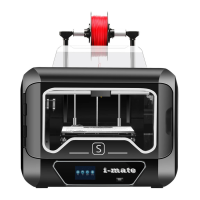
' Never reach inside QIDI printer while they are in operation.
' Children should be under constant supervision when using QIDI products.
' The printer contains high-speed moving parts, so be careful of hands pinching.
' There is a potential risk of burns: the print heads of the QIDI printers can reach temperatures
above 300 0C, while the hot bed can reach temperatures above 100 CDO not touch either of
these parts with your Ibare hands.
' Do not place the printer in a vibrating or other unstable environment. Otherwise the shaking of
the machine will affect the printing quality.
• After printing, use the residual temperature of the print head to clean the filament around the
nozzle with the dedicated tools in time. Do not touch either of these parts with your bare hands.
e Perform routine maintenance for your product by using a dry Cloth to clean the printer body when
it is turned off. Additionally, remove any dust, Ibonded printing materials, or foreign objects that
may accumulate on the optical axis. Regular lubrication is necessary for the linear shaft and Z axis
screws.
• If the machine is in standby mode for a long time,please unplug the power of the QIDI products.
• If the machine is not used for a long time, please pay attention to protect the printer from dust
and damp.
• There are manuals, slicer software and other related informations in the USB flash drive.
(The information in the USB flash drive may not be the latest. You can obtain the latest
information by contacting the After-sales Service marked at the end.)


 To Next Page
 Loading...