3. Hardware Installation
This section provides information on installing drives.
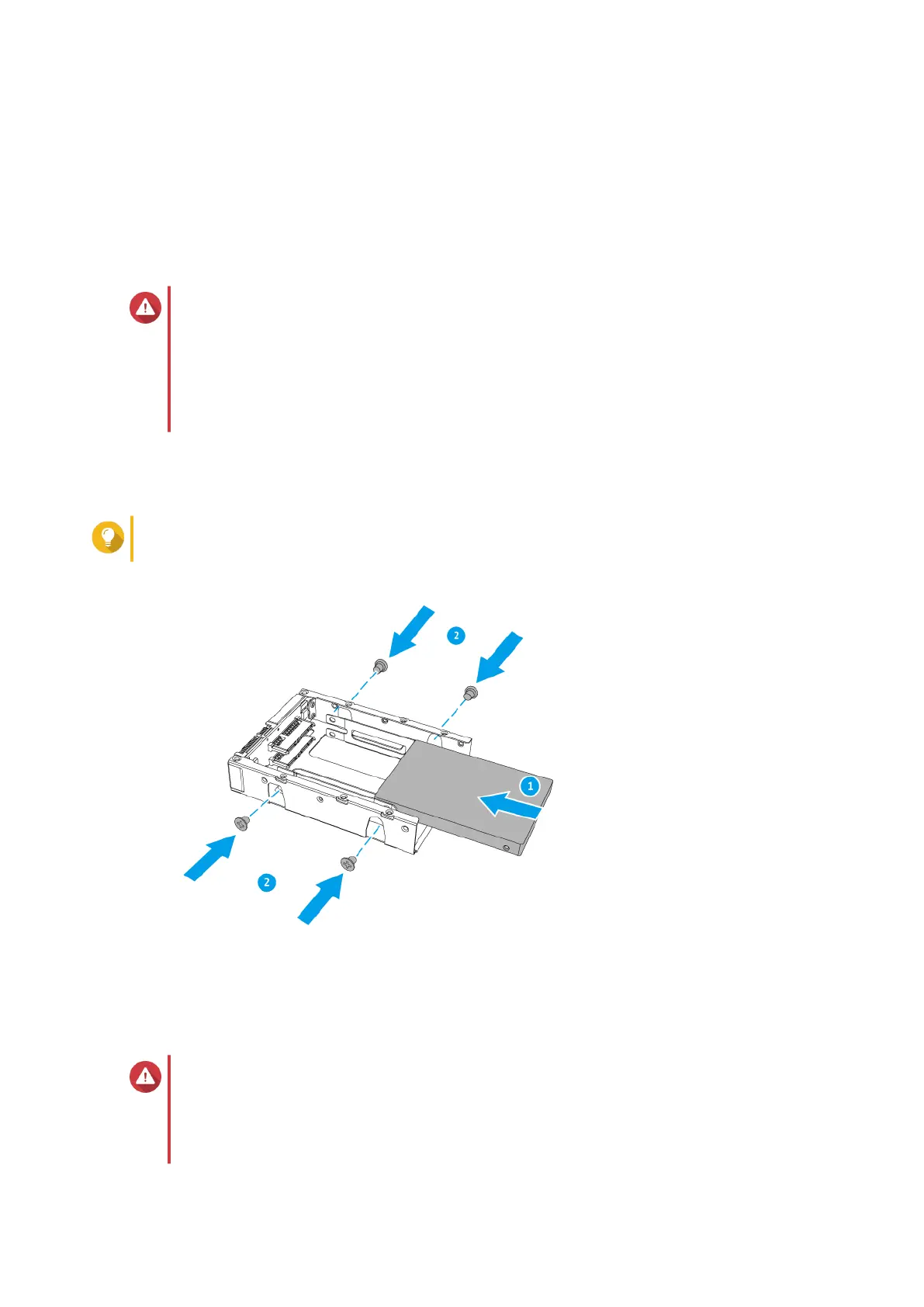
Installing 2.5-inch Drives on the QDA-A2AR
The QDA-A2AR is compatible with 2.5-inch hard drives and solid-state drives.
Warning
• Installing a drive deletes all data on the drive, unless the drive adapter is in Individual
mode.
• Observe electrostatic discharge (ESD) procedures to avoid damage to components.
• Installing a QNAP drive adapter in another QNAP drive adapter is not supported.
1. Insert the drive into the slot.
2. Attach the screws.
Tip
Use a Philips #2 screwdriver.
Installing M.2 Solid-state Drives on the QDA-A2MAR
The QDA-A2MAR is compatible with M.2 2280 SATA solid-state drives.
Warning
• Only qualified personnel should perform the following steps. Failure to follow
instructions can result in serious injury or death.
• Observe electrostatic discharge (ESD) procedures to avoid damage to components.
QNAP Drive Adapter User Guide
Hardware Installation 6



 To Next Page