14 15
3: Playback
or
Press the LEFT/RIGHT button to playback mode. Return to the main
menu by selecting the Home icon or pressing the SCAN button. Press
the ENTER button to conrm the selection.
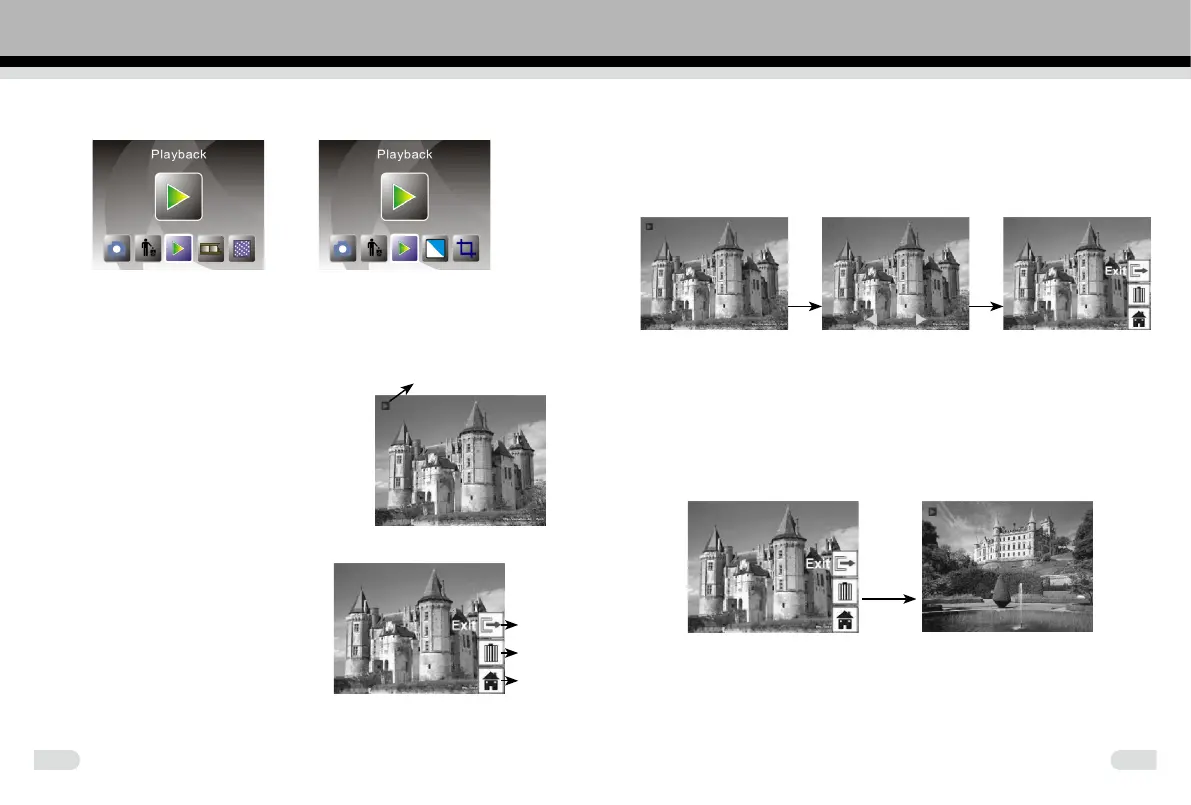
3.1 Playback: Auto Slide Show
Playback mode (defaulted to a slide show
preview), the screen will display all images
stored in internal memory or memory card.
There is a 2 seconds interval between
images. Pause the slide show by pressing
the ENTER button (Only the images captured
by the film scanner are displayed in the
playback mode)
3.2 Playback: Edit Menu
①
Exit: return to Slide show mode
②
Delete: delete this picture stored in
internal memory or memory card
③
Home: return to main menu
3.3 Playback: Slide show→Single picture→Edit mode
Pause the slide show mode to single picture playback by pressing the
ENTER button. Browse through each picture by pressing the LEFT/
RIGHT button. Press the ENTER button to bring out the edit functions to
modify the selected image.
Enter Enter
Slide show mode Single picture mode Use LEFT/ Edit mode
RIGHT button To browse pictures
If there is no memory card inserted or there are no images in the internal
memory, the screen will automatically display 20 frames of defaulted
images. These images cannot be edited.
3.4 Playback: Exit
Enter
Selecting the Exit function in the edit menu, the display will return to the
slide show mode. It starts from the current picture without any changes
made.
Slide show mode
①
②
③



 To Next Page