QRS Pno
3
User Guide
QRS Music Technologies, Inc.
Technical Support - 800-247-6557
www.qrsmusic.com
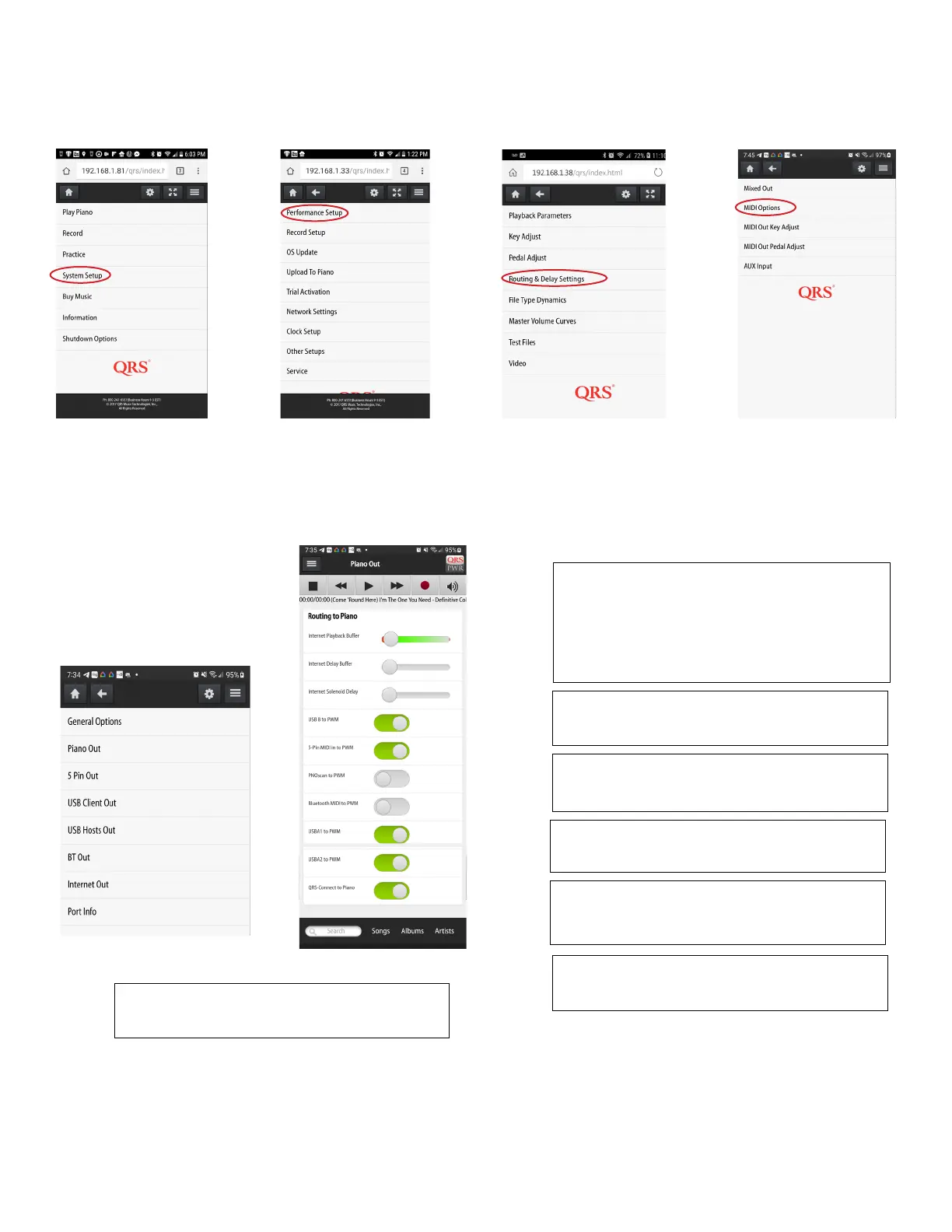
Internet Playback Delays are used when watching third party
live video streams that play the piano via “QRS-Connect.com”
The sliders are adjusted based on your subjective feel for hear-
ing and seeing the artist playing. It varies depending on video
stream approach and Internet speeds.
To control your piano from a USB output from like a computer
this should be on.
To control your piano from a legacy 5 pin MIDI input this should
be on.
To play your piano remotely with a teacher without double
strikes this should be on.
To play your piano from a Bluetooth MIDI signal. This should be
on and your device paired under system setup, other setups,
Bluetooth.
To Play your piano from either of the USB A ports this should
be on
QRS-Connect to the Piano on if third party is using a QRS-
Connector or live sessions is needed.
Routing and Delays - MIDI Options
Setup of Piano Out



 To Next Page