
 Need help?
Do you have a question about the QSA Global OPENVISION DX and is the answer not in the manual?
Categorizes safety alerts into NOTICE, CAUTION, and WARNING levels for user awareness.
Outlines essential safety measures for job site operations, including surveillance and locking procedures.
Specifies that operators must be properly trained and qualified for radiographic inspections.
Highlights precautions regarding fragile components, vibrations, shock, and liquid contact.
Details safety information for the Class 2 target laser, including safe usage and precautions.
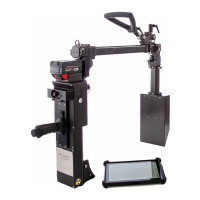
Lists the items provided with the OpenVision DX system, typically shipped in a Pelican case.
Notes that the monitor's DVR functionality is not compatible with the DX system.
Discusses factors affecting radiographic image quality, focusing on energy and intensity selection.
Compares X-ray and Gamma Ray sources based on their energy (quality) and intensity.
Explains how to determine exposure requirements for X-ray radiography using the OpenVision DX.
Details output radiation levels and boundary distances for the OpenVision DX under various conditions.
Advises operators to monitor backscatter levels when scanning unknown materials or geometries.
Details the step-by-step process for quickly setting up and preparing the OpenVision DX for scanning.
Describes the HUD accessory as an alternative display, listing its specifications and features.
Details the handle extension assembly for relocating the trigger assembly to the C-Arm.
Warns against using solvents or cleaning agents directly on the OpenVision DX to prevent damage.
Offers guidance on troubleshooting system issues, including a table of error codes and corrective actions.
 General
| Brand | QSA Global |
|---|---|
| Model | OPENVISION DX |
| Category | Industrial Equipment |
| Language | English |

 To Next Page