The QTX DM-X24 is a 24-channel DMX dimmer console designed for intelligent lighting control. It offers comprehensive control over 48 channels with 48 scene/chase playback faders, allowing for simultaneous playback. Each scene or chase can contain up to 1000 individual steps or "looks." The console is rack-mountable, occupying seven rack spaces (7U), and is powered by a DC 9-12V 1000mA output, 100V~240V, 50/60Hz input auto-ranging power supply. An LED gooseneck lamp is included for illumination.
Function Description:
The DM-X24 serves as a universal intelligent lighting controller. It provides 24 physical faders for direct control, A/B master faders for cross-mixing, and Fade and Speed time faders for on-the-fly adjustments. An LED display facilitates easy navigation of controls and menu functions. Programs can be triggered by music, MIDI, automatically, or manually. Channel assignments are re-programmable, enhancing flexibility for controlling different fixtures.
Important Technical Specifications:
- Channels: 24-channel DMX-512 dimming console, controlling 48 channels with 48 scene/chase playback faders.
- Playback: 4 pages with 12 scenes each, yielding 48 total playback faders (simultaneous playback).
- Steps: 96,000 programmable steps.
- Auxiliary Buttons: 2 programmable.
- Time Control: Adjustable chase and fade times.
- Channel Assignment: Re-assignable channels.
- DMX Connections: 3-pin and 5-pin DMX connections.
- Cross Fader: Built-in, with dark and kill buttons.
- MIDI: MIDI in, out, and thru (with file dump capability).
- Audio Input: Direct audio input (line level, 100mV to 1Vpp).
- Triggering: Beat-activation, tap sync, auto run, MIDI in/out.
- Mounting: 7-space (7U) rack mount.
- Dimensions: Length: 485 mm, Width: 290 mm, Height: 98 mm.
- Weight: 5 kg.
- Power: DC 9V 1000mA, 100-240V auto-switching adapter (2-pin Edison).
- Thermal: Maximum ambient temperature 104°F (40°C).
- DMX Output: Locking 3-pin XLR female socket.
- DMX Pin Configuration: Pin 1 shield, pin 2 (-), pin 3 (+).
- DMX Protocols: DMX-512 USITT.
- Remote Input: Standard 1/4" jack for Blackout and Full On control.
Usage Features:
- Programming Modes: Allows entry into program mode (record enable) to create, edit, erase, and modify scenes and steps. Scenes can be single static looks or sequences of up to 999 steps.
- Scene Playback: Scenes can be played back manually, triggered by audio, or controlled by the Speed slider or standard beat. The Speed mode can be changed between 5 and 10 minutes.
- Fader Assignment: Physical faders can be re-assigned to different DMX channels, allowing users to unify control attributes across various fixtures (e.g., color, gobo, dimmer channels).
- Auxiliary Controls: Two programmable auxiliary buttons can be assigned to channels for shortcuts, useful for controlling strobes, fog machines, or pan/tilt functions.
- MIDI Operation: The console responds to MIDI Note On commands on a user-assigned MIDI channel for triggering programs, activating channels, blackout, hold, audio on/off, and mode selection. It can also transmit MIDI note commands.
- File Dump: Supports sending and receiving MIDI file dumps to copy entire shows between compatible DM-X24 consoles.
- Chase Control: Features Beat Rev, Chase Rev, Rev One, and All Rev buttons to reverse chasing directions.
- Instant Control: Flash buttons bring relevant faders to 100% or DMX value of 255. Full On momentarily brings all channels to full intensity. Blackout kills all output except Full On.
- Audio Triggering: Scenes can be triggered by audio input, with adjustable sensitivity via the Audio Level fader, using either the built-in microphone or the audio jack.
- Page Selection: Tap the Page button to select pages of scenes from 1-4.
- Mode Selection: Mode Select button allows switching between Single/Mix Chase, 1-24 Single, and Preset modes.
- Park Function: Park button selects Single/Mix Chase, brings channels 13-24 to full, or momentarily programs a scene into Master B slider.
- Tap Sync: Repeatedly tapping this button establishes the chase speed.
- Hold: Momentarily maintains the current scene.
- Insert % or 255: Used to add steps or change display value cycle between % and 0-255.
Maintenance Features:
- Safety Instructions: Emphasizes proper voltage connection, indoor use only, avoiding flammable materials, and not attempting self-repair. Users are advised to contact authorized technical assistance for service.
- Troubleshooting Guide: Provides solutions for common issues such as auto shut-off (check fan thermal switch reset), dim beam (check optical system, lamp, 220V/110V switch), breaker/fuse blowing (check total load), loss of signal (use DMX cables, install terminator, separate from power cables), and unresponsive fixtures (check DMX Dip switch settings, cables, polarity).
- DMX Primer: Explains DMX-512 protocol, channel assignment, and the importance of DMX terminators to prevent electrical noise.
- Unpacking Instructions: Advises users to inspect contents upon receipt, notify the shipper of any damage, and retain packing materials for potential returns.
- Factory Reset: The "Erase All Scenes" function resets the controller to its factory defaults, erasing all programs and settings.

 Need help?
 General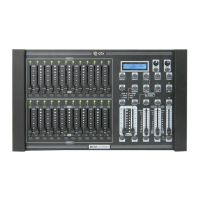

 To Next Page