www.avsl.com 154.103UK User Manual
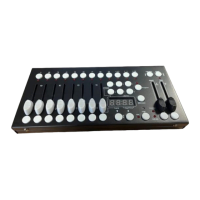
Fixture selection buttons
Press to select the desired lighting fixture
Lit to indicate the current selected fixture
Slide to adjust DMX parameter values
Press to store and select scenes
Displays current parameters or status
Step forward scenes/steps in banks/chases
Step backward scenes/steps in banks/chases
Switches faders between 1-8 and 9-16
Press to confirm current procedure or add to it
Activate Auto mode/Delete key during Program mode
Press to set all fixtures to zero
Slide to adjust scene hold time or step time
Slide to adjust the rate of fading or cross fading
Press to enter Program mode
Activate music mode/Copy key during program mode
Tap tempo sync during playback/Switch DMX display to
percentage in Program mode
Chase memory selection 1-6
Setting up:
1. Connect the power supply to the socket on the back of the unit and plug into a mains socket.
2. Connect a DMX lead to the socket on the back of the unit and a compatible DMX-512 device.
3. Switch on the power to the controller which will perform a self-test (LCD display will show 192).
4. Once the LCD display shows 101 the controller is ready to use.
Operation:
Manual mode
1. Select a Fixture button.
2. Move the faders to change DMX parameters for the selected fixture(s).
3. Press the Page selection button to switch between fader control pages (Red LED: Ch1~8), (Blue LED:
Ch 9~16).
4. Press the Tap Sync display button to toggle the output indicator on the LCD display between DMX
values (0-255) and percentage (0-100).
NOTE: All changes made in Manual mode are temporary and won’t be recorded.
Review a Scene or Chase
NOTE: This instruction assumes that you have already recorded scenes and chases on the controller.
Otherwise skip this section and go to programming.
Scene review:
1. Select a Scene button to review.
2. Select any one of the 23 banks by pressing the Bank up or Bank down buttons.
3. Move Channel faders to change fixture attributes.


 To Next Page
 Loading...