154.030UK User Manual
Important - Initial set up
Before commencing any programming check that the unit is in master mode.
Programmes will not be stored if in slave mode.
To check, proceed as follows:
• Press the MENU button repeatedly until the display shows
[] followed by ENTER.
• The display will show
[], [], [], [] or [].
• If it shows [] then it is already in master mode in which case exit this routine by
pressing and holding MENU for 5 seconds.
• If the display shows [], [], [] or [] press the UP or DOWN button
repeatedly until it shows [].
• Press ENTER to select and then press and hold MENU for 5 seconds to store.
Programming
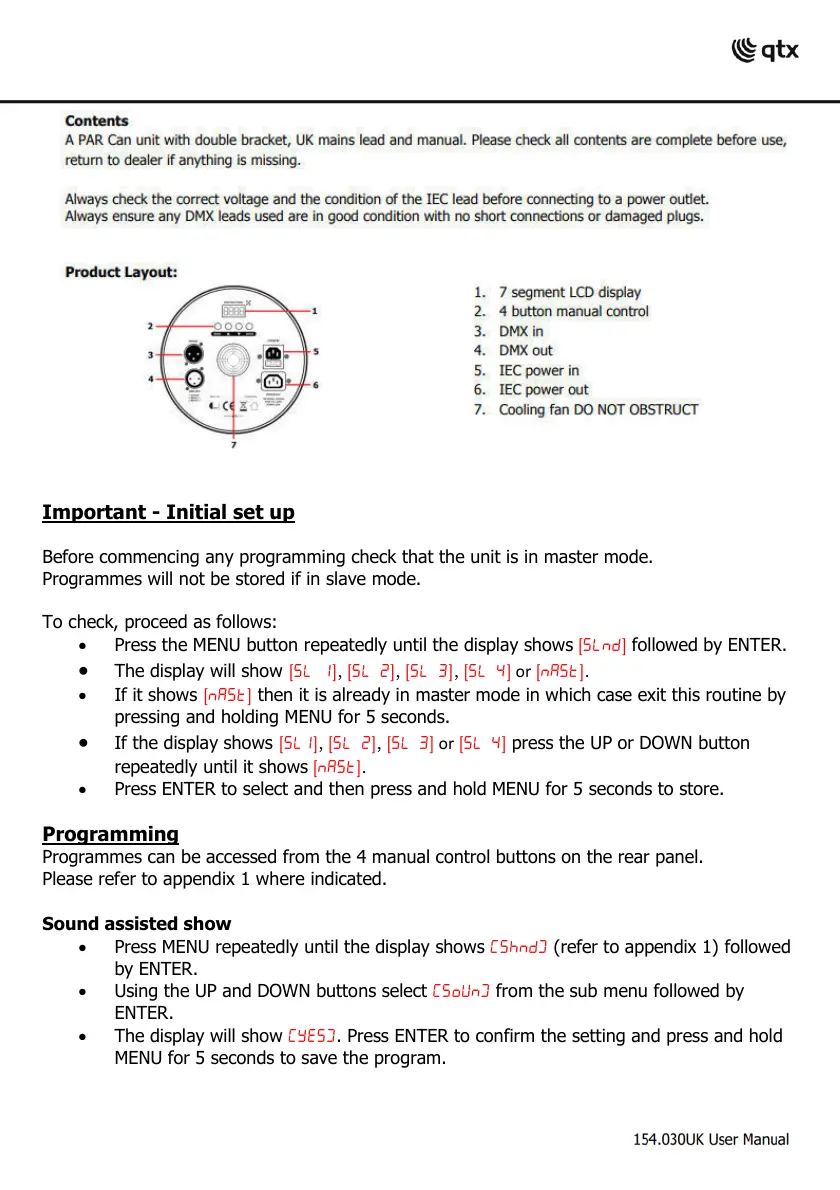
Programmes can be accessed from the 4 manual control buttons on the rear panel.
Please refer to appendix 1 where indicated.
Sound assisted show
• Press MENU repeatedly until the display shows
(refer to appendix 1) followed
by ENTER.
• Using the UP and DOWN buttons select
from the sub menu followed by
ENTER.
• The display will show . Press ENTER to confirm the setting and press and hold
MENU for 5 seconds to save the program.



 To Next Page