EN -6-
Before using your freezer
•
and prevents damage to the compressor.
•
the smell will fade away when your freezer starts to cool.
USING YOUR FREEZER
PART 2.
Thermostat setting
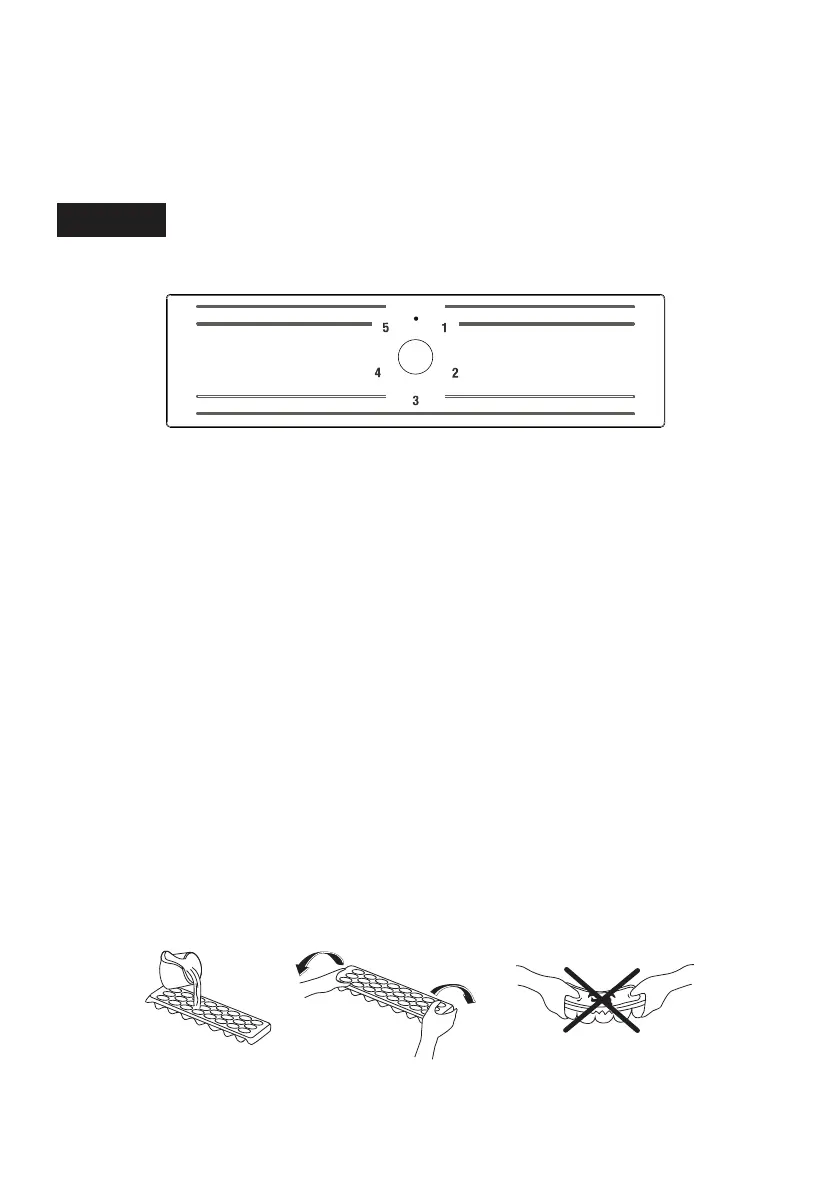
Freezer thermostat automatically regulates the inside temperature of the compartments. By
rotating the knob from position “1” to “5”, colder temperatures can be obtained.
Important note: Do not try to rotate knob beyond 1 position it will stop your appliance.
Freezer Thermostat Setting;
1 - 2 : For short-term storage of food in the freezer compartment, you can set the knob
between minimum and medium position.
3 - 4 : For long-term storage of food in the freezer compartment, you can set knob medium
position.
5 : For freezing the fresh food. The appliance will run for colder temperatures.
Note that
• The ambient temperature, temperature of the freshly stored food and how often the door
is opened, affects the temperature in the freezer compartment. If required, change the
temperature setting.
• For best internal temperature the indicator in the freezer thermostat should be positioned
between 2 and 4.
Accesories
Making Ice cubes (Ice tray)
• Fill the ice tray with water and place in the freezer compartment.
• After the water has completely turned into ice, you can twist the tray as shown below to
remove the ice cubes.


 To Next Page