SETTINGS/DOSES
DOSE1
Sec. Sec. Sec.
DOSE2 DOSE3
SOFTWARE INTERFACE
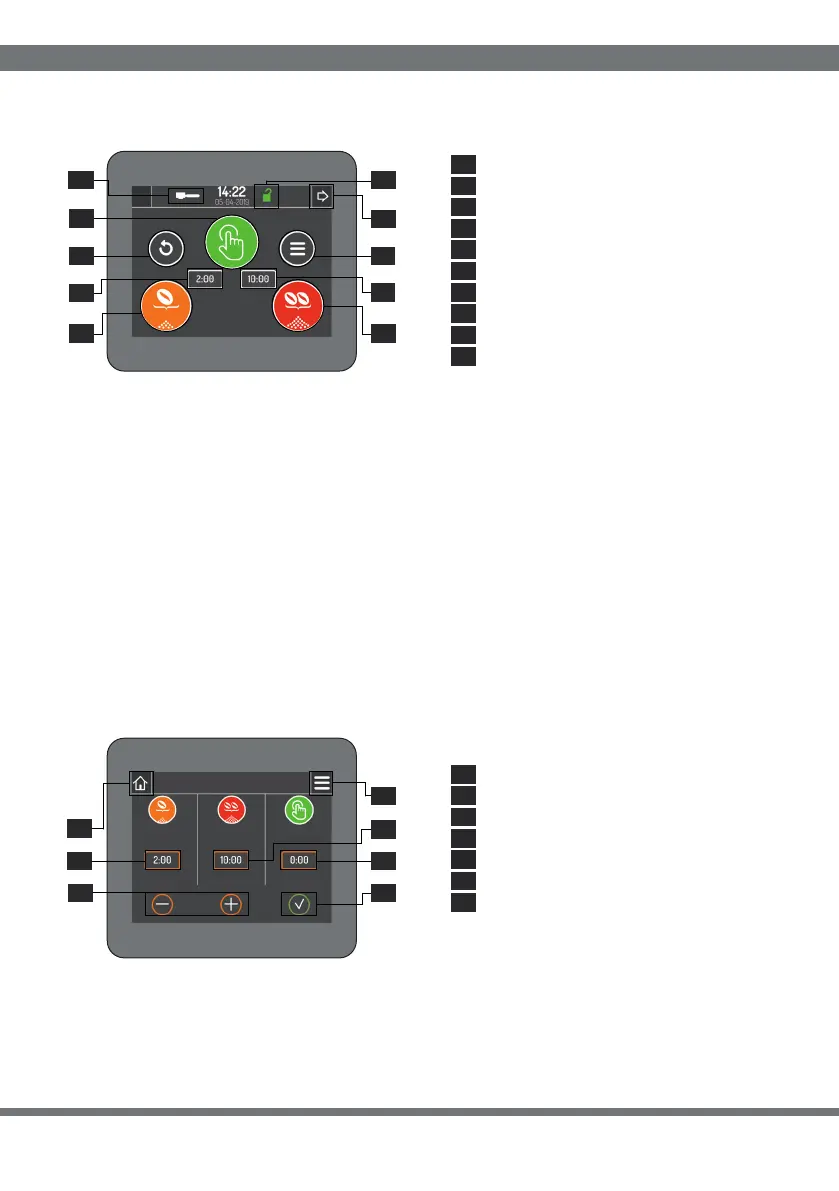
MANUAL MODE: Clicking button 1.1 starts grinding in manual mode for a maximum
cycle time of 20 min. To stop grinding, click button 1.1 or the Reset button ( 1.7 ) again.
SINGLE DOSE MODE: Clicking button 1. 2 starts single dose grinding for a set time
cycle ( 1. 3 ). By clicking on the 1. 2 button during grinding the process can be suspended
and then restarted until the set dose time is completed.
DOUBLE DOSE MODE: clicking the button 1. 4 starts the double dose grinding for
a set time cycle ( 1. 5 ). By clicking on button 1. 4 during grinding the process can be
suspended and then restarted until the set dose time is completed.
You can set the grinding times for the doses by clicking inside the reference cell (2.1, 2.2
and 2.3) and using the adjustment buttons (2.5). To confirm the desired time, click on
the confirm button (2.5).
1 HOME PAGE
Manual dose start/stop
Start/Stop single dose
Start/Stop double dose
Single dose grinding time
Grinding time double dose
Menu: access (par.3)
Reset
Settings/Doses: access (par.2)
Password active/inactive
On/o switch button
2 SETTINGS/DOSES
Set grinding time single dose
Set grinding time double dose
Adjustment buttons
Set grinding time manual dose
Confirmation button
Home: return (par.1)
Menu: access (par.3)
2.1
2.2
2.3
2.4
2.5
2.6
2.7
1.1
1.7
1. 1.
1.
1.
1.
1.
1.
1.
2 4
5
6
8
9
3
10
1.1
1.2
1.3
1.4
1.5
1.6
1.7
1.8
1.9
1.
10
2.
2.
2.
1
4
2
2.3
2.5
2.6
2.7
39


 To Next Page
 Loading...
