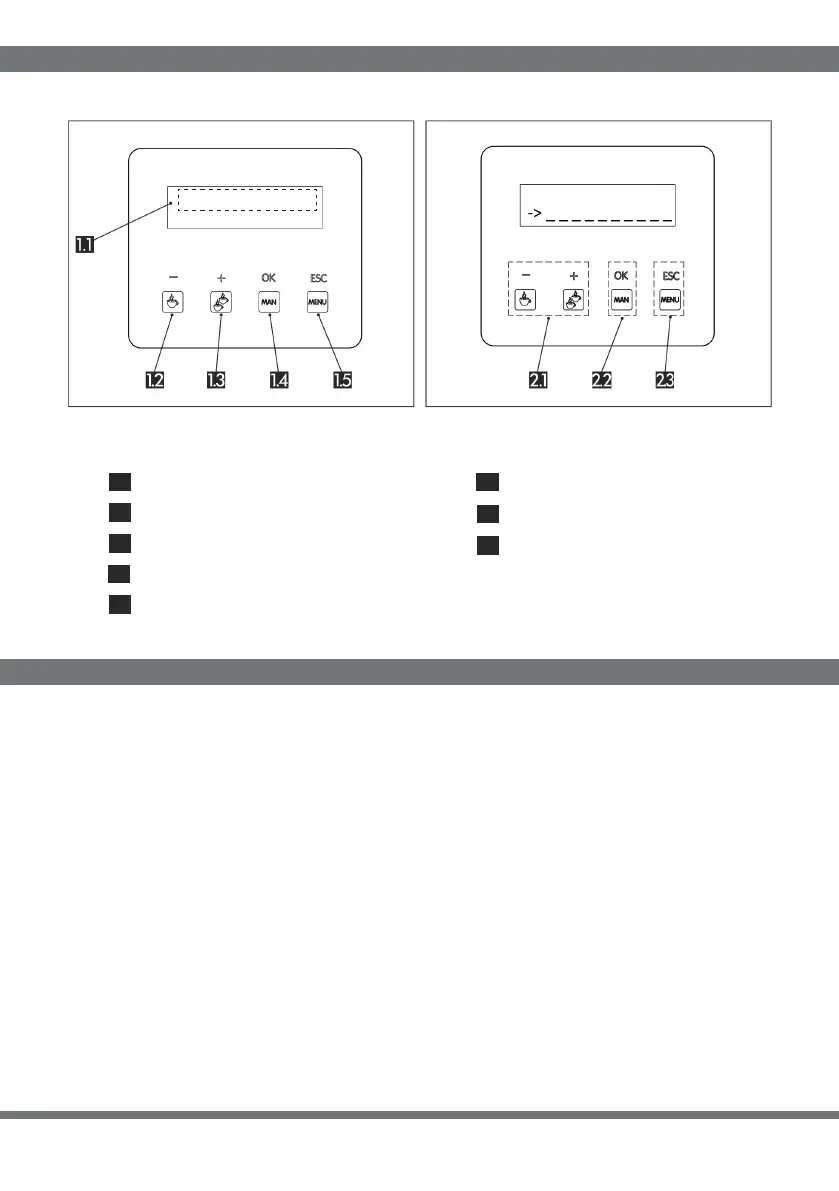
USER INTERFACE PANEL
DISPLAY PROGRAMMING
Partial counter Adjustment buttons
Start/stop single dose Confirmation button
Start/stop duble dose Return button
Start/stop manual dose
Menu: access
12.
11.
13.
14.
15.
21.
22
.
23
.
FOR ONE COFFEE CUP - Press for 3 seconds key “MENU” to get access to programme
menu. Press the key “+” or “-” to slide the menu options, select “time dose 1” pressing key
“OK”; using key “+” or “-” it’s possible to increase or decrease the erogation time, which is
displayed in seconds (3 numbers) and cents of seconds (2 numbers) to set and re-fine the
released dose. After setting parameter of time press again key “OK” to confirm and exit. To
exit from programme menu press “ESC”.
FOR TWO COFFEE CUPS - the same as for one cup, just positioning on parameter written
“time dose 2”.
STAND-BY TIME - It is the time after which the display enters in power saving mode. press
for 3 seconds key “MENU” to get access to programme menu. Press the key “+” or “-” to
slide the menu options, select “STAND BY time”. Select it pressing key “OK”, then using “+”
or “-” it’s possible to increase or decrease the time, which is displayed in seconds.
44
PARTIAL: 000000
READY
Programming


 To Next Page
 Loading...
