8
9
P- 1
P- 2
P- 3
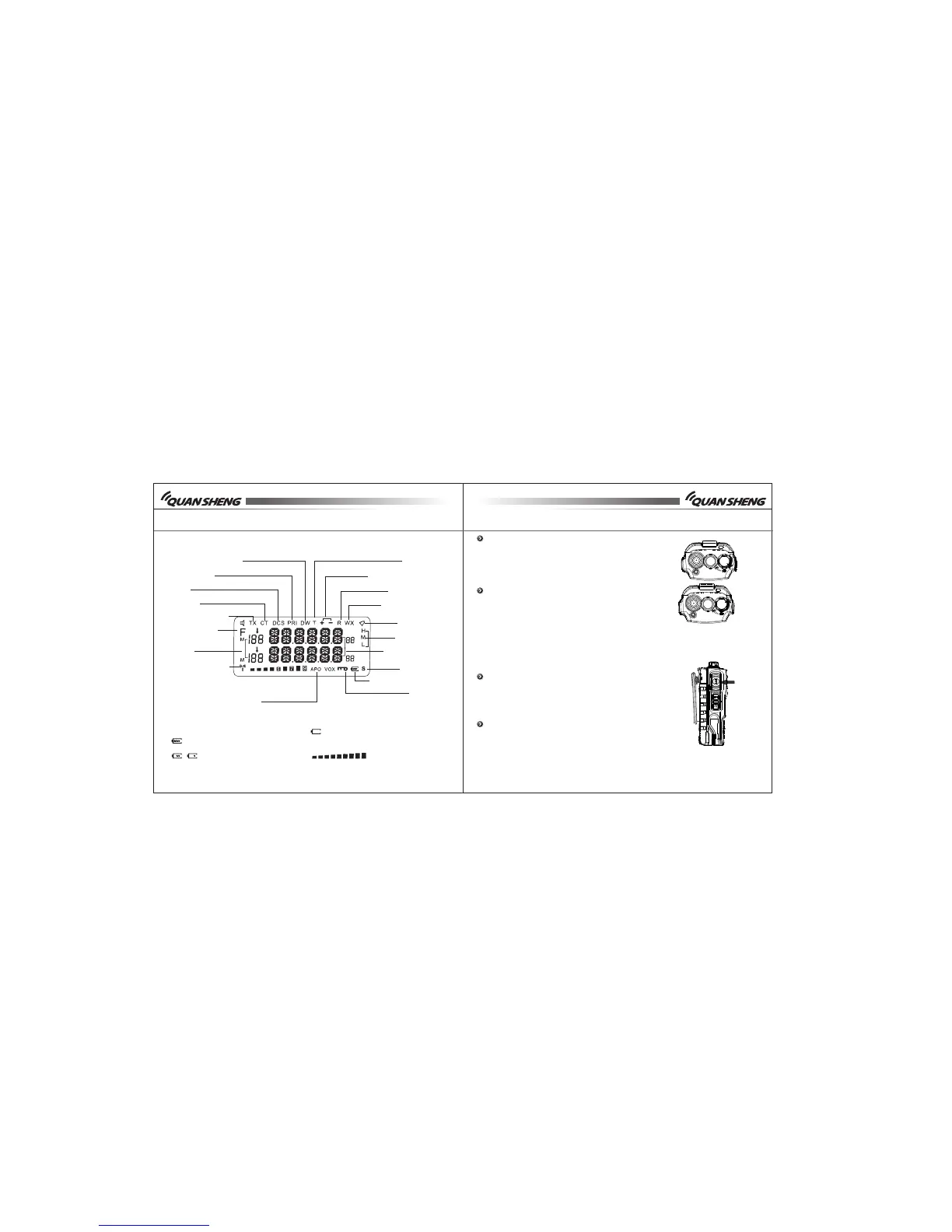
Dual watch operation
Priority scan
DCS
CTCSS
Transmit indicator
Function key
Signal
TX/RC signal indicator
VOX transmit function
Priority scan channel
Repeater shift direction
Reverse function
U-U, V-V, U-V mode
Keypad sound
H /M / L p o we r
Frequency display
Scan function
Battery capacity indicator
Keypad lock
Battery capacity indicator (Full)
Note:
The rest capacity of the battery
The battery is exhausted, please
change a new battery or charge the
battery
Rece i ve s ignal indicator
LCD DISPLAY
BASIC OPERATION
Turn the Power/Volume knob clockwise to turn
the power on. When you turn it on, it will beep
and the channel willdisplay on the LCD.
The LCD backlight shows. (P-1)
Turn Power/Volume knob counter-clockwise to
turn off the radio. (P-2)
Note:
Press and hold the Monitor button, thenrotate
thePower/Volume knob to turn up and down the volume.
To make a call, press and hold the PTT switch, then " "
speak into the microphone in normal speaking tone.
Hold the microphone approximately 1.5inches (3-4cm)
from yourlips.
Release PTT to receive signals. (P-3)" "


 To Next Page