Manual Freewheel Levers
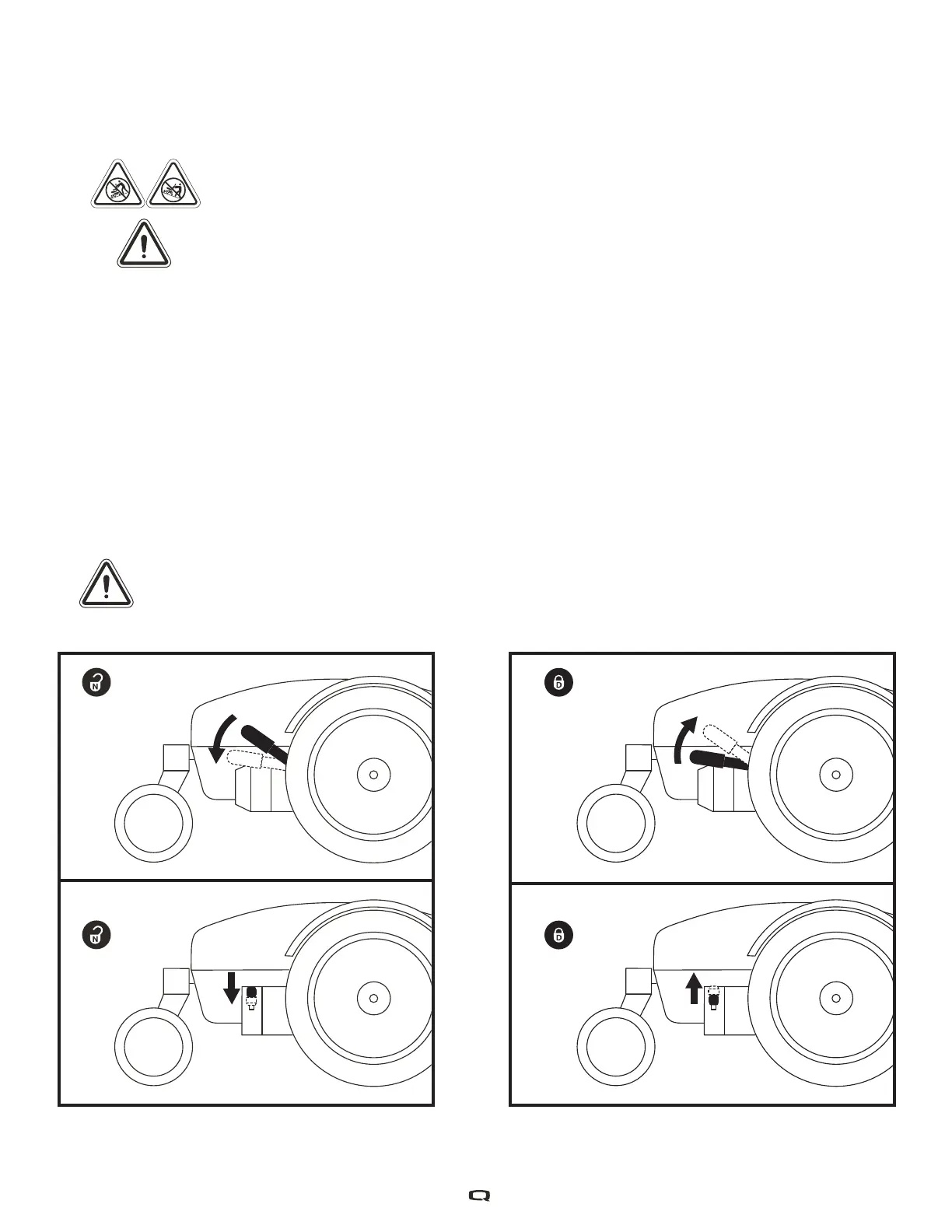
For your convenience, your power chair is equipped with a manual freewheel lever mounted on each
motor. The levers allow you to disengage the drive motors and maneuver the chair manually.
WARNING! Do not use the power chair while the drive motors are disengaged! Do not
disengage the drive motors when the power chair is on an incline, as the unit could roll
on its own! Only engage the freewheel mode when on a level surface.
WARNING! It is important to remember that when your power chair is in freewheel mode,
the braking system is disengaged.
To operate the manual freewheel levers:
1. Push down both manual freewheel levers for freewheel mode (drive motor disengaged). See figure 2.
2. Pull up both manual freewheel levers for drive mode (drive motor engaged). See figure 3.
NOTE: You must turn off the power before disengaging the drive motors; otherwise, you may get
an error code on the controller. To clear this code, turn off the controller and place the power
chair in drive mode. Then, turn on the controller. The error message should be cleared. If it is not,
contact your Quantum Rehab Provider.
NOTE: The power chair will be significantly easier to push with the power off.
WARNING! Avoid applying excessive force to the manual freewheel levers.
WARNING! Do not use your foot to operate the manual freewheel levers. Do not stand on the manual
freewheel levers. Applying excessive force to the manual freewheel levers may result in damage to
the freewheel levers, motors, and brakes.
WARNING! Do not use the freewheel lever handles as tie-down points to secure this product.
Figure 2. Freewheel Mode (Drive Disengaged) Figure 3. Freewheel Mode (Drive Engaged)



 To Next Page