29
For Your Information
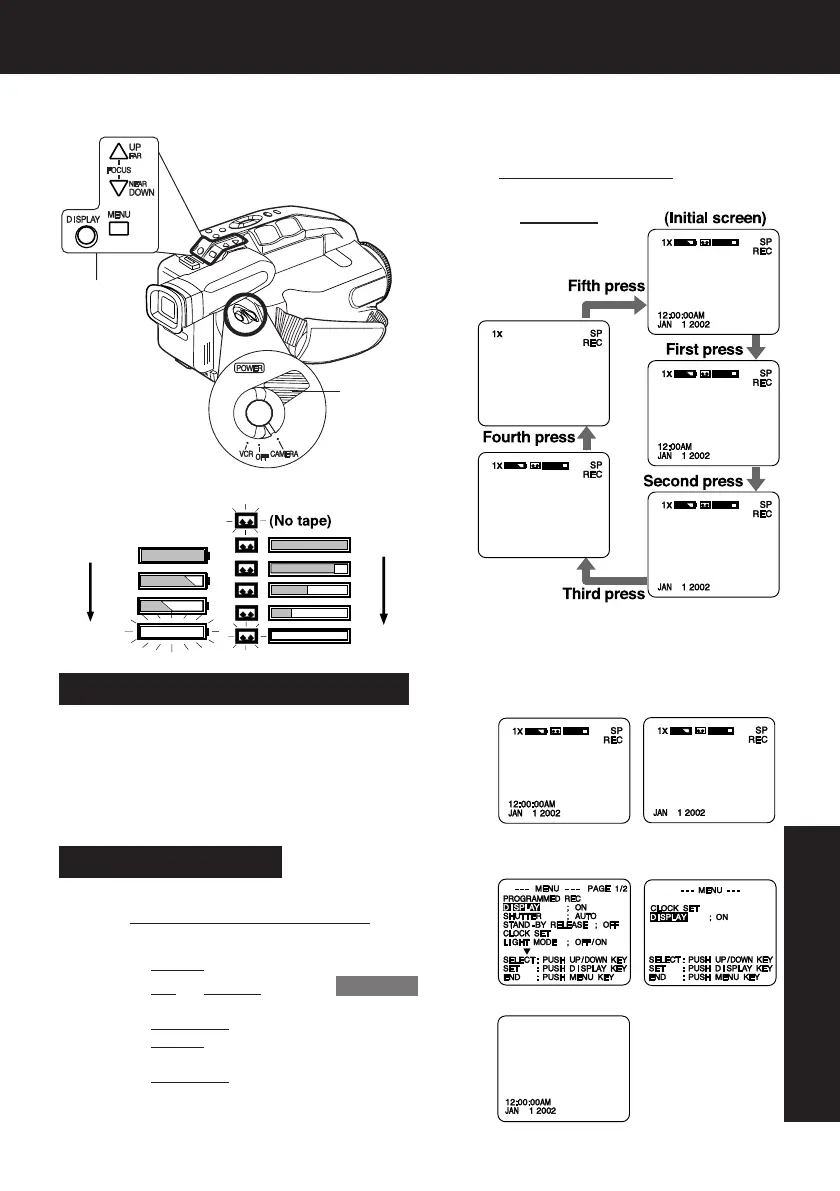
Viewfinder/LCD Monitor Indications
Recording the Date and Time
aDo steps 1 and 2 above to select time/date,
date only, or no display.
bStart a recording (page 16).
• Only the Date and/or Time are recorded.
1Set POWER to CAMERA.
2Press DISPLAY
repeatedly to select
the following displays.
FULL
EMPTY
Tape Remaining:Battery Remaining:
FULL
EMPTY
• Tape remaining indicator operates a few
seconds after tape starts moving.
ASet POWER to CAMERA or VCR.
BPress MENU for MENU mode.
Press
UP or DOWN to select DISPLAY .
CPress DISPLAY to select OFF.
Press
MENU to exit.
DPress DISPLAY repeatedly to remove time/date.
Indications are restored the next time Camcorder is
turned on.
[CAMERA MODE] [VCR MODE]
Display-Off Mode
Tape remaining and battery charge level
can be displayed.
Before you begin...
• Connect Camcorder to power source.
2,
B
,
C
,
D
1,
A
06.L152 Infor p29-34 02.2.18, 1:39 PM29


 To Next Page
 Loading...