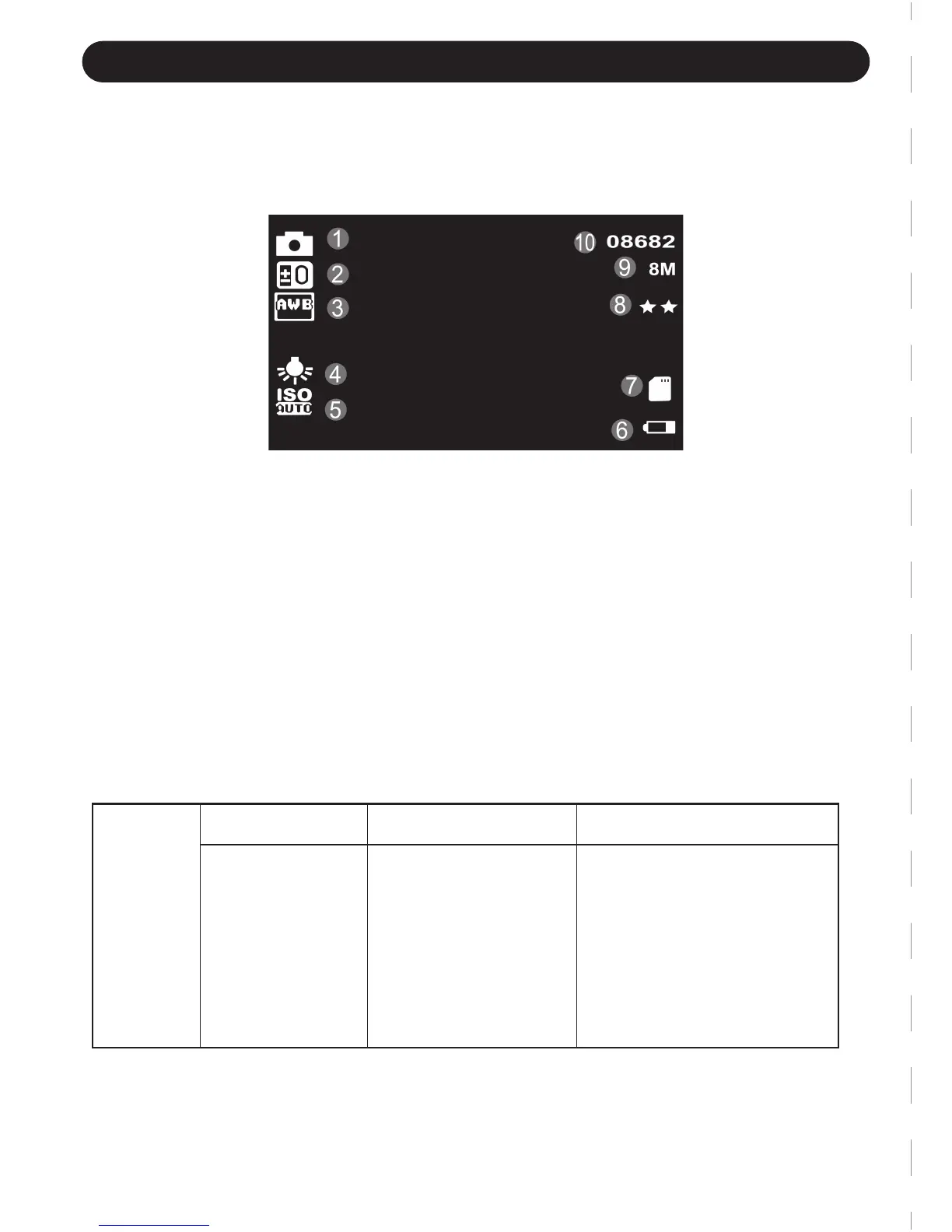
STILL (PICTURES SHOOTING) MODE
1. Still Mode 6. Power status
2. Exposure 7. Micro SD card
3. White balance 8. Quality
4. Day/Night light 9. Resolution/MP
5. ISO 10. Photo Number
Photo Settings:
a. Under Still Mode, press Menu Button to access Still Settings interface.
b. Press Up Button to highlight which item you want to set and press REC Button
to access sub-menu
c. Press Up / Down Button to customize settings. The selected item will be
highlighted and press REC Button to confirm.
d. Press Menu Button to back to previous menu.
Video
Menu
Resolution
Select settings
12M 4032x3024
10M 3648x2736
8M 3264x2448
5M 2592x1994
3M 2048x1536
2MHD 1920x1080
1.3M 1280x960
VGA 640x480
Remark
Higher resolution makes
the images clearer but
occupies more space.
-5-
Still Mode is used to take still pictures
Launch to take pictures:
1. Press Mode Button to Still Mode.
2. Press REC button to snap pictures.



 To Next Page