The QuDo Typhoon RGB Gaming Mouse, model PRO MSE12, is a high-performance wired gaming mouse designed for an immersive and customizable gaming experience. It is compatible with Windows XP and later operating systems, offering advanced driver features for personalized settings.
Function Description:
The PRO MSE12 is a 7D RGB gaming mouse, meaning it features seven programmable buttons and customizable RGB lighting. Its primary function is to provide precise and responsive control for gaming, with a focus on ergonomic design and durability. The mouse includes standard left and right click buttons, a scroll wheel, forward and back buttons, a DPI switch, and a polling rate button. The RGB lighting enhances the aesthetic appeal and can be customized to suit user preferences.
Important Technical Specifications:
- Model: PRO MSE12
- Officeworks Product Code: TYGM007H
- Sensor: PMW3389 IC
- DPI Range: Adjustable from 800 to 8000 DPI via hardware switch, and up to 16000 DPI via driver.
- Pre-set DPI levels: 800 (Red), 1200 (Dark blue), 1600 (Green), 2000 (Purple), 2400 (Orange), 3200 (Sky blue), 8000 (White).
- Switches: HUANO switches with a 20 million click lifetime for both left and right keys.
- Ergonomics: Perfect ergonomic design with a honeycomb shell for reduced weight and improved grip.
- Cable: 1.8m USB paracord cable with a magnet ring, designed for flexibility and durability.
- Polling Rate: Adjustable to 125Hz, 250Hz, 500Hz, or 1000Hz.
- Rating: 5V⎓100mA
- Maximum Acceleration: 50G
- Max. Speed: 1015 cm/second
- Connectivity: Plug and play via USB.
Usage Features:
- Plug and Play: The mouse is ready to use immediately after plugging the USB cable into a computer's USB port. The mouse lights will illuminate upon connection.
- DPI Adjustment: The dedicated DPI switch allows users to cycle through pre-set DPI levels (800, 1200, 1600, 2000, 2400, 3200, 8000). Each DPI level is indicated by a specific body light color. After a few seconds, the body light will return to a breathing light mode.
- RGB Lighting Control:
- Change Light Mode: Press the scroll wheel and back button simultaneously to cycle through 7 different light modes.
- Turn Off Light: Press the scroll wheel and forward button simultaneously to turn off the RGB lighting.
- Turn On Light: Press the scroll wheel and forward button simultaneously again to turn the lights back on.
- Advanced Driver Features (Windows Only):
- Driver Download: Customizable drivers can be downloaded from www.officeworks.com.au/drivers.
- Lighting Customization: The driver software allows users to select various lighting modes (e.g., Streaking) and adjust brightness. Users can also set specific RGB color values.
- Button Customization (Customise): Users can assign different functions to the mouse buttons, including default functions or custom macros.
- Macro Assignment (Macro): The "Macro" section in the driver allows users to create and assign macro keys for complex in-game actions. This includes recording mouse actions (move to left, right, top, down) with adjustable delays.
- DPI & Reporting Settings: The "DPI & Reporting" section provides granular control over DPI settings (up to 16000 DPI) and allows users to adjust the mouse cursor speed. It also enables selection of the USB reporting rate (polling rate) from 125Hz, 250Hz, 500Hz, or 1000Hz. Additionally, there's an option for "Proper Mouse Setup" with adjustable delay time and height detection.
Maintenance Features:
The manual does not explicitly detail user-level maintenance features beyond the general advice for product care. However, the durable HUANO switches and paracord cable are designed for longevity, reducing the need for frequent maintenance. The honeycomb shell design might also facilitate easier cleaning compared to solid shells.
- Fire/Shock Hazard: Do not expose the unit to rain or moisture.
- Electrical Shock: Do not open the cabinet. Refer to a service agent or qualified engineer for any repairs.
Product Warranty:
- Duration: Officeworks Ltd provides a 3-year warranty from the date of purchase for Australian customers.
- Coverage: The warranty covers defects and ensures the product works as intended. Officeworks will repair or replace the product at its expense if it fails within the warranty period.
- Exclusions: The warranty does not cover: cosmetic damage; damage from consumables; misuse (not following instructions); fair wear and tear; unreasonable use; intentional or negligent damage; or customer-attempted repairs.
- Claim Process: To make a claim, return the product with proof of purchase to an Officeworks store or contact 1300 633 423.
- Consumer Law: The warranty is in addition to rights under the Australian Consumer Law, which provides for replacement or refund for major failures and compensation for foreseeable loss, and repair or replacement for goods not of acceptable quality if the failure is not major.

 Need help?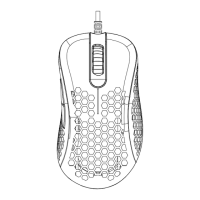

 To Next Page
 General